How to Deal with Member Spam: Automatic and Manual Methods
Protect your community. Learn how to identify member spam and set up automatic and manual methods using 9bot to shield your WhatsApp groups from scams.
How it works in practice

Step by step in the 9bot dashboard
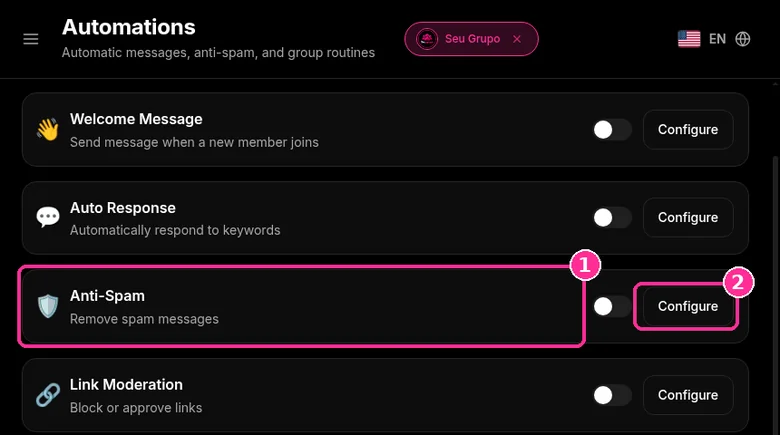
In Groups, select the group and open Automations > Anti-Spam > Configure. Anti-Spam counts how many messages each member sends within an interval and acts when someone goes over the limit. The screenshots below come from the real dashboard, in a test group called "Seu Grupo", with other group names blurred. The numbers on the images follow the order of the clicks. For one to one chats, a WhatsApp Business auto reply handles the greeting and the after hours away message. Frequency matters too, so read how to send news without looking like spam.
Before you start, the group must be connected to the 9bot dashboard and the bot must be a group admin in WhatsApp. Co-admins and team moderators can go on the Whitelist, a tab in Automations, so the filters do not block them.
Step 1: Open Anti-Spam
- With the group selected, click Automations in the side menu.
- On the Anti-Spam card ("Remove spam messages"), click Configure.
Step 2: Set the limit and the penalties
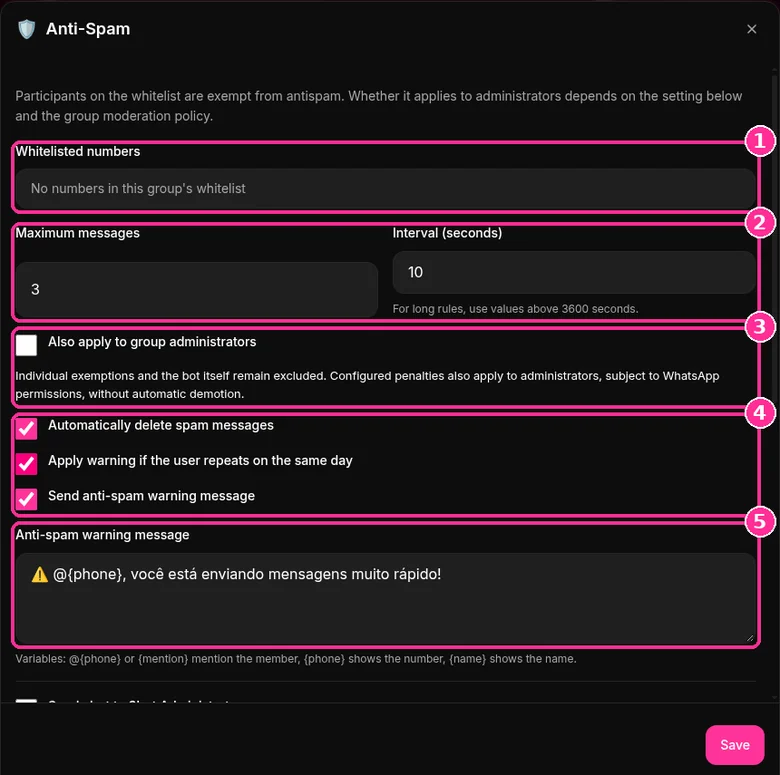
- Whitelisted numbers are exempt from anti-spam.
- Set Maximum messages and Interval (seconds). The example uses 3 messages in 10 seconds. For long rules, use values above 3600 seconds.
- Also apply to group administrators is unticked. If you tick it, penalties apply to admins too, within WhatsApp permissions and with no automatic demotion.
- Tick what 9bot should do: Automatically delete spam messages, Apply warning if the user repeats on the same day and Send anti-spam warning message.
- Edit the Anti-spam warning message. Variables:
@{phone}or{mention}mentions the member,{phone}shows the number,{name}shows the name.
Step 3: Admin alert and initial tolerance
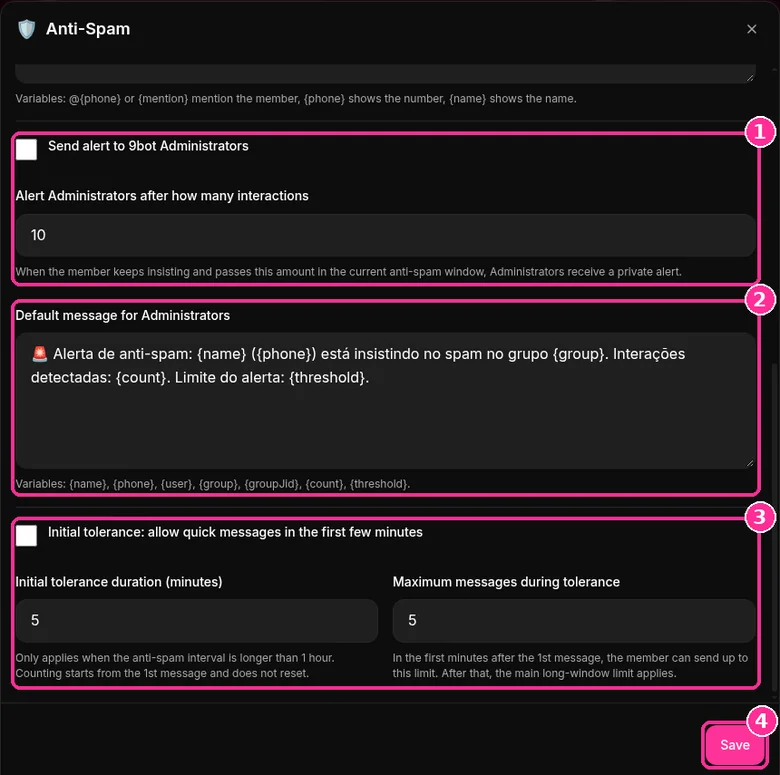
- Tick Send alert to 9bot Administrators and set after how many interactions the private alert arrives.
- Adjust the Default message for Administrators, with variables such as
{name},{group}and{count}. - Initial tolerance allows quick messages in the first few minutes. It only applies when the interval is longer than 1 hour, and counting starts at the 1st message without restarting.
- Click Save.
To combine Anti-Spam with the rest of your moderation, use the moderation checklist for large groups and the guide on how to stop spam from group members. Want to try it? See the 9bot plans with a 7-day trial. Put it in writing in your WhatsApp group rules so nobody can say they did not know.
Why Daily Monitoring is Indispensable
With the massive growth of digital interactions worldwide, managing WhatsApp groups requires increased vigilance. Surveys indicate that nearly 40% of messaging app users have already received spam or invasive advertisements from unknown numbers. This influx of unwanted messages doesn't just annoy participants—it destroys the trust members place in your brand, leading them to mute notifications or leave the group permanently.
Scammers are constantly finding sophisticated loopholes in messaging platforms. They slip into groups silently during off-peak hours, fire dozens of messages containing malicious phishing links, and remove themselves immediately to prevent easy reporting. If spam isn't contained quickly, engagement plummes, and your group's reputation is severely damaged.
To protect your community, modern administrators must act preventively. Combining the human touch of direct moderation with the speed of automated filters is the secret to maintaining a productive, clean, and high-value channel.
The Problem in Practice
The absence of active barriers against spammers leads to three major operational pain points:
- Mass Invasions and Malware: Spambots join the chat and share fraudulent "reward" links or phishing scripts. If the link is not removed instantly, real members can be compromised, leaving administrators legally and socially vulnerable.
- Drama and Broken Rules: Unsolicited promotions trigger friction among participants. The welcoming, cooperative climate of the group is replaced by aggressive arguments and complaints.
- Moderator Burnout: Manually managing a high-traffic community requires 24/7 monitoring. Without automation, admins experience severe exhaustion, leaving no energy to produce valuable content.
Automation serves as your first line of active defense, deterring spammers before their unsolicited content floods the chat.
What You Will Configure and Solve
By the end of this tutorial, you will know how to use 9bot to build a secure group environment that solves:
- The automatic blocking of aggressive, rapid-fire spammers.
- The immediate deletion of unauthorized links and attachments.
- The manual approval process and strategic vetting of new member profiles.
- The consolidated logging of infractions and warning metrics in the background.
9bot as your group's firewall
Moderating spam manually is like trying to delete unwanted phishing emails from your inbox one by one after they have already been read by your entire team. With 9bot, it's like deploying a high-speed active network firewall and edge security system. The millisecond a spam bot posts an unauthorized link or malicious file, 9bot intercepts it at the edge, checks the domain against threat databases, deletes the banned content instantly, and bans the sender. The community remains secure before anyone even notices.
Test Your Setup Now
- Using a secondary test number (non-admin, not listed in your whitelist), send rapid, consecutive messages (flooding) into the WhatsApp group.
- Confirm that 9bot deletes the extra messages instantly and fires the warnings notice.
- Send an unauthorized link and verify that the bot removes it on the spot.
If the bot acted within a second to wipe out the spam and logged the strike successfully on your Dashboard, your smart drawbridge is fully operational and protecting your community.
Spam risk calculator for your number
Answer based on the last week of the number that runs your groups. The score shows which behavior weighs most and what to change first. It is not a WhatsApp rule; it is a guide based on the signals the WhatsApp Help Center links to spam.
Estimate based on your answers. A low score does not guarantee the account will not be restricted.
Read also

Frequently asked questions
Does 9bot Anti-Spam apply to administrators?
How do I exempt someone from Anti-Spam?
What constitutes member spam in WhatsApp groups?
What is the benefit of combining manual and automatic methods?
Does 9bot's Anti-Spam filter work when I am offline?
How many messages does the Anti-Spam filter allow before triggering?
Can members report spam directly inside the group chat?
Does forwarding count as spam?
Is a new number riskier?