WhatsApp Business message limit per day
A guide for admins of large groups and sales teams who send announcements at volume and need to separate official limits from ban risk.
How it works in practice

Step by step in the 9bot dashboard
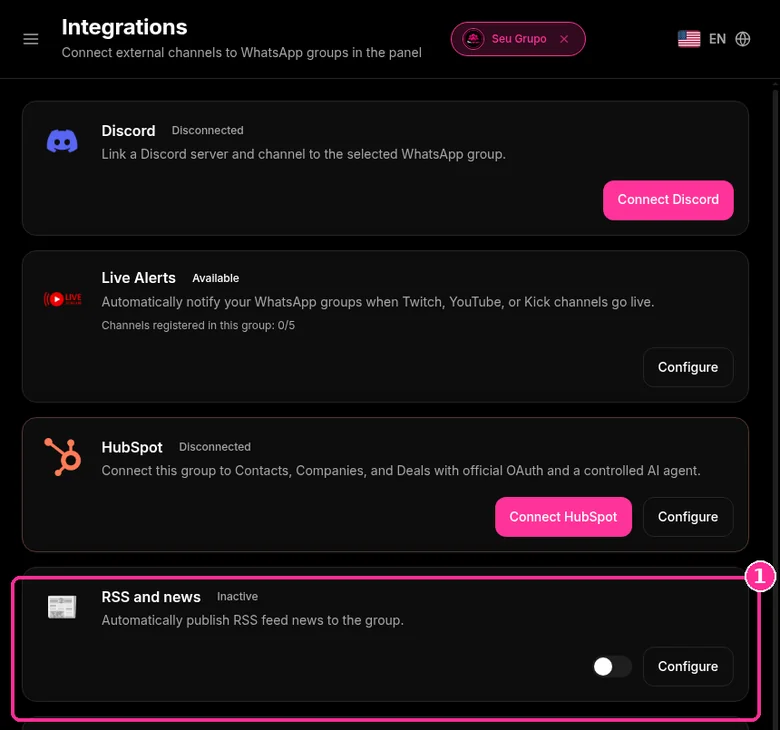
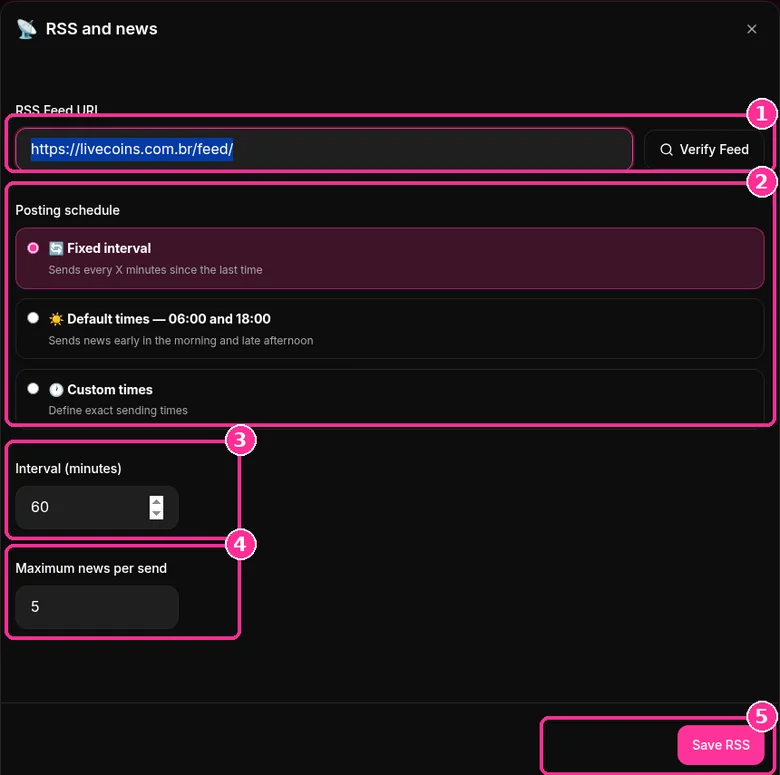
In the side menu, open Integrations ("Connect external channels to WhatsApp groups in the panel"). It has cards such as Discord, Live Alerts, HubSpot and RSS and news. The example below uses RSS. The screenshots below come from the real dashboard, in a test group called "Seu Grupo", with member names and contacts blurred. The numbers on the images follow the order of the clicks.
Instead of mass sending news to many contacts, RSS posts it inside the group on a schedule you control.
Step 1: Open RSS and news
- On the RSS and news card ("Automatically publish RSS feed news to the group"), click Configure.
Step 2: Set up the feed
- Paste the RSS feed URL and click Verify Feed.
- Under Posting schedule, choose Fixed interval, Default times (06:00 and 18:00) or Custom times.
- Set the Interval (minutes) and the Maximum news per send.
- Click Save RSS.
Want to try it in your group? See the 9bot plans with a 7-day trial.
Direct answer: Meta does not publish an official number of messages per day for the WhatsApp Business app. The documented limits are different: broadcast lists of up to 256 contacts, forwarding to up to 5 chats at a time, business broadcasts charged per delivered message and, on the API (WhatsApp Business Platform), a limit on unique contacts per 24 hours outside the customer service window that starts at 250 per portfolio and can rise to 2,000, 10,000, 100,000 or unlimited. Bans do not depend on a magic number: they depend on reports, blocks and unsolicited bulk sending.
In short:
- The app has no official daily limit; it has list, forwarding and group creation limits.
- On the API, the limit is per portfolio: 250, 2,000, 10,000, 100,000 or unlimited in 24 hours.
- Ban risk comes from reports and blocks, not from a published quota.
The limits Meta publishes
| Where | Published limit | Source |
|---|---|---|
| Broadcast list (app) | Up to 256 contacts per list; only people who saved your number receive it | Help Center |
| Forwarding | Up to 5 chats at a time; a message forwarded many times goes to 1 chat at a time | Help Center |
| Adding members and creating groups | If you exceed the limit, you may need to wait 24 hours | Help Center |
| Business broadcasts (Business app) | Charged per delivered message, with the price shown before sending | Help Center |
| API (Business Platform) | 250, 2,000, 10,000, 100,000 or unlimited unique contacts in 24 hours, per portfolio | Meta documentation |
Outside this list, figures such as "200 messages per day" that circulate online do not appear on official pages. Treat any such number as an unsourced estimate.
How the limit works on the official API
According to the Meta documentation, the limit counts unique contacts who receive business initiated messages outside the customer service window, in a rolling 24 hour period. Since October 2025 it is set at the business portfolio level and shared by every number in the portfolio.
- New portfolios start at 250.
- The limit rises to 2,000 when the business is verified or delivers 2,000 messages with good quality templates in 30 days.
- After that, it rises one tier automatically if messages are high quality and the business uses at least half of its limit in 7 days.
Replies to messages the customer started do not count toward this limit. For groups on the API, see what the Groups API allows.
What raises ban risk
The WhatsApp Terms of Service prohibit bulk, automated or unauthorized messaging. In practice, what matters is how recipients react:
- messages to people who did not ask for them or did not save your number;
- the same text sent to many chats in a short time;
- many reports and blocks;
- unofficial apps that imitate WhatsApp.
Spacing out messages does not make unsolicited messaging acceptable. What lowers the risk is permission and expected content.
If the number is already restricted, see what to do when a group or number is suspended.
A group instead of individual bulk messages
When the same notice goes to hundreds of people who want it, a group or community where only admins post solves it with a single message. People joined by choice, so the notice is expected. With 9bot, the connected number posts scheduled notices in one or several groups and answers commands such as .notices. 7-day trial; with the coupon FIRST9, monthly plans are 50% off for the first 3 months after the trial. Compare formats in broadcast list, group or channel.
Read also

FAQ
What is the daily message limit on WhatsApp Business?
How many messages can I send without being banned?
What is the starting WhatsApp API limit?
Is the API limit per phone number?
Are WhatsApp Business broadcasts paid?



