Moderation checklist for large WhatsApp groups: the admin routine
Keep control of your community. Access the essential checklist and learn how to configure 9bot to automate WhatsApp group moderation.
How it works in practice
About this guide: this is your moderation routine checklist. Protection settings against raids and scams are in Security settings for large WhatsApp groups: stop raids and scams, and what to check in your reports every day is in What to monitor every day in WhatsApp groups.
The Challenge of Keeping Order in Active Chats
Managing a WhatsApp group with dozens or hundreds of highly active participants is like running a fast-growing small town. Conversations flow non-stop, diverse opinions clash, external links are shared, and the overall chat environment can spiral out of control in seconds. For brands hosting VIP customer channels, creators managing student cohorts, or media networks distributing content, an unmoderated group quickly turns into digital chaos.
Without a structured moderation process, human administrators get trapped in an exhausting monitoring loop. Reading every single text message, checking if links are safe, and warning hostile participants drains the vital daily energy of any digital professional. As a result, the community loses its core focus, high-value members leave due to spam noise, and the group stops generating commercial value.
Message moderation is the shield that preserves your group's integrity. But to scale this protection without suffering mental burnout, the modern community manager must combine the common sense of human oversight with the tireless precision of smart automations.
The Problem in Practice
Relying entirely on manual moderation in populous, high-traffic groups creates three major operational vulnerabilities:
- Spambots invading during off-hours: It only takes a few minutes away from your screen for spambots, scams, or malicious links to flood your chat, compromising member safety.
- Mental drain from direct conflict resolution: Manually intervening in heated chat arguments exposes administrators directly to emotional friction, draining their authority and public neutrality.
- Inconsistent rules enforcement: Without automated metrics, tired moderators are prone to letting critical violations slide or overreacting to minor slip-ups, which ultimately ruins community trust.
By delegating mechanical security chores to the bot, the moderator protects their peace of mind and keeps a high strategic posture.

What You Will Configure and Solve
In this practical moderation guide, you will learn how to configure automated security barriers on your 9bot panel so you can:
- Filter inappropriate messages and suspicious links instantly.
- Build a fair, automated warning and strike system for violators.
- Mute or kick disruptive users without needing to engage in manual arguments.
- Guarantee a respectful, safe, and highly engaging environment for all members.
Before You Begin
- A WhatsApp group successfully connected to your 9bot Dashboard.
- Administrative access to the 9bot control panel.
- Your target group selected from the top sidebar dropdown.
- The bot configured as an administrator in your WhatsApp group settings.
Step-by-Step Dashboard Setup
Step 1: Configure Defense Barriers and the Strike System
- Log in to your 9bot Dashboard and verify that you have selected the correct group.
- In the sidebar menu, click Moderation and select Strike System.
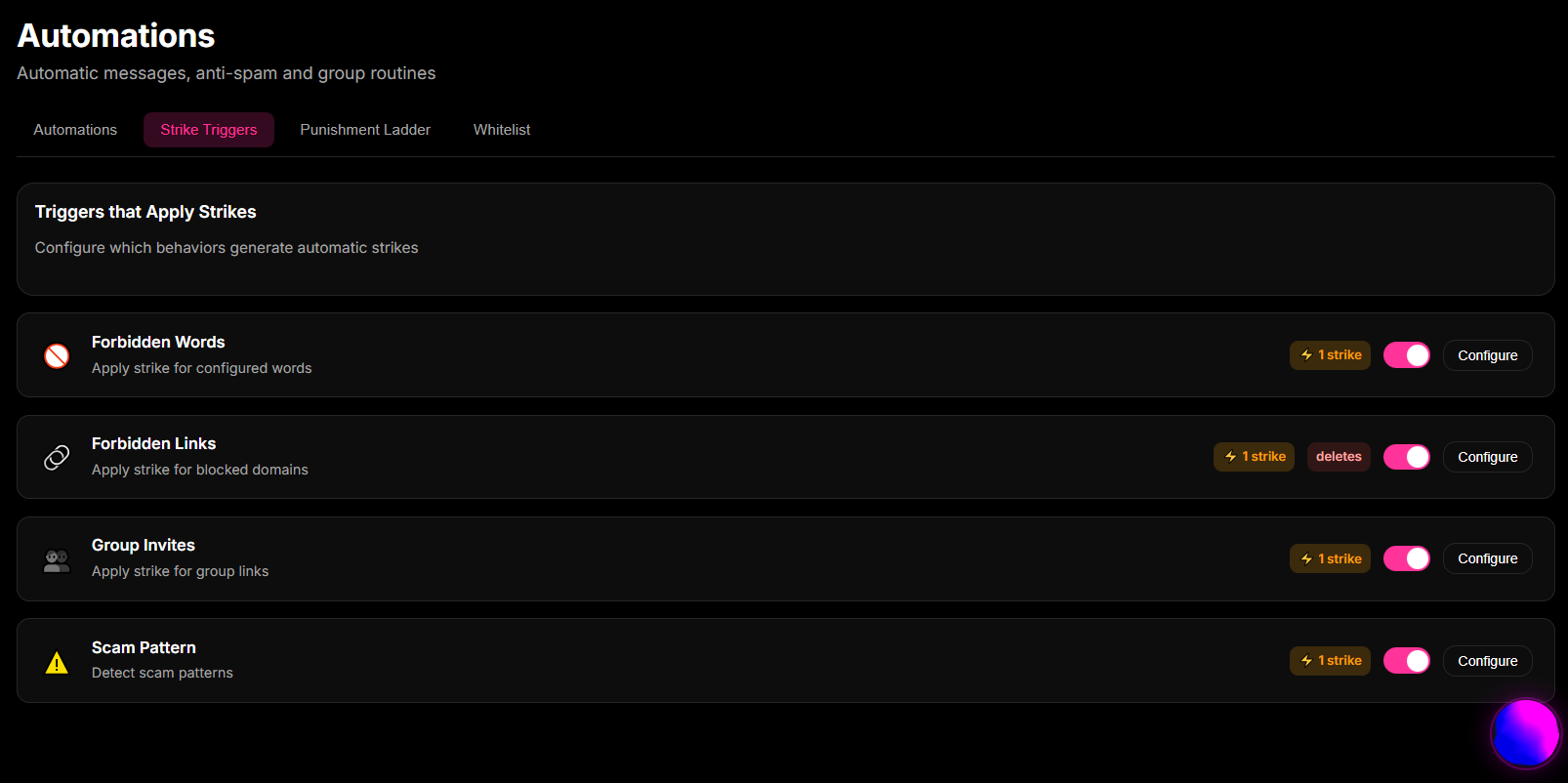
- Enable automated triggers to capture recurring violations such as banned words, flooding, or unauthorized group invitation links.
- Set up the bot's progressive punishments. For example: 1st strike: private warning warning; 2nd strike: temporary mute for 2 hours; 3rd strike: instant kick and group removal.
- Access Moderation > Moderation Logs to audit the automated actions executed by the bot.
Quick Checkpoint: Make sure to add your human team moderators and internal co-administrators to the Whitelist under Moderation > Whitelist. This ensures they can post official announcements and links freely without triggering the bot's spam alarms.
From a lone guard to an automated airport
Imagine managing the security and moderation of an active WhatsApp group manually as the job of a Single Customs Officer guarding the main entrance of a massive International Airport.
Without 9bot (relying purely on manual control), the officer (administrator) must check every passenger's passport (members' profiles), open and inspect every single suitcase by hand looking for prohibited items (reading every text and URL), and chase down people starting fights in the check-in lines (chat conflicts). With thousands of passengers arriving every hour, the queues grind to a halt, travelers miss their flights (high member churn), bad actors slip through the gates when the officer is in the restroom, and the officer drops into their chair at the end of the shift due to pure exhaustion. It is a highly insecure, unsustainable way to operate.
Configuring 9bot is like installing Automated Biometric Security Gates and High-Speed X-Ray Baggage Scanners:
- Every passenger (member) passes through electronic gates that check credentials instantly (controlled by the Welcome Message and Automatic member approval modules).
- The high-speed X-ray scanner (the Anti-Spam and Anti-Link filters) scans suitcases silently and automatically. If someone tries to bring in contraband (malicious links or spam floods), the gates lock instantly, and the illegal item is disposed of without delaying the rest of the queue.
- If a passenger repeatedly violates minor airport rules, the system registers warnings on their boarding pass (the Strike System). Once they hit the warning threshold, the biometric gates block their ticket and escort them out of the terminal automatically.
- The chief of security (administrator) can sit back in a high-tech control room, monitor operational metrics on sharp screens (Dashboard modulations and blocked items logs), and enjoy a hot cup of coffee. He only steps in for rare, complex human security matters. The airport operates with flawless speed, absolute safety, and total efficiency.
Essential Smart Moderation Checklist
- Human co-moderator Whitelist populated and active.
- Anti-Spam limits calibrated (e.g., maximum of 3 messages in 5 seconds).
- Link Moderation (Anti-Link) active with an approved domain Whitelist.
- Progressive Strike System configured with clear escalation rules.
- Fast FAQ shortcut (e.g., `/rules`) active in Custom Commands.
- Moderation logs audited weekly to refine banned keywords.
Test Your Setup Now
- Using a secondary test account (non-admin), try posting an unauthorized link and verify that the bot deletes the message within a second.
- Have the test account send several identical messages in under 2 seconds to test the sensitivity of the Anti-Spam barrier.
- Access Moderation > Moderation Logs on your Dashboard to confirm that all test violations and warnings were logged with mathematical precision.
If the bot executed the blocks immediately and logged the actions successfully, your automated airport checkpoint is fully active and guarding your peace of mind!
Read also

Frequently asked questions
What is automated WhatsApp group moderation using 9bot?
How does the Strike System work in the 9bot Dashboard?
Is it safe to grant administrative privileges to the 9bot profile?
Can I allow social media links while blocking all other URLs?
Where can I check the history of deleted messages and kicked members?