WhatsApp vs Telegram Bots: Full Analysis
Understand the technical and practical differences between WhatsApp and Telegram bots. Choose the best automation and learn how 9bot brings flexibility and safety to WhatsApp.
The Origin of Bots and Their Evolution
In the beginning, messaging bots were very simple scripts designed only to respond with automated greetings or perform purely repetitive tasks. Today, they have evolved into true virtual operations assistants, acting as the right hand of those who manage communities, serve customers, and inform audiences in real time. In this evolution, the two most popular messaging platforms followed completely opposite philosophical and structural paths.
Telegram was one of the absolute pioneers in opening its doors to unrestricted automation development, fostering an open-source developer culture and allowing extremely flexible integrations in a highly accessible way. Because of this, even public agencies quickly adopted the platform to automate complex interactions, such as the news of Assis city hall launching an artificial intelligence assistant bot in beta.
Privacy vs Freedom: While Telegram focused on building an open environment with few technical barriers, WhatsApp opted to be the most secure and reliable channel for daily communications.
On the other hand, WhatsApp, being the primary and most personal communication channel for billions of users across the globe, followed a much more cautious path focused on the privacy and security of its users. To prevent noise and the mass dissemination of unsolicited advertisements (spam), the network adopted very strict rules on how automated systems interact in the app, requiring official APIs and authorized partners. This is exactly where technology solutions like 9bot excel: they solve and simplify the original technical limits while maintaining safety and smooth operation.
The Problem in Practice
Without strategically calibrated automation and with unprotected channels, group administrators face severe bottlenecks in their corporate daily routine:
- Extreme vulnerability to spam: The lack of automatic moderation attracts malicious bots that invade active channels just to dump abusive chains and suspicious links.
- Chronic loss of commercial relevance: When the group does not offer dynamic interactions or quick answers to common questions, the audience quickly loses interest and mutes the chat.
- Extreme professional burnout: Managing large user bases, policing conflicts in the middle of the night, and answering dozens of identical questions manually leads to extreme mental exhaustion and frequent mistakes.
- Silent departure of participants: A participant in an inactive or spam-filled group feels their mobile device is being cluttered and decides to leave the community.
What You Will Configure and Resolve
In this practical analysis tutorial, you will understand the basic technical distinctions and learn how to use the 9bot Dashboard to:
- Structure interactive menus and automated reply buttons on WhatsApp.
- Configure dynamic commands for self-service assistance (e.g., `/help`).
- Enable anti-spam security filters to suppress harmful external links.
- Connect news portals and automated feeds ensuring the integrity of shared data.
Before You Begin
- A WhatsApp group officially integrated into the 9bot Dashboard.
- Administrator access enabled for your account in the 9bot console.
- A list containing your brand's main support questions to register as quick commands.
- Bot moderation permissions active in the target WhatsApp chat.
Step-by-Step on the Dashboard
Step 1: Access the Custom Commands Hub in 9bot
- Log in to the official 9bot Dashboard using your security credentials and select the WhatsApp channel you wish to manage.
- In the left navigation bar, locate and click the Comandos (Commands) tab and select the Comandos Personalizados (Custom Commands) module.
- This is the brain of your automations, allowing you to build smart shortcuts with immediate responses on WhatsApp, bypassing the app's lack of native interactive features.
Step 2: Create Quick Commands with Interactive Self-Service Menus
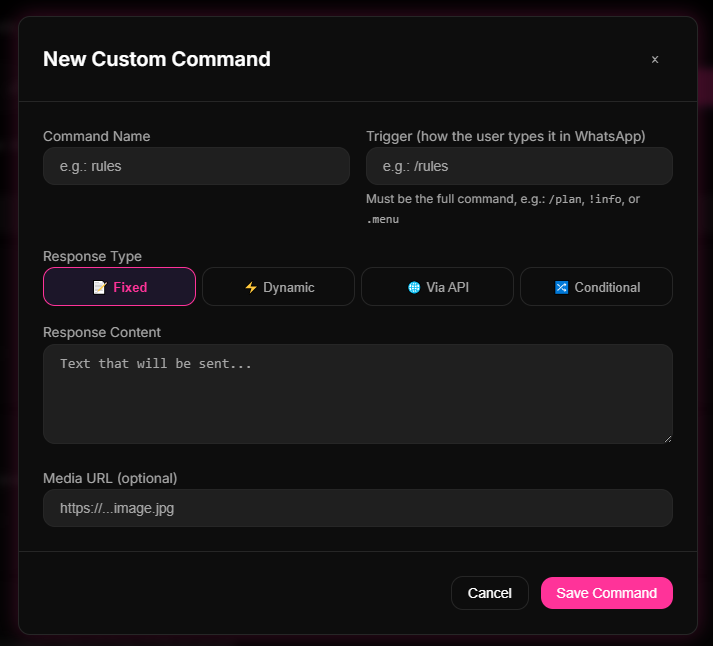
- Within the Custom Commands tab, click the Novo Comando (New Command) option.
- Define the keyword that will serve as the shortcut in the group (e.g., `/help`, `/support`, or `/site`).
- In the reply field, insert objective and direct text, associating important links and shortcuts containing dynamic quick-click buttons to make it easy for members to use.
- Save the new settings and share the created shortcuts in your WhatsApp group's welcome message.
Quick Checkpoint: Open WhatsApp on your test smartphone, type the shortcut you registered (e.g., `/support`) in the group chat and make sure 9bot sent the response with the configured buttons in less than 1 second and without network failures.
Step 3: Enable Active Blocking of External Links from Spammers
- To consolidate WhatsApp's security barriers against common spam invasions (typical of Telegram groups without active moderation), access the Moderação (Moderation) tab on the sidebar.
- Go to the Filtros de Link (Link Filters) menu and activate the strict ban on sending external URLs for conventional users who do not belong to the Whitelist.
- Configure the automatic warning message and set the maximum number of infractions before definitive account removal.
- Save the configured parameters so that automatic moderation takes effect 24 hours a day.
How It Works in Practice
Understanding the difference between WhatsApp and Telegram groups without the right support is like trying to manage two completely opposite event spaces. Telegram runs like a massive open town square: anyone can walk in without an invite, and interactions are louder and more scattered. WhatsApp operates like a cozy private club: people value privacy, close relationships, and expect a focused and warm environment.
9bot acts as the specialized host for your private club on WhatsApp. It knows exactly which house rules to follow to keep the environment pleasant (WhatsApp moderation guidelines and delivery limits) and manages conversations automatically and elegantly. The bot prevents spam and intrusions without pushing away legitimate members, ensuring your group maintains that close human atmosphere ideal for building partnerships, sharing updates, and engaging communities.
Test It Now in Your Group
- Send the shortcut of your most important dynamic command (e.g., `/support`) from your smartphone in the test WhatsApp group.
- Make sure the bot responded instantly and that the redirection links to the official website are working.
- Ask a common contact to post any external link in the group and check if the moderation filter deleted the post in milliseconds.
- Monitor the real-time telemetry of messages and interactions in the report tab of your 9bot account.
If the responses to custom commands and automatic security filters responded immediately and cleanly, your WhatsApp group has overcome operational barriers and is ready to reach the maximum level of engagement!
Read also
FAQ
What is the basic technical difference between bots on WhatsApp and Telegram?
Can using automation on WhatsApp with 9bot block my phone number?
Does Telegram support more members and features than WhatsApp?
Can I integrate external billing systems and platforms with bots on WhatsApp?
Which automation platform is recommended for my business?