Export a WhatsApp group chat and contacts
A guide for admins who need to archive a work group chat or use the member list and want to do it lawfully.
How it works in practice

Step by step in the 9bot dashboard
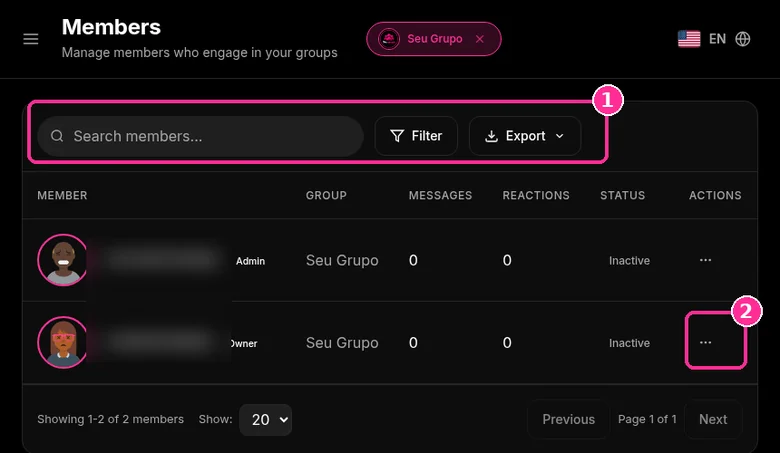
In the side menu, open Members ("Manage members who engage in your groups"). The screenshots below come from the real dashboard, in a test group called "Seu Grupo", with member names and contacts blurred. The numbers on the images follow the order of the clicks.
Before exporting, use search and Filter to get only the members you need.
Step 1: Find the member
- Use Search members... to find someone by name.
- Filter narrows the list and Export downloads the table.
- The table shows group, messages, reactions and status for each member.
- Click the three dots under Actions.
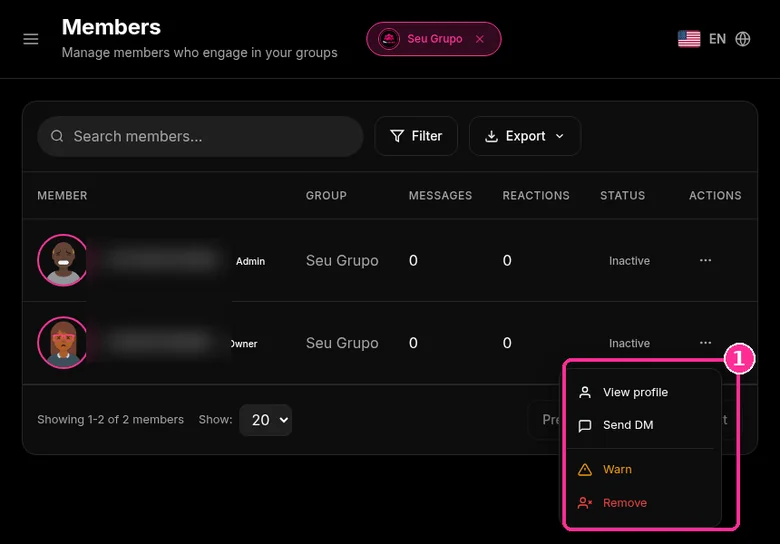
Step 2: Pick the action
- In the menu, choose View profile, Send DM, Warn or Remove.
Want to try it in your group? See the 9bot plans with a 7-day trial.
Direct answer: To export a group chat, open the group, tap More options, More and Export chat, and choose with or without media. The result is a text file that cannot be imported back into WhatsApp. The Help Center does not describe a feature to export a group's member list. If the group has Advanced chat privacy turned on, nobody can export the chat. Exported names and numbers are personal data: using them for another purpose needs a legal basis under laws such as the GDPR in the European Union or the LGPD in Brazil.
In short:
- Export chat: More options > More > Export chat, with or without media.
- Advanced chat privacy blocks exporting.
- Exported contacts are personal data and fall under data protection law.
How to export a group chat
According to the Help Center:
- Open the group.
- Tap More options > More > Export chat (on iPhone, tap the group name and Export chat).
- Choose Without media or Include media.
- Choose where to save or send the file.
With media, the most recent media are attached. The exported history is a text file, not a backup, and cannot be imported again.
What about the group contact list?
The Help Center does not describe a feature to export the participants list. Names and numbers appear in group info and in exported messages. Extensions and apps that promise to "extract contacts from groups" are not official and may violate the WhatsApp terms. For one to one updates to people who saved your number, a WhatsApp broadcast list is often the better fit.
Collecting numbers from a group to send unsolicited individual messages is the fastest way to trigger reports and blocks.
When export is blocked
With Advanced chat privacy on, participants cannot export the chat. In groups with customer data, turning it on reduces leaks. See how the setting also blocks Meta AI mentions.
What data protection law requires
Names, numbers and messages identify people, so they are personal data under the GDPR in the European Union and the LGPD (Law 13,709/2018) in Brazil. Both require a defined purpose, data minimization, transparency and a legal basis such as consent or legitimate interest.
- Export only what the purpose needs (for example, a record of decisions).
- Store the file with restricted access.
- Do not use group numbers for another purpose without a legal basis.
Details are in what data a group admin can collect. To keep records without exporting everything, 9bot stores fixed answers in commands. 7-day trial; with the coupon FIRST9, monthly plans are 50% off for the first 3 months after the trial.
Read also

FAQ
Can I warn or remove a member from the 9bot dashboard?
How do I export a WhatsApp group chat?
Can I export the group contact list?
Can an exported chat be imported back?
Why is Export chat missing?
Can I use group numbers to send offers?