What Data Can a WhatsApp Group Admin Legally Collect? (LGPD Guide)
Discover what member data you can legally collect on WhatsApp under data protection laws. Understand LGPD/GDPR compliance and secure your group with 9bot.
The digital community landscape and messaging power
In recent years, we have observed a significant transformation in how digital communities organize, communicate, and grow. Message application groups, particularly on WhatsApp, have become central gathering hubs for creators, businesses, companies, and content portals. In these spaces, personal data circulates, and if not properly secured, it can bring serious risks to participant privacy.
Brazil's data protection agency, ANPD, has highlighted high risks in aggressive personal data sharing and reinforced the absolute need for transparency and periodic audits. With compliance laws like LGPD/GDPR in force, managing privacy has become a mandatory checklist item for both large enterprises and small community moderators.
What data can be legally collected
Data privacy laws outline clear parameters for treating personal information. Personal data refers to items that identify the holder, such as names, phone numbers, and public profiles. Group admins can legitimately handle only the basic public information required to secure and moderate the chat:
- Username and phone number: Basic visible data, legitimate exclusively for in-group moderation.
- Profile picture and status: Publicly available, but prohibited from being logged or exported for external marketing.
- In-group interactions and logs: Messages and reactions, provided their treatment and storage remain restricted within the group environment.
- Peak activity metrics: Telemetry regarding when the community is active, used internally to calibrate security filters.

Practical settings in the Dashboard
The best way to run a group with complete compliance is to utilize the telemetry tools and data audits in the 9bot Dashboard. Below, we detail the suggested workflow:
Step 1: Transparent onboarding and welcome sequence
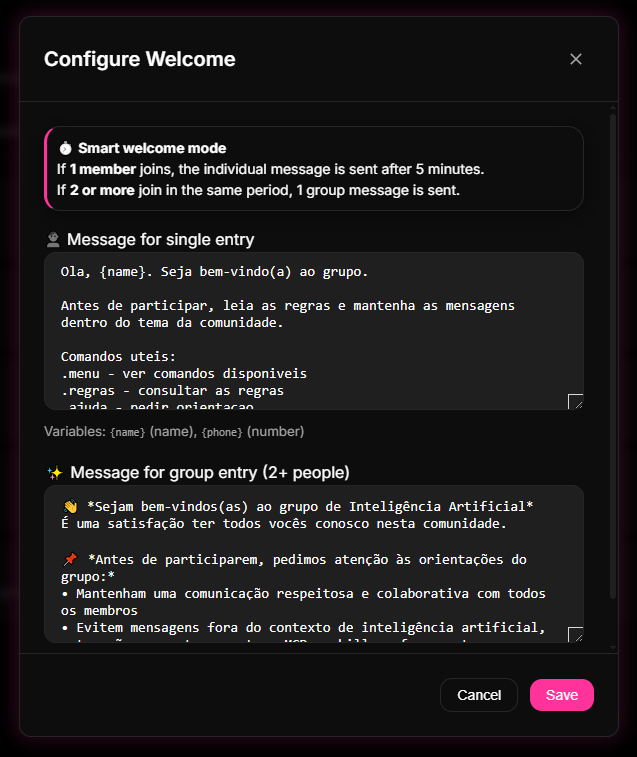
- Access the 9bot Dashboard, go to the Automations tab, and click Welcome Message.
- Set up the welcome greetings, clearly detailing what basic telemetry logs will be processed.
- Explicitly publish the support channel where users can resolve doubts or request data erasure.
What the law says and GDPR/LGPD legal limits
Data protection laws outline the pillars of Transparency, Purpose, Necessity, and Security. Data processing must remain limited to the minimum necessary to fulfill the stated purposes. At 9bot, all modules are built under Privacy by Design: the bot handles only the operational telemetry required to secure the chat, purging temporary logs once routing is complete.
Be mindful of sensitive personal data (disclosing origins, beliefs, political views, or health metrics). If your community discusses sensitive topics, encrypting and isolating user bases is mandatory to avoid compliance errors.
Consequences of non-compliance and data security
Processing data outside compliance borders or exporting phone directories for external marketing without explicit consent is a severe breach. As outlined by the Creci‑PB, unauthorized data handling can lead to civil and criminal liability for the administrator, heavy fines, and permanent group bans.
- Out-of-group tracking: Trying to track private member communications outside the collective group is strictly forbidden.
- Opace file logging: Storing shared chat attachments without detailing the legal necessity violates GDPR guidelines.
- External notifications: Harvesting user list contacts to blast private ads without prior opt-in parameters.
Authorities like ANPD, Cade, and Senacon are constantly reviewing opaque data practices. Operating with transparency is the absolute shield against system bans and legal warnings.
Best practices for obtaining consent in the group
User consent must not be hidden in tiny prints. It must be detailed explicitly, transparently, and in plain language. A great brand habit is to schedule periodic privacy notices to remind members of their data rights.
Automating these privacy notifications through the 9bot Dashboard removes manual fatigue for admins, documenting compliance good-faith while delighting participants with a safe digital ecosystem.
How It Works in Practice
Managing the privacy and security of group members is exactly like keeping a visitor guestbook at the reception desk of a commercial building. If you leave an open notebook on the counter where any incoming visitor can read the full name, personal phone number, and arrival times of all other guests, you are exposing their privacy and committing a major violation of data protection laws (such as GDPR/LGPD).
With 9bot, data management operates like a modern and secure electronic reception system. The bot acts as a professional receptionist that requests only the basic and strictly necessary information to grant access (such as name and phone number), displays the code of conduct for the member to accept, and stores everything in a closed, secure system. No one else in the group has access to other members' private details, ensuring a harmonious, protected, and fully compliant environment.
Practical test in your group
- Go to the Welcome Message tab in 9bot and add a clear line explaining group rules and privacy protection policies.
- Review your data configurations in the Members directory to ensure telemetry is kept purely for moderation compliance.
- Ensure your user support pipeline executes data deletion requests immediately through the Dashboard.
If the entry privacy notice is visible to all and admin privileges are properly locked down on the whitelist, your group data gatekeeping is perfectly compliant!
Read also

Frequently asked questions
What data can the administrator collect?
Can the administrator see my private messages?
How do I know if my data has been collected?
Is it legal to collect photos or audios from the group?
Can I request the deletion of my data in the group?