How to prevent scams in WhatsApp groups
Learn how to protect your WhatsApp groups from scams, malicious links and bot raids with 9bot's automated moderation and strike system.
Direct answer: To avoid scams in WhatsApp groups, protect your account and lock down the group: never share your verification code or two-step verification PIN, be wary of messages asking for money, bank details or a link tap, and review your Linked devices. As admin, turn on Approve new members, let only admins edit the group and, when needed, let only admins send messages. 9bot completes the protection with anti-spam, link filtering, banned words, strikes and a punishment ladder.
Beyond filtering scams, protect your privacy: see how to hide your phone number in WhatsApp groups with usernames and settings.
In short:
- No legitimate person asks for your verification code or PIN: with the code, a scammer can register your number on another phone.
- Scam signs per WhatsApp: requests for money or data, links to "activate" something, prizes, jobs, investments or loans, someone pretending to be a person you know.
- Linked devices shows every session, and you can log out the ones you don't recognize.
- When you report, WhatsApp receives up to the last 5 messages; the reported person isn't notified.
- In the group: member approval, admin-only permissions and automatic moderation with 9bot.
Why WhatsApp groups are vulnerable to scams
WhatsApp groups are great channels for businesses and paid communities, but their visibility makes them an easy target for scammers. Without protection, criminals join chats to post fake promotions, send cloned bank links (phishing), harvest members' data and flood the group with financial spam, destroying your audience's trust in seconds.
For admins of business and professional communities, security can't depend on someone watching the chat. 9bot provides built-in protection that works as a permanent security barrier: it checks every message in real time and applies strikes and automatic bans to offenders.
The security risks of manual moderation
Moderating large groups by hand is risky and inefficient:
- Slow reaction: by the time someone reads the message, spots the scam and removes the scammer, dozens of members may already have clicked the malicious link.
- Mass attacks (bots): automated accounts can fire off dozens of spam messages per second, flooding the group before an admin even opens the app.
- Impersonation: scammers use accounts with the same photo and name as your admins to approach members in private chats pretending to be support.
- Foreign virtual numbers: virtual numbers registered abroad (+234, +62, +263) are bought in bulk by scammers to slip into groups unnoticed.

Setting up the security filters in the Dashboard
You can lock down your group against scams directly in the 9bot Dashboard with these steps:
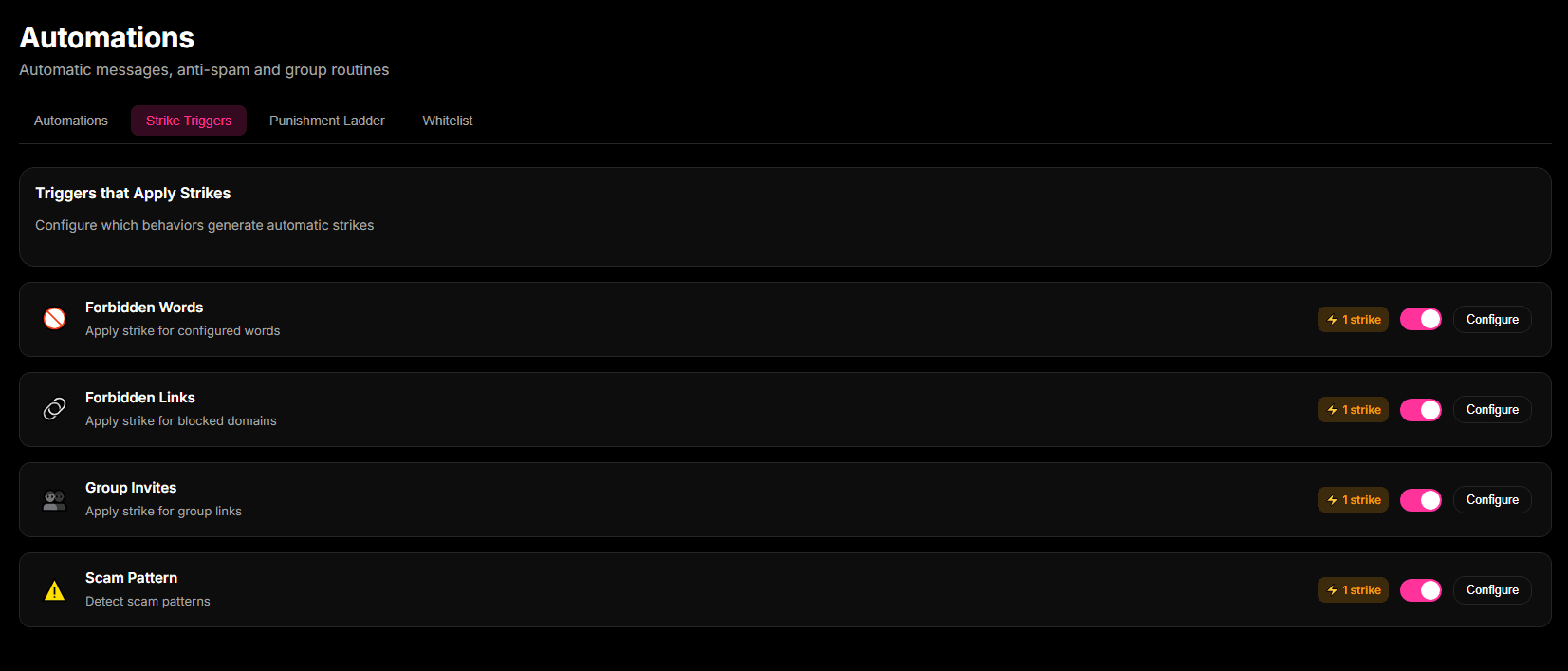
Step 1: Turn on the Strike System and security triggers
- Open Moderation > Strike System in the 9bot Dashboard for the selected group.
- Turn on the main triggers: scam pattern detection, blocked links, flood and group invites.
- Set how many strikes each trigger applies and configure it to delete the offending message automatically.
Important: Keep the scam detection trigger on with immediate removal for serious threats such as fake bank (phishing) links.
Step 2: Set up the Whitelist and the penalty ladder
- Add trusted accounts, partners and co-admins under Whitelist so the triggers never block them.
- Set up cumulative penalties (e.g. 1 strike = warning, 3 strikes = temporary mute, 5 strikes = permanent removal).
- Review the reports and logs in the Moderation tab to keep track of what the bot has done.
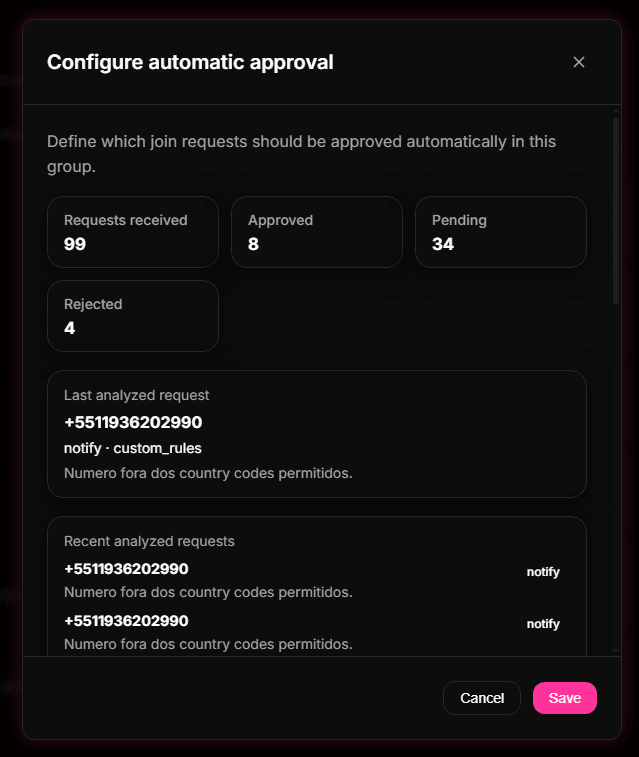
Step 3: Filter and block suspicious country codes in Auto-Approval
- Go to Automations > Auto-Approval in the Dashboard settings.
- Create a country-code rule to hold or automatically decline join requests from suspicious prefixes.
- Block the foreign prefixes most often used by bots (e.g. +234 for Nigeria, +62 for Indonesia), unless your community actually has members there.
How the strike system and country-code blocking work together
Protecting a group from scams takes several layers. The first is selective Auto-Approval: by blocking specific country codes in the Dashboard, 9bot stops spam and phishing bots from getting into the group at all. That solves the problem at the root, before the scam account ever reaches the member list.
The second layer is the Strike System, a real-time barrier inside the group. If a scammer gets in with a local number, content analysis catches suspicious keywords and patterns (e.g. promises of quick profits, unknown shortened links). Once the strike limit you set is reached, the bot removes the member and instantly deletes the harmful content.
How it works in practice
Handling a WhatsApp group's security by hand is like running a bank branch and putting the general manager at the front door to check every customer's ID by eye, run after people handing out fake flyers in the lobby, scrub graffiti on the spot and grab anyone trying to con customers. It's physically impossible, and the scam will happen right in front of you.
With 9bot, the group gets a digital security system (like an IPS/WAF). The bot stops cloned numbers and foreign bot numbers (such as +234) at the door. If a scammer who slipped in tries to spread scam or phishing links, the filter reads the message in milliseconds, deletes it before anyone clicks, applies a strike and removes the intruder. Everything is logged in the Dashboard so admins can review it.
Anti-scam security checklist in 9bot
Hands-on test: simulate a scam
- Open the 9bot Dashboard and turn on scam pattern detection and blocked links in the Strike System of a test group.
- From a test account, simulate an attack by typing a typical scam message (e.g. 'Get $500 now with this link: http://fake-link.com').
- Send it in the group chat and check that the bot removes it instantly, applies the strike and logs the violation under Moderation > Moderation Logs in the Dashboard.
Tip: for a more thorough test, simulate several strikes to make sure the penalty ladder (mute or removal) does the right thing in the test group. With automatic removal and message deletion working, your community is protected!
What people also ask about WhatsApp scams
These are real questions people search about this topic (AlsoAsked, AnswerThePublic and Google autocomplete), answered with WhatsApp Help Center sources.
What are the most common WhatsApp scams?
WhatsApp lists the signs that show up most in suspicious messages: asking you to tap a link, activate a feature or download an app; asking for personal details like card or bank numbers, birth date or passwords; asking for money or claiming you must pay to use WhatsApp; pretending to be someone you know; or talking about the lottery, gambling, a job, an investment or a loan (Help Center: suspicious messages and scams). In groups, trading and investment "opportunities" posted by new members are a typical version.
How do scammers get access to your WhatsApp?
To register your number on another phone, a scammer needs the SMS verification code sent to you. Without it, they can't complete verification. So never share that code, not even with someone claiming to be support or a group member (Help Center: verification code), and turn on two-step verification so a PIN is also required (Help Center: two-step verification).
How can I tell if my WhatsApp is hacked or someone can read my chats?
Open Linked devices: it lists every computer, browser and other device linked to your account. Tap any you don't recognize and log it out (Help Center: linked devices). If you lost access to the account, follow the official steps to recover a compromised account (Help Center: recover a compromised account).
How do I lock a WhatsApp group and require approval to join?
In Group info > Group permissions, an admin can turn off Send new messages (only admins can send), turn off Edit group settings and Add other members, and turn on Approve new members so nobody joins via link without an admin's approval (Help Center: group admin settings).
What happens when a WhatsApp group is reported?
When you report a group, WhatsApp receives up to the last five messages sent to you in it, and nobody is notified. A report doesn't guarantee a ban: WhatsApp checks for Terms of Service violations and doesn't publish a number of reports that gets an account banned (Help Center: reporting and blocking).
What's the difference between blocking and reporting?
Blocking stops someone's messages, calls and status updates; reporting sends recent messages for review but doesn't block on its own. Blocking also won't stop you both from seeing each other's messages in a shared group (Help Center: reporting and blocking). Inside a group, the fix is for an admin to remove the scammer and delete the message for everyone.
To fully lock down a group, see Security settings for large WhatsApp groups: stop raids and scams; for hoaxes and chain messages, see How to Combat Fake News in WhatsApp Groups.
Read also

FAQ
How does 9bot spot scams in WhatsApp messages?
The bot uses heuristic filters and lists of known scam patterns. It checks keywords linked to financial fraud, typical phishing message structures and blocked links in milliseconds.
How does blocking foreign numbers improve security?
Most spam and scam bots use virtual numbers from a handful of foreign country codes (such as +234 or +62). Blocking those prefixes at the door stops intruders from joining the group, as long as your community has no real members from those countries.
What happens if a legitimate member gets blocked by the bot?
Admins can set up a Whitelist to protect members and partners from automatic penalties. And if someone is muted or removed by mistake, the action can be reversed in the Dashboard.
Can I set penalties before a permanent ban?
Yes. Each trigger can apply a different number of strikes (e.g. posting group invites = 3 strikes, a mildly offensive word = 1 strike), so you control how strict the penalties are.
Does the bot delete the scam message from the chat?
Yes. When configured to do so, the bot deletes the message containing the link or scam right away, so other members never see the harmful content.
What are the most common scams in WhatsApp groups?
How do I know if someone is using my WhatsApp on a computer?
What happens if I report a WhatsApp group?
If I block someone, will I still see their messages in a group?