How to Deal with Member Spam: Automatic and Manual Methods
Protect your community. Learn how to identify member spam and set up automatic and manual methods using 9bot to shield your WhatsApp groups from scams.
Why Daily Monitoring is Indispensable
With the massive growth of digital interactions worldwide, managing WhatsApp groups requires increased vigilance. Surveys indicate that nearly 40% of messaging app users have already received spam or invasive advertisements from unknown numbers. This influx of unwanted messages doesn't just annoy participants—it destroys the trust members place in your brand, leading them to mute notifications or leave the group permanently.
Scammers are constantly finding sophisticated loopholes in messaging platforms. They slip into groups silently during off-peak hours, fire dozens of messages containing malicious phishing links, and remove themselves immediately to prevent easy reporting. If spam isn't contained quickly, engagement plummes, and your group's reputation is severely damaged.
To protect your community, modern administrators must act preventively. Combining the human touch of direct moderation with the speed of automated filters is the secret to maintaining a productive, clean, and high-value channel.
The Problem in Practice
The absence of active barriers against spammers leads to three major operational pain points:
- Mass Invasions and Malware: Spambots join the chat and share fraudulent "reward" links or phishing scripts. If the link is not removed instantly, real members can be compromised, leaving administrators legally and socially vulnerable.
- Drama and Broken Rules: Unsolicited promotions trigger friction among participants. The welcoming, cooperative climate of the group is replaced by aggressive arguments and complaints.
- Moderator Burnout: Manually managing a high-traffic community requires 24/7 monitoring. Without automation, admins experience severe exhaustion, leaving no energy to produce valuable content.
Automation serves as your first line of active defense, deterring spammers before their unsolicited content floods the chat.
What You Will Configure and Solve
By the end of this tutorial, you will know how to use 9bot to build a secure group environment that solves:
- The automatic blocking of aggressive, rapid-fire spammers.
- The immediate deletion of unauthorized links and attachments.
- The manual approval process and strategic vetting of new member profiles.
- The consolidated logging of infractions and warning metrics in the background.
Before You Begin
- A WhatsApp group successfully connected to 9bot.
- Access to the 9bot Dashboard.
- Your target group selected in the active Groups sidebar.
- Admin permissions granted to the bot in your WhatsApp group.
- Drafted guidelines or community rules ready to be implemented.
Step-by-Step Dashboard Setup
Step 1: Establish Clear Rules and Pending Approvals
- Write clean guidelines defining what constitutes spam and pin them to your group description or automated welcome notes.
- Enable the Approve New Participants toggle in your WhatsApp group settings to hold spambots in a pending queue until they are vetted by a human moderator.
Step 2: Configure the Anti-Spam Filter on the Dashboard
- Log in to your 9bot Dashboard.
- On the sidebar navigation, click Automações and select the Anti-Spam section.
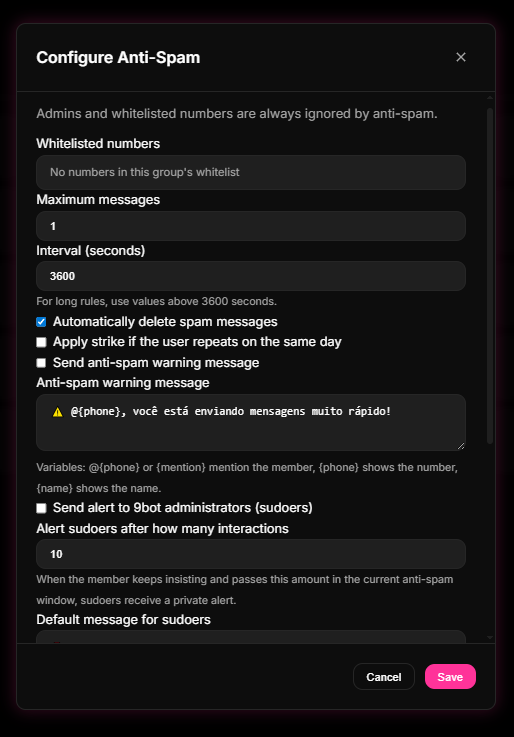
- Toggle the filter on and define your threshold (e.g., maximum of 3 messages within a 5-second window). Establish the automatic penalty for violations.
Quick Checkpoint: Make sure the penalty for repeated Anti-Spam violations is set to a progressive model (such as warning/strike first before banning). This prevents automatic kicks of legitimate members who just happen to post rapid-fire messages.
Step 3: Enable Link and Attachment Moderation
- Under the same Automações tab, click Moderação de Links (Link Moderation).
- Set the active action to "delete message" or "remove member" to deal with aggressive spammers decisively.
- Complete your whitelist by adding your brand's official URLs and payment portals so legitimate links are never blocked.
Quick Checkpoint: Review the Moderação > Logs de Moderação tab weekly to audit which links are being filtered. This audit helps calibrate the whitelist, ensuring well-meaning members are not penalized for sharing useful references.
How it works in practice
Moderating spam manually is like trying to delete unwanted phishing emails from your inbox one by one after they have already been read by your entire team. With 9bot, it's like deploying a high-speed active network firewall and edge security system. The millisecond a spam bot posts an unauthorized link or malicious file, 9bot intercepts it at the edge, checks the domain against threat databases, deletes the banned content instantly, and bans the sender. The community remains secure before anyone even notices.
Test Your Setup Now
- Using a secondary test number (non-admin, not listed in your whitelist), send rapid, consecutive messages (flooding) into the WhatsApp group.
- Confirm that 9bot deletes the extra messages instantly and fires the warnings notice.
- Send an unauthorized link and verify that the bot removes it on the spot.
If the bot acted within a second to wipe out the spam and logged the strike successfully on your Dashboard, your smart drawbridge is fully operational and protecting your community.
Read also
Frequently asked questions
What constitutes member spam in WhatsApp groups?
What is the benefit of combining manual and automatic methods?
Does 9bot's Anti-Spam filter work when I am offline?
How many messages does the Anti-Spam filter allow before triggering?
Can members report spam directly inside the group chat?