Professional WhatsApp Group Etiquette: Guidelines & Automation
Learn to define clear etiquette rules for professional WhatsApp groups. Enhance productivity, minimize clutter, and optimize team workflows with 9bot.
Why Etiquette is Indispensable in the Corporate Environment
In the professional world, small details make a massive difference. WhatsApp has become an essential business tool, but the speed of instant messaging brings a constant risk of misunderstandings, clutter, and loss of focus.
According to research, a vast majority of professionals participate in at least one work-related chat group. This massive volume of active business conversations highlights the need for clear communication guidelines and professional standards tailored to corporate goals.
Shared Operational Focus: Corporate groups without clear regulations tend to suffer rapid dilution of attention, generating mental fatigue and friction between team members.
Without explicit rules, long-term work groups easily degenerate into a chaotic "no man's land." Excess informality, off-topic discussions, and constant alerts drain productive time from employees and managers. Establishing digital etiquette rules protects professional relationships, ensures fast project delivery, and frees up administrative time, allowing automation tools like 9bot to maintain order automatically.
Top Digital Etiquette Practices for Professional Groups
Participating in a work-related channel requires respect for others' time, objectivity, and clarity. Drawing from the experience of thousands of companies managing digital teams, we have compiled the most effective guidelines for your daily routine:
- Respect business hours: Avoid dispatching non-urgent requests or technical demands outside of agreed working hours. Respecting offline time prevents employee fatigue and maintains high productivity during active work windows.
- Be direct, structured, and concise: Write a single, organized message containing all details, questions, and deadlines for a project, rather than sending dozens of fragmented thoughts that make the recipient's phone buzz repeatedly.
- Prefer text over audio messages: Long audio recordings waste productive time, are impossible to search in the WhatsApp chat history, and make it hard to retrieve project metrics during quick standups. When audio is unavoidable, keep it under 30 seconds.
- Maintain strict on-topic focus: Generic "good morning" messages, memes, political debates, or jokes should be actively discouraged. These belong in a dedicated informal channel for team building.
- Guarantee data confidentiality: Sensitive corporate statistics, financial spreadsheets, lead contact details, and strategic roadmaps must remain strictly confidential, keeping them out of unsecured chats where they could be exposed.
Attention When Sending Audio: A 5-minute audio note might save 2 minutes for the sender, but it drains 5 minutes of focused attention from every receiver on the bus, and blocks search indexes.
The Moderator's Role in Enforcing Etiquette
WhatsApp group administrators often accumulate heavy operational overhead. They are responsible for both response times and mediating friction caused by off-topic comments or inappropriate posts.
The most efficient way to moderate actively is to define, document, and share group rules transparently. You can easily implement this through:
Step 1: Formulate and publish the guidelines
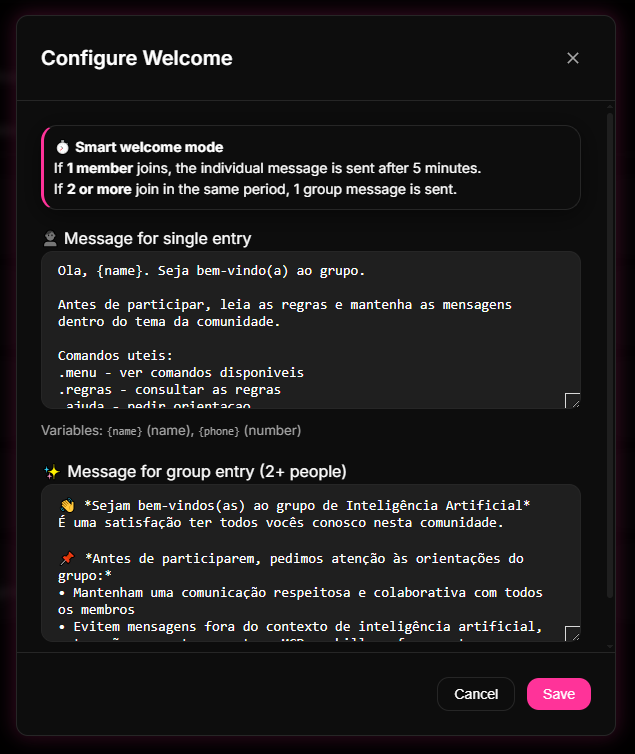
Create direct guidelines for conduct. Access the 9bot dashboard and use the Welcome Message editor to write rules that will be delivered automatically to every new member the exact millisecond they join.
Step 2: Configure active moderation filters
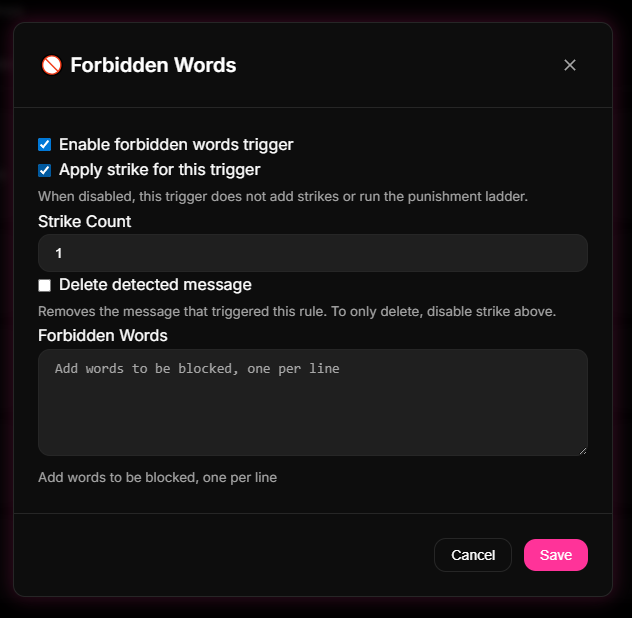
Enable keyword filters and link restrictions in the control console to prevent spammers from cluttering the group. The bot will automatically delete posts with off-topic or inappropriate words.
Practical Rules That Drive Business Results
We have tested various formats of digital group netiquette. The most widely accepted professional codes of conduct include:
- Exclusive Purpose: Explicitly state that interactions in the channel must be strictly limited to the team's operational goals (e.g., sales support, development ticket tracking, or content scheduling).
- Read-Only Alerts: Set the group permissions to read-only or limit active discussions during important management announcements to avoid message dilution.
- Private Feedback: Individual performance critiques and personal corrections must occur strictly in private chats, keeping the team channel clean and professional.
- Large File Policies: Require administrative approval before sharing heavy media attachments or large document bundles to prevent visual overload.
How It Works in Practice
Maintaining order, courtesy, and focus in a corporate WhatsApp work group manually is exactly like managing a shared office (co-working) where people walk in without identifying themselves, shout at the same time, paste sales flyers on windows, and play loud music at any hour, disrupting everyone's productivity and focus.
With 9bot, your group benefits from an elegant and automatic set of professional best practices. The bot acts as the digital etiquette guidelines for the office: it sends warm and clear guidelines to new members upon entry (avoiding long voice notes or spam), restricts unwanted ads or late-night links (anti-link), and provides quick shortcuts via commands (like /rules or /contact). The work environment remains clean, focused, and highly professional, allowing the team to collaborate with maximum value and zero distraction.
Test It Now in Your Group
- Access the 9bot Dashboard and open the Word Filter tab.
- Add a few casual words or off-topic phrases to the blacklist.
- Have a test number send a message containing the blacklisted keyword in your active group chat.
- Confirm that the automation instantly deletes the unauthorized payload and sends the warning alert to the sender without requiring administrative intervention.
When your business messaging network filters noise automatically in real time, your team gets 100% of their focus back to close enterprise deals and boost revenue!
Read also
Frequently Asked Questions
What is professional WhatsApp group netiquette?
How does message automation help enforce group etiquette?
Should messages outside of working hours be restricted?
What is the business benefit of banning memes in corporate groups?
How should administrators handle members who break etiquette guidelines?