How to Send News on WhatsApp Without Being Marked as Spam
Distribute news safely. Learn how to configure 9bot to schedule updates and avoid blocks or suspensions on WhatsApp.
The Challenge of Informing Readers Without Annoying Them
Distributing real-time news and updates via WhatsApp represents one of the highest-converting organic traffic strategies for content portals, blogs, and corporate channels today. The agility with which a breaking story reaches the user's mobile lock screen is unmatched. However, this high speed comes with a severe operational risk: Meta's strict automated anti-spam algorithms.
When a profile or bot dispatches dozens of consecutive links without any personalization, at inappropriate hours, or using clickbait-style hooks, WhatsApp's automated security filters interpret this behavior as highly suspicious. Even more dangerous is the human reaction: annoyed members who choose to mute, report, or block the sender. Just a few consecutive reports are enough to temporarily suspend a corporate phone number.
The solution is not to abandon technology or revert to manual sharing, which is slow and exhausting. The safe path lies in intelligent, humanized automation. By timing dispatches appropriately, structuring message layouts in a clean format, and scheduling updates for moments when your audience is naturally receptive, you build a high-credibility channel completely free from suspensions.
The Problem in Practice
Ignoring secure sending practices on WhatsApp leads to chronic traffic issues for your portal:
- Number Blocking or Suspension: Losing your official communication chip immediately stops active daily newsletters and requires massive efforts to rebuild your contact database.
- Engagement Plunge: Groups that receive piles of cold, consecutive, unpersonalized links quickly become "virtual graveyards" of ignored text blocks.
- Muted Chats: When messages are dispatched invasively in the middle of the night or too early in the morning, members set the group to "muted forever," destroying your click-through rate (CTR).
Ethical and scheduled distribution reduces the risk of blocking to nearly zero and considerably improves the daily click-through rate.
What You Will Configure and Resolve
In this practical guide, you will learn how to structure your news distribution flow in the 9bot panel to:
- Schedule news updates to be dispatched at high-traffic strategic times.
- Apply automated rules to block duplicate or redundant dispatches.
- Personalize the message layout with brief summaries and friendly formatting.
- Reduce spam reports by establishing mutual respect with your audience.
Before You Start
- An active content portal or blog (with an XML RSS Feed or editorial system).
- A 9bot account connected to your corporate WhatsApp number.
- Full access to the administrative Dashboard.
- Administrator role granted to the bot in the target WhatsApp group.
Step-by-Step on Dashboard
Step 1: Configure secure scheduling and delivery rules
- Open your 9bot Dashboard and select the target group where news will be shared.
- Navigate to the sidebar and enter the Automations section.
- Click on the Schedules tab (or set up checking intervals inside your RSS/news integrator).
- Program daily dispatches for strategic peak times (e.g., at 09:00 AM and 06:00 PM) to avoid flooding.
- Calibrate the minimum delay between consecutive posts (we recommend at least 30 to 60 minutes between minor updates).
- Design the message template using dynamic tags (such as title, brief introduction, and the destination URL) to ensure each dispatch is layout-wise unique. Save your settings.
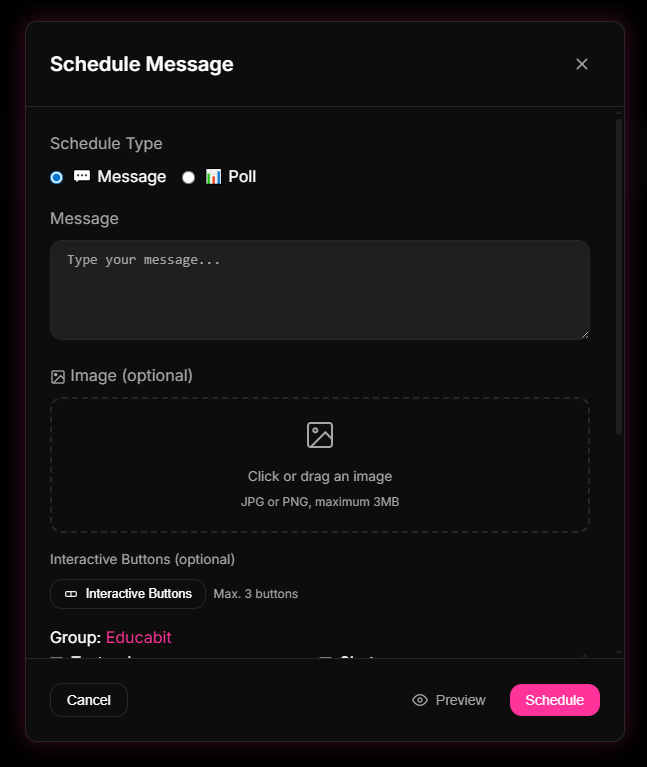
Step 2: Monitor interactions and fine-tune frequency
- Once the automated scheduling is running, check the moderation log tab to confirm the bot is delivering messages as expected.
- Keep a close eye on member feedback. If members complain, lower your daily delivery volume in the settings panel.
- Program a custom command (e.g., `/feedback`) to let the community easily signal their thoughts on the newsletter frequency, maintaining an active open dialogue.
Quick Checkpoint: Fill out your editor list in the dashboard's admin whitelist so your writing staff can modify schedules or pause automated dispatches directly from the chat.
How it works in practice
Broadcasting updates randomly and excessively is like flooding your users' phones with push notifications at 3 AM, driving them to uninstall your app immediately. With 9bot, it's like running a precision-scheduled delivery server with traffic pacing rules. You schedule consolidated digests during peak hours (like 9 AM or 6 PM) and configure delay gaps between dispatches. The bot delivers messages at the optimized speed, keeping your brand relevant on their screens without triggering spam alerts or driving users to mute.
Read also
FAQ
What causes WhatsApp to classify news messages as spam?
Can I use 9bot to broadcast news links in batches without limits?
What is the best message format to share links without looking pushy?
Will the bot face restrictions if it sends updates to multiple groups at once?
Can I integrate automatic WordPress feeds without spam risks?