Top FAQs About WhatsApp Group Automation
Resolve your operational and security doubts regarding WhatsApp group automation. Learn if bots are safe, how to avoid network bans, and how to easily automate rules with 9bot.
In short:
- Automating a group = welcomes, moderation, scheduling and alerts running without you.
- The bot must be an admin to delete messages and remove members.
- WhatsApp Business is free, but its automatic replies are for one-to-one chats.
- 9bot: 7-day free trial, then US$35/month for the first 3 months and US$70/month after that.
The digital community landscape and messaging power
Today, managing high-performance digital communities requires continuous attention, lightning-fast response times, and surgical control over user behavior. WhatsApp groups have become the main asset for content creators, large businesses, media portals, and internal enterprise teams. However, as these ecosystems grow in active nodes (members), manual moderation becomes a technical nightmare.
Recent statistics from IBGE prove that nearly 89% of Brazilians over the age of 10 own a smartphone, and over 92% of internet users rely on WhatsApp as their primary messaging channel. In this vast sea of interactions, delegating mechanical tasks to an automated assistant is no longer just a convenience, but a technical necessity to preserve moderator bandwidth and ensure data is captured outside business hours.
What tasks can be automated on WhatsApp
WhatsApp has vastly expanded its transactional scope. Today, the app hosts medical inquiries, customer support, newsletter distribution, and entire professional networks. Here are the operational tasks you can delegate to 9bot with 100% autonomy:
- News and bulletin scheduling: Automated RSS integration delivering updates at calibrated times.
- Onboarding gatekeeping: Auto-approvals and instant delivery of personalized rules to new signups.
- Peripheral safety filters: Instant detection of unauthorized links, spam, and forbidden keywords.
- Quick shortcut triggers: Automated millisecond responses for commands like
/linksor/notice. - Analytical telemetry: Periodic reports of traffic, message volume, and inactive users in the dashboard.

Practical security settings in the Dashboard
The best way to eliminate operational worries is to know where security and telemetry modules are configured. Below, we detail the core workflow within the 9bot Dashboard:
Step 1: Secure onboarding and entry controls
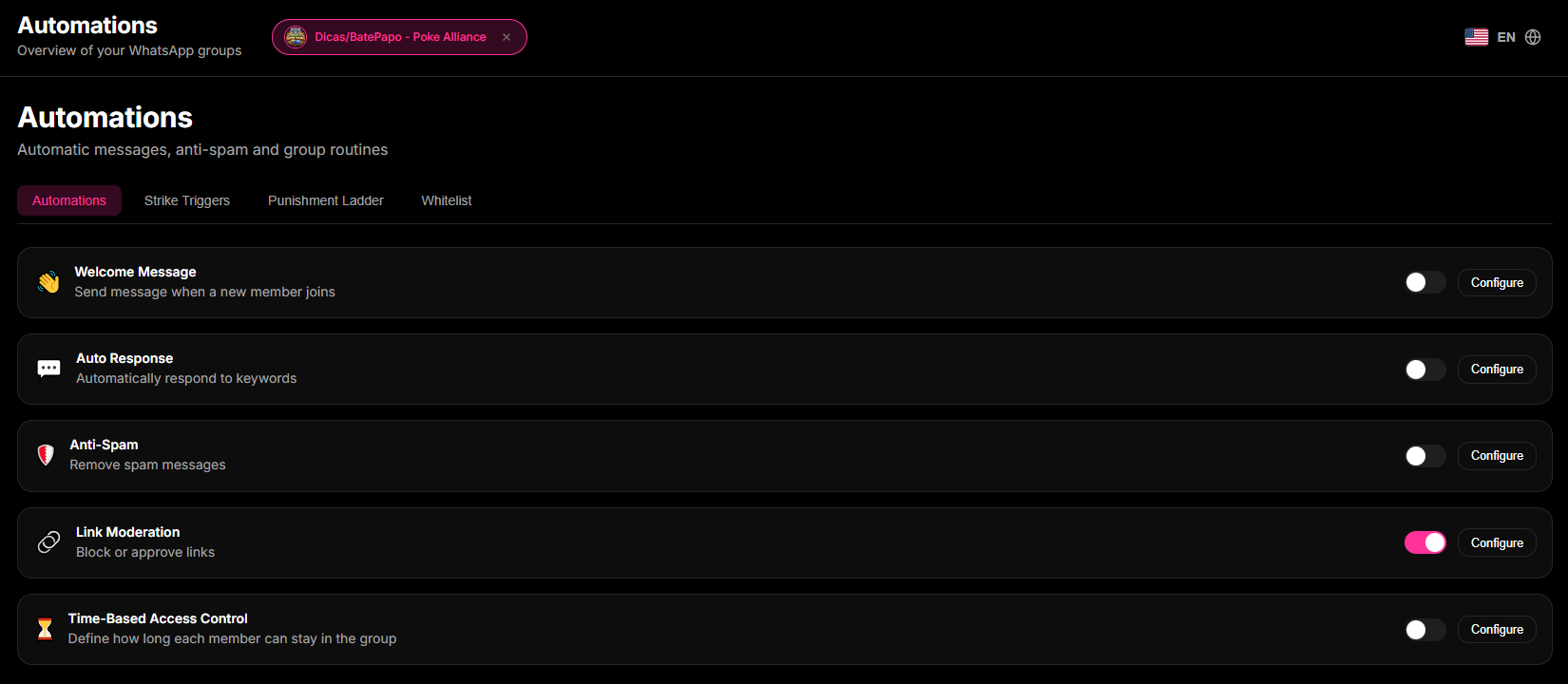
- Go to the Automations tab in the Dashboard and configure the Auto-Approval section.
- Set up a structured welcome sequence with dynamic greeting variables.
- Enable network protection delays to scale the entry of new participants smoothly.
Step 2: Analytical monitoring and telemetry
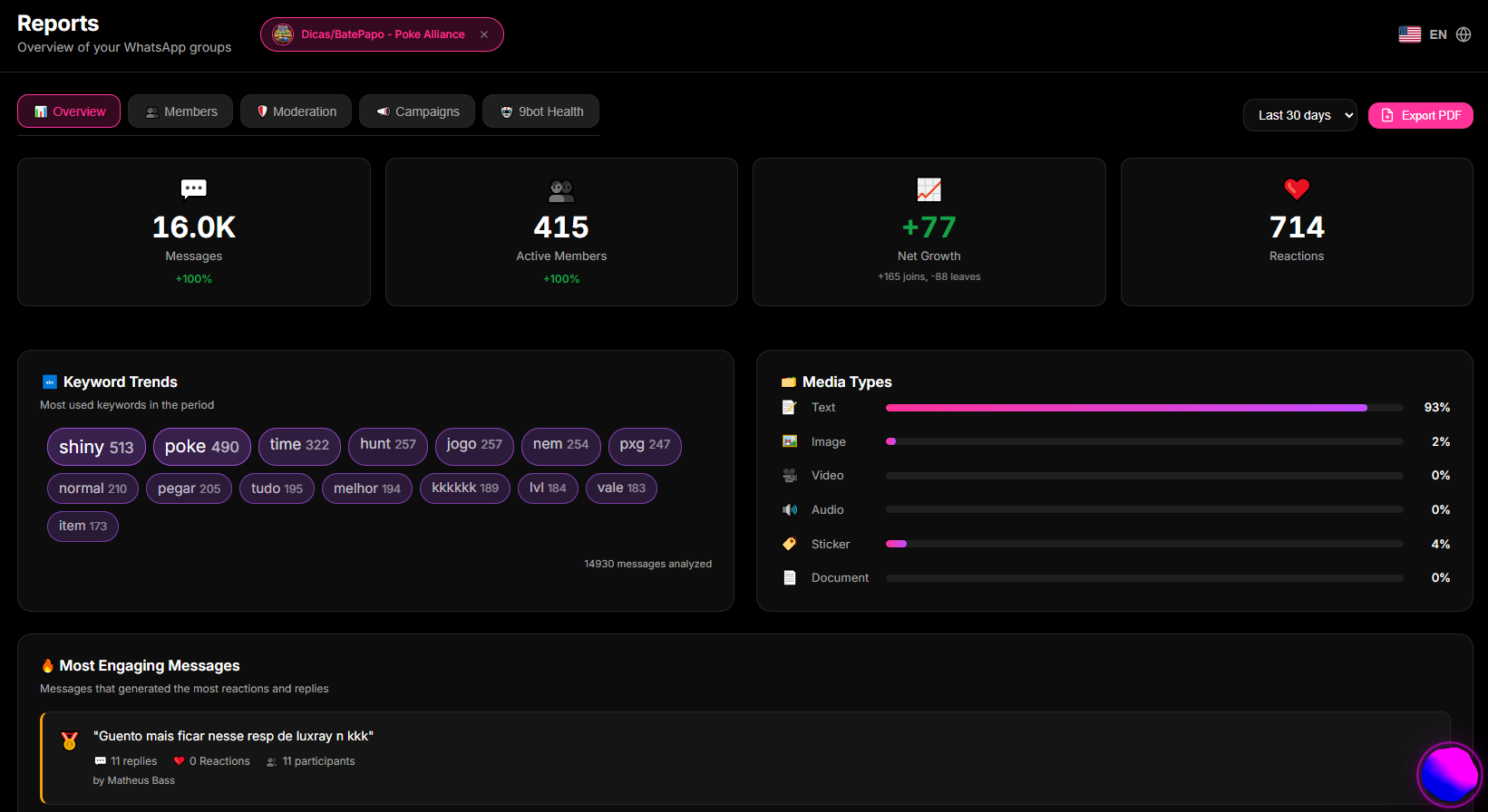
- With rules active, periodically review the Reports > General Overview dashboard.
- Observe the growth curve of active participants and peak traffic hours.
- Use consolidated telemetry to refine trigger words and adjust moderation filters if anomalies are detected.
Quick checkpoint: Confirm that the bot replies with the same speed during peak traffic by checking the response time metrics in the telemetry tab.
Is automation permitted and safe on WhatsApp?
Yes, automation is 100% safe and permitted, provided you follow Meta's platform guidelines. The risk of account bans is not related to using automation tools themselves, but rather to unethical spamming practices (such as cold messaging or blasting repeated links without consent).
To operate without risks, ensure your setup employs smart delays, avoids repeating identical notifications to the same node, and respects user privacy policies. Ethical, professional platforms like 9bot are specifically built under these strict compliance architectures.
Main challenges of growth and how to overcome them
A common concern is whether automation makes the administrator obsolete or makes the group feel robotic. The reality is quite the opposite: technology acts to empower and professionalize the manager's role:
- Preserving human presence: By letting the bot handle administrative tasks (guidelines, spam, FAQs), you gain valuable hours to build deep connections and strategic funnels.
- Saving biological CPU: Ends the exhaustion of monitoring a chat 24/7, preventing burnout and protecting your offline hours with absolute security.
- Organizing clean contexts: Preserves visual harmony by dropping link spam at the network edge, stopping high-quality members from leaving.
With clear parameters and calibrated filters, your community grows with absolute safety, keeping human presence focused where it actually drives revenue.
How to choose the best virtual assistant for your group
Choosing the right tool requires looking beyond magical claims of automated miracles. Give priority to mature platforms in the digital landscape that provide high uptime, connection stability, and clear data protection policies.
Verify the ease of control panels, the clarity of statistical telemetry, and user privacy settings. This structural security is what keeps your community growing smoothly, professionally, and without operational hiccups.
How It Works in Practice
Managing busy WhatsApp groups without any automation is like being the owner of a crowded physical store who must personally open the door for every single customer, hand out the house rules, watch the aisles for shoplifters 24/7, and answer the exact same questions every minute. Physical and mental exhaustion is inevitable, leaving you with zero time to build real relationships with your best customers.
With 9bot, it is as if you hired a team of dedicated virtual assistants for your store. One stands at the entrance giving warm welcomes and explaining how things work, another acts as a silent security guard removing spam and unwanted links the very second they appear, and another instantly answers common questions about prices or rules. The store runs in perfect order, and you (the admin) can focus on closing deals and bringing real value to your members.
Immediate practical test in your group
- Access the Custom Commands tab in the 9bot Dashboard and create a
/helpcommand listing available shortcuts. - Send the trigger trigger word using a test phone and verify the bot's reaction speed.
- Monitor message telemetry curves in the Reports tab after the initial setup to evaluate the onboarding performance.
If the assistant's reply was delivered in milliseconds and moderation filters worked flawlessly, your virtual infrastructure is secure, stable, and ready to grow!
How to automate a WhatsApp group in 5 steps
- Set the goal: community, sales, deals or announcements. That decides what to automate.
- Connect a number to the bot (ideally a number just for the bot) as a linked device.
- Add the number to the group and make it admin, otherwise it can't delete messages or remove members.
- Turn on the basics: welcome with rules, anti-link, anti-flood and strikes.
- Schedule recurring posts (notices, polls, daily content) and use reports to tune the frequency.
Learn what a group bot is and how to add one in WhatsApp Group Bot: What It Is, What It Does and How to Add One to Your Group.
Can you automate WhatsApp for free? How much does it cost?
- WhatsApp Business (app): free, with greeting messages, away messages and quick replies designed for one-to-one chats with customers (Help Center: greeting messages, away messages).
- Official WhatsApp API: Meta charges for messages according to its pricing; see what it does for groups in WhatsApp Groups API: what the official API can do, its limits and alternatives.
- Chatbot tools usually focus on one-to-one support; check each one's pricing page for what is free.
- 9bot: 7 days free; then US$35/month for the first 3 months and US$70/month after that.
We compare free, paid and open-source options, with the risks of each, in Free vs Paid WhatsApp Group Bot: Ban Risk, Security and Cost.
Automatic message examples for groups
- Welcome: "Hi @name! Please read the pinned rules. Links to other groups are not allowed."
- Rule notice (anti-link): "@name, links are not allowed. Strike 1 of 3."
- Weekly scheduled: "Monday, 8am: this week's agenda and a rules reminder."
- Deals: "🔥 Deal of the day: [product] for [price] – [link]", sent at peak time or from an RSS feed.
To build an automated deals group from scratch, see WhatsApp Deals Group: How to Create One and Automate Affiliate Offers.
Read also

Frequently asked questions
What is WhatsApp group automation?
What mistakes should I avoid when automating groups?
How can I automate WhatsApp groups safely?
Is it worth automating WhatsApp groups?
What tools should I use to automate groups?
How do I automate a WhatsApp group?
Can you automate WhatsApp for free?
How much does WhatsApp automation cost?
How do I automate a deals group?