WhatsApp group bot: free or paid? Ban risk, security and cost
GitHub, APK or managed service: see what each option really costs, what WhatsApp says about automation and how to lower the risk of losing your number.
How it works in practice
To calculate what manual moderation costs per month and how much a bot saves, see Manual moderation vs bot in WhatsApp groups: cost and ROI calculator.
To set up a sales group with an offer pace and rules that prevent reports, see WhatsApp sales group: how to create one and sell without becoming spam.
If you are thinking of building your own bot, compare first year cost in Build your own WhatsApp bot or buy one: costs and risks.

Step by step in the 9bot dashboard
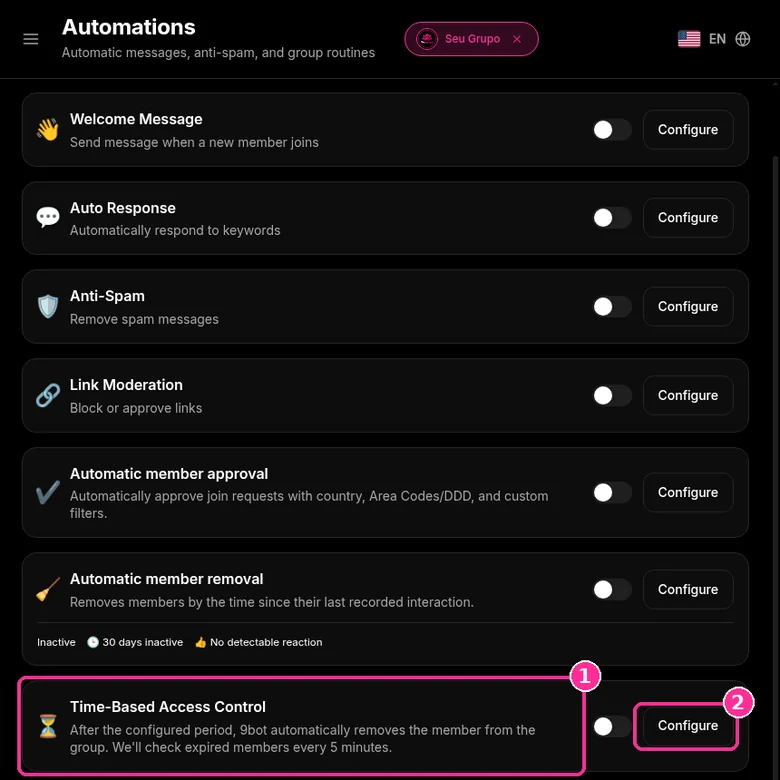
In Groups, select the group and open Automations > Time-Based Access Control > Configure. After the period you set, 9bot removes the member from the group automatically and checks for expired members every 5 minutes. The screenshots below come from the real dashboard, in a test group called "Seu Grupo", with other group names blurred. The numbers on the images follow the order of the clicks.
An example of a paid bot feature that free bots rarely offer: removing members on their own when the period ends.
Step 1: Open Time-Based Access Control
- With the group selected, click Automations in the side menu.
- On the Time-Based Access Control card, click Configure.
Step 2: Set the period, scope and exceptions
- In Remove members after, type the number and choose the unit: days, weeks, months or years. The example uses 7 days.
- In Apply to, choose New members only (the timer starts when the person joins) or All members (current members are counted from the activation date).
- Tick Warning enabled if you want this automation's warning on.
- In Exceptions, choose who never gets removed: administrators, whitelisted members and manually added members.
- Click Save Settings.
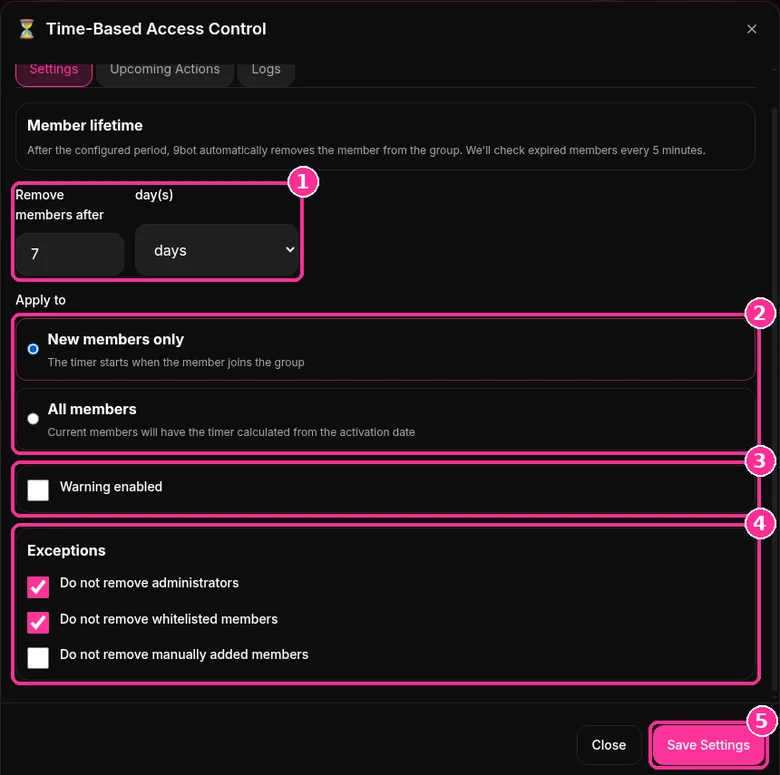
The Upcoming Actions and Logs tabs in the same window show who is about to be removed and who already was.
To set up the whole group with payments and renewals, read the paid WhatsApp group guide. Want to try it? See the 9bot plans with a 7-day trial.
For the full picture of what can be automated in customer, partner and team groups, read the guide to WhatsApp group automation for business.
Direct answer: There are three routes: free open-source projects on GitHub that you host yourself, APKs or modified WhatsApp apps, and paid managed services. Free usually means paying for a server and spending time on maintenance; modified WhatsApp APKs are unofficial apps, which WhatsApp itself says can get you banned. No bot, free or paid, is immune: WhatsApp doesn't allow automated or bulk messaging, and the risk depends heavily on how the bot is used. To manage groups, pick a maintained solution, use a dedicated number and never use the bot for mass messaging.
The 3 types of WhatsApp group bot
| Type | Cost | What it takes | Main risks |
|---|---|---|---|
| Open-source project (GitHub) | Free code; you pay for a server or keep a computer on | Installing, configuring and updating it; keeping it running 24/7 | Breaks when WhatsApp changes something; security and backups are on you |
| APK or modified WhatsApp | Usually free | Installing an app from outside the official store | Unofficial app: risk of bans and malware |
| Managed service (paid) | Monthly fee | Connecting a number and configuring it in a dashboard | Depends on the provider's reliability; still subject to WhatsApp's rules |
In every case, the “bot” is a WhatsApp number connected to a system that replies automatically. The difference is who maintains that system, where it runs and what happens to your data.
What about running it on a phone (Termux)? Some tutorials show how to run an open-source bot on Android with Termux. In practice it's the same as the GitHub route: the phone has to stay on and online all the time, and maintenance is still on you.
Can a bot get your number banned? What WhatsApp says
It's worth being upfront about the rules, because plenty of ads promise a “ban-proof bot”:
- WhatsApp says its products aren't intended for bulk or automated messaging, and that both violate its Terms of Service (Help Center).
- Unofficial apps, such as modified versions of WhatsApp, can lead to temporary or permanent bans (Help Center).
- Linking your account to unofficial apps or websites can also lead to a ban, according to the page about linked devices.
Most group bots, free or paid, connect as a linked device, the same way WhatsApp Web does. 9bot works this way too. That's why no serious provider can guarantee zero risk. What moves the risk up or down is how you use it:
Raises the risk
- Sending bulk messages or messaging people who didn't ask.
- Adding lots of people to groups without consent.
- Getting many spam reports.
- Using an APK or modified WhatsApp.
Lowers the risk
- Using the bot to manage groups that want it.
- Using a number dedicated to the bot.
- Keeping automated messages to a low pace.
- Moderating spam instead of producing it.
What about WhatsApp's official API for groups?
Meta has an official Groups API, but it was designed for businesses, not communities. According to the Groups API documentation, it requires an Official Business Account (OBA), groups are capped at 8 participants, people can only join through an invite link and the API can't delete messages. If you run a neighborhood, class or customer group, it won't replace a moderation bot.
Security and privacy: what to check before you choose
- Who stores your number's session? Whoever has the session data can use the account. With a GitHub project, it lives on your server and protecting it is your job. With a service, ask where it's stored and who can access it.
- Where does the code come from? APKs from unknown sites can carry malware. Open projects are more transparent, but you have to trust and update their dependencies.
- What happens to members' data? Read the privacy policy. 9bot's states that the bot doesn't collect, store or sell personal data and that it only takes the actions you set up.
- Does the bot need admin rights? To moderate, yes. Give admin only to the bot number and trusted moderators.
If you run large groups, combine the bot with WhatsApp's own security settings and check what data you can legally collect.
How much does a WhatsApp group bot cost?
The real cost goes beyond the price tag:
- Free GitHub bot: the code costs nothing, but you pay for hosting (or keep a computer on all the time) and spend hours installing, fixing and updating it whenever something changes.
- Free APK: the cost shows up later, if the number gets banned or the phone is compromised.
- Paid service: a monthly fee that covers servers, updates, a dashboard and support.
With 9bot, each account runs on a dedicated server, there's a 7-day trial, no setup fee and you can cancel anytime. Current prices for each plan are on the plans page.
How to choose: a quick checklist
- Can you code and do you have time to maintain a server? An open-source project can work for testing and personal use.
- Do you need moderation (anti-link, strikes, member approval) running 24/7 without maintenance? A managed service usually pays off.
- Someone offering a “ban-proof” APK? Stay away: it's an unofficial app.
- A provider promising “zero ban risk”? Be skeptical: no bot controls WhatsApp's rules.
- Does the plan have a 7-day trial and easy cancellation? Test it in a small group first.
See everything 9bot does in WhatsApp group bot: a look inside 9bot and, if you try it, start with your group's permissions.
Comparator: cost per group of each option
Compare the cost of hosting a bot yourself with a managed service. Enter maintenance hours, the value of your hour, the server and the service price, which starts at 0 so you can type the amount from the pricing page.
Values come from what you type. 9bot has a single plan, Basic Pro, with a 7-day trial.
Features by tool: what to check
Before comparing price, check whether the tool covers what your groups need. The 9bot column lists product features; for the others, check each tool documentation.
| Need | 9bot | Own bot (GitHub) | Other service |
|---|---|---|---|
| Anti-spam and link moderation | Yes, with strikes | Depends on the project | Check |
| Scheduled messages | Yes | Depends on the project | Check |
| RSS | Yes | Depends on the project | Check |
| Member approval with filters | Yes, with a daily limit | Depends on the project | Check |
| Inactive member removal | Yes, with a notice first | Depends on the project | Check |
| Time-limited access | Yes | Depends on the project | Check |
| API and integrations | REST API, MCP, Discord, live alerts and affiliate offers | You build it | Check |
AI bots: where they fit in this choice
An AI bot generates replies from a language model such as ChatGPT. A moderation bot applies fixed rules: it deletes links, removes rule breakers and schedules notices. They are different tools, and pricing follows the logic of this guide: free versions usually cap volume and features, and AI also has a per use model cost.
| Need | Bot type |
|---|---|
| Answer open questions from members | AI bot |
| Delete links, spam and profanity | Moderation bot |
| Welcome messages and fixed rules | Moderation bot |
| Summarize long discussions | AI bot |
Privacy and answer accuracy concerns are covered in AI and ChatGPT bots in WhatsApp groups.
Read also

FAQ
Does 9bot remove administrators when the period ends?
How often does 9bot check for expired members?
Is there a free WhatsApp group bot?
Is a GitHub WhatsApp bot safe?
Does a paid bot prevent bans?
How much does a WhatsApp group bot cost?
Can WhatsApp's official API manage community groups?
Can I use my personal number for the bot?
How much does a bot cost per WhatsApp group?
How do I compare WhatsApp group bots?
Is an AI bot better than a moderation bot?
Is there a free ChatGPT bot for groups?