WhatsApp deals group: how to create, organize and automate affiliate offers
From the group name to the posting routine: how to build a deals group for Amazon and other stores that people actually want to follow, without looking like spam and without spending your day copying links.
How it works in practice

Step by step in the 9bot dashboard
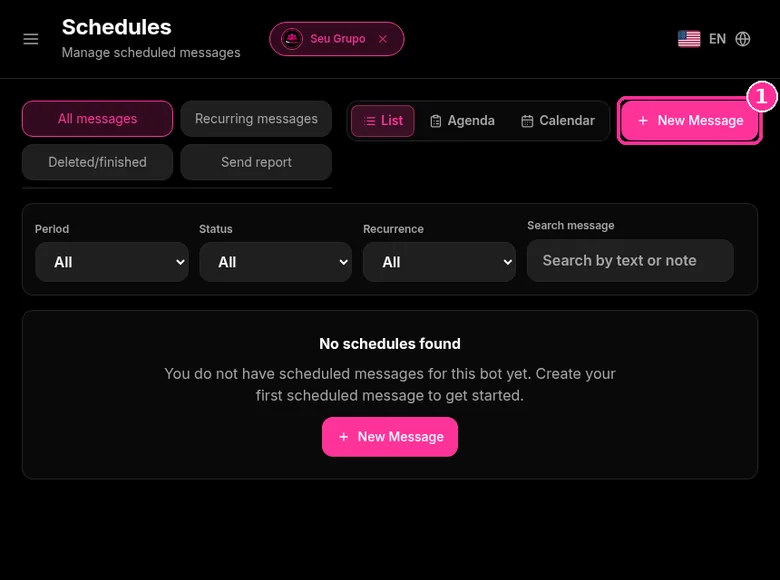
In the side menu, click Schedules. It has the tabs All messages, Recurring messages, Deleted/finished and Send report, with List, Agenda or Calendar views. The screenshots below come from the real dashboard, in a test group called "Seu Grupo", with other group names blurred. The numbers on the images follow the order of the clicks.
For offers, schedule each post with a date and time, and tick Recurrent message when the same offer should come back.
Step 1: Start a new schedule
- In Schedules, click New Message.
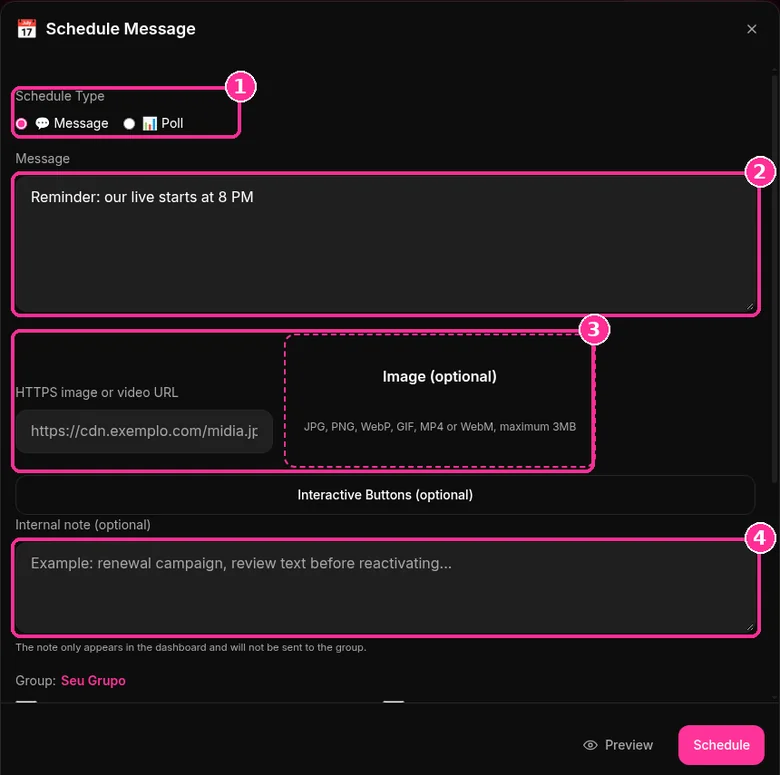
Step 2: Build the message
- Under Schedule Type, choose Message or Poll.
- Type the text in the Message field.
- For media, paste an HTTPS image or video URL or upload it under Image (optional): JPG, PNG, WebP, GIF, MP4 or WebM, up to 3MB.
- Use Internal note (optional) for team reminders. The note stays in the dashboard and is not sent to the group.
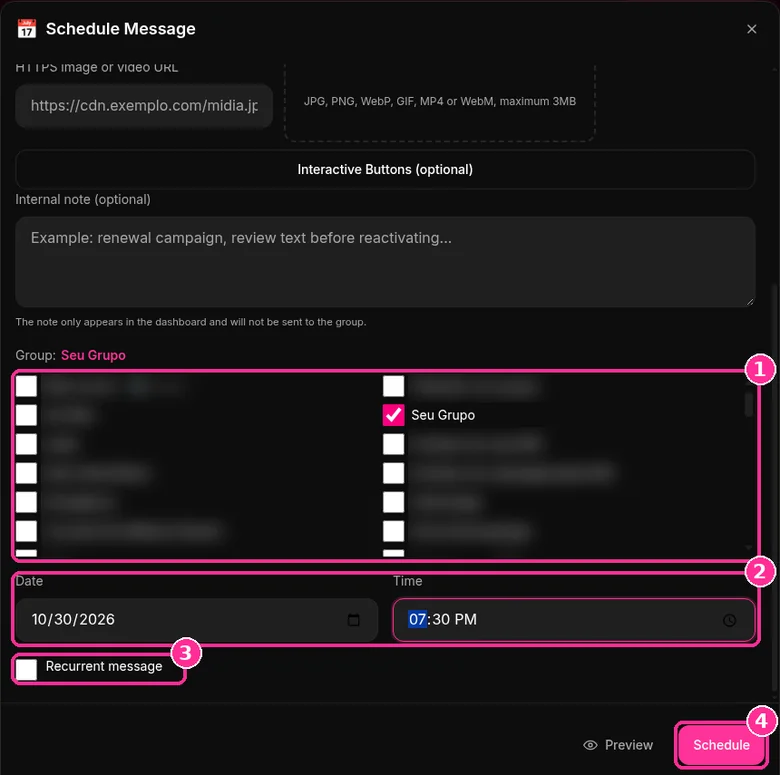
Step 3: Choose the group, date and time
- In the group list, tick the group that should receive the message.
- Fill in Date and Time.
- Tick Recurrent message if the send should repeat.
- Click Preview to check it, then Schedule.
Need to send right now, with no date? Use 9bot Broadcast for multiple groups.
Sent messages show up in the Send report tab. Want to try it in your group? See the 9bot plans with a 7-day trial.
Direct answer: To create a WhatsApp deals group: pick a niche, join the affiliate programs of the stores you'll promote and read their rules, create the group with a clear name, photo and description, set it so only admins can send messages and share the invite link. Then set a posting routine with fixed times and a standard format (product, price, code, link and expiry) and disclose your affiliate links. To avoid living on your phone, use a bot that schedules and distributes offers across your groups.
How to create a WhatsApp deals group: step by step
- Pick a niche: tech, home, fashion, baby, gaming. Focused groups keep members longer than "everything on sale".
- Join the affiliate programs of the stores you want to promote (Amazon and others) and read each program's promotion rules.
- Create the group with a name, photo and description that make it clear what people will get.
- Set permissions so only admins can send messages.
- Write the rules and pin a message explaining how often you post.
- Share the invite link instead of adding contacts without asking.
- Build a posting routine and automate the repetitive parts.
The next sections cover each step in detail.
Before you start: niche, affiliate program and group identity
The most common mistake is opening a generic group and posting any deal. People join deals groups to save time, so a clear focus ("tech deals", "home finds") helps them decide to stay.
Each store runs its own affiliate program, with its own sign-up, commissions and promotion rules. These rules change often, and some cover where and how links can be shared, including on messaging apps. Read each program's terms before you start.
The name and photo matter: WhatsApp evaluates group names and photos to identify scams and spam. Avoid promises like "easy money" or "everything free", which look like scams. See why WhatsApp groups get suspended.
How to set up your deals group
A deals group works best as an announcement channel: only admins post and members just read. That way nobody mixes their own links with your offers and the group stays clean.
- Send messages: admins only. Change it in the group settings. The guide to group member permissions covers each option.
- Edit group info: admins only. Stops anyone from changing the name, photo or description.
- Approve new members: useful when your invite link is shared in places you don't control.
- Rules in the description: what you post, how often, and a note that links are affiliate links.
As your audience grows, split by niche and bring everything together in a community. Each community holds up to 100 groups and 2,000 members in total, and the announcements group lets you reach everyone at once. Compare the formats in community vs. group vs. channel and check the numbers in WhatsApp limits in 2026.
Your deals routine: frequency, timing and format
Deals groups die in one of two ways: silence or overload. Some practical guidelines:
- Fixed times: blocks like 9 a.m., noon and 8 p.m. build a habit. People know when to check.
- Quality over quantity: a few good deals per block beat dozens of links.
- Checked prices: confirm the price and code before posting, and say they may change.
- A standard format: deals with the same structure are easier to scan.
A simple offer template you can copy and adapt:
🔥 XYZ Bluetooth Earbuds
Was $59, now $39 (34% off)
🎟️ Code: EXAMPLE10
🔗 [affiliate link]
⏰ Price checked at 9 a.m. It may change at any time.
#ad | affiliate link
To vary your wording without losing the format, try the customer message generator.
How to automate your deals with 9bot
Copying links one by one into every group is what eats most of an affiliate admin's time. 9bot has an Affiliates feature to organize and distribute offers from Mercado Livre, Amazon and Shopee more often and with less manual work. In practice, the routine looks like this:
- Scheduling by time, repeating daily, weekly or monthly. The step by step is in how to schedule a message in a WhatsApp group.
- Templates reused across several groups without redoing the setup.
- Reports showing when members are most active, so you can adjust the routine.
- Anti-Spam and link moderation, so only your offers circulate if members are allowed to post.
Automation doesn't mean posting nonstop. Keep the frequency your audience accepts and review scheduled offers. To send the same content to several groups safely, read how to send content without being flagged as spam.
Disclosure: label ads and affiliate links
Many countries require advertising to be clearly identifiable as advertising, and affiliate relationships to be disclosed. In the United States, for example, the FTC's Endorsement Guides cover this; other countries have their own consumer protection and advertising rules. For a deals group, in practice:
- say in the description that links are affiliate links and that you may earn a commission;
- add a short label to each offer, such as "#ad" or "affiliate link";
- don't advertise discounts that don't exist or hide conditions like shipping or limited stock;
- follow the rules of each affiliate program.
This isn't legal advice. If the group is part of a larger business, check the rules that apply where you and your audience are.
How to promote your deals group
Members who asked to join stay longer and report less. So always prefer invitations:
- create an appealing invite with the group invite generator;
- share the invite link and QR code on Instagram, TikTok, your bio and your website;
- show real examples of deals you've posted, so people know what they'll get;
- don't add contacts without permission: people who didn't want to be there tend to report the group.
When the group fills up, open a second one with the same rules and bring them together in a community. To talk to different audiences without repeating everything everywhere, see how to communicate with segmented audiences.
How much a WhatsApp deals group earns
A deals group earns affiliate commission on sales made through its links. There is no fixed value per member: the result depends on how many members click each offer, how many clicks become purchases, the average order value and the commission rate, which each affiliate programme sets per product category and publishes in its own table.
The maths: members × % who click per offer × offers per day × 30 days = clicks per month; clicks × conversion = sales; sales × average order × commission % = monthly commission. The calculator below does it and shows how many members you would need for an income you choose.
Formula only, using the numbers you enter. Not a promise of earnings: commission rates vary by store and category.
The inputs that move the result most are the click rate and the posting pace. Too many offers tire the group and raise departures; too few let it go quiet. If you still send offers through a broadcast list, remember that a list only reaches people who saved your number, while a group reaches everyone who joined through the link.
To separate niches (electronics, home, fashion) without repeating everything, organise the groups in a community. See WhatsApp Business community.
To set up a sales group with an offer pace and rules that prevent reports, see WhatsApp sales group: how to create one and sell without becoming spam.
To share affiliate links without putting your number at risk, see How to share affiliate links on WhatsApp without getting banned.
If the group also takes orders from resellers, see how to organize WhatsApp ordering with commands and logging in your system.
Read also

FAQ
Can I schedule a poll in a group?
Does the internal note show up in the group?
How do I create a WhatsApp deals group?
Should a deals group be admins-only?
How many deals should I post per day?
Do I need to disclose affiliate links?
Can I automate offers from Amazon and other stores?
Can a deals group get suspended?
How much does a WhatsApp deals group earn?
How many members do I need to earn from a deals group?
How do you join WhatsApp deal groups?
How can you tell if a WhatsApp deals group is trustworthy?
How do you choose good deals to post in the group?