How to Segment Audiences in Your WhatsApp Groups for High Impact
Speaking to everyone the same way is speaking to no one. Learn how to segment your WhatsApp group members using 9bot and broadcast high-relevance, high-impact messages.
The challenge of communicating with heterogeneous groups
Anyone who manages large digital communities or runs content portals on WhatsApp quickly discovers a fundamental reality: groups are made of totally different people. Gathering hundreds or thousands of participants in a single chat is a valuable first step, but the true operational challenge lies in delivering continuous relevance to each of these profiles without cluttering everyone else's screen.
Speaking uniformly to a heterogeneous crowd generates immediate noise. What is highly valuable to a new participant can be completely irrelevant to a long-term member. A lack of focus and sending messages without context are the primary reasons why members choose to mute notifications and, eventually, leave the community altogether.
For communication to be truly effective and drive genuine engagement, you must learn to subdivide your audience and personalize deliveries. Handing the right content to the right person at the appropriate moment is what separates a highly engaged, high-converting group from a noisy, forgotten chat room.
The problem in practice
The absence of structured segmentation strategies creates severe pain points for the manager:
- Excessive visual noise: Broadcasting irrelevant messages to the entire chat causes collective annoyance and immediate mute spikes.
- Silent member churn: Participants who find no utility in general discussions quietly exit the group, weakening the community's base.
- Wasted conversions and opportunities: Generic promotional campaigns fail because they are not targeted at the niches with the highest historical purchase intent.
Smart tag segmentation of participants is the only effective antidote to protect your main chat from mass user exit.

What you will configure and resolve
In this practical operational guide, you will learn how to use the intelligent tools in your 9bot Dashboard to:
- Create custom tags and categorize participants based on behavior or interests.
- Map preferences automatically when new members join.
- Schedule and send targeted broadcasts targeted exclusively at specific subgroups.
- Lower your channel's churn rate by clearing irrelevant clutter out of the main chat.
Before starting
- Full administrative access to the 9bot Dashboard.
- An active WhatsApp group connected to your account.
- The 9bot helper promoted to administrator in the respective group.
- Simple segmentation criteria defined (e.g., division by thematic interest or location).
Step-by-step in the Dashboard
Step 1: Categorize participants using smart tags
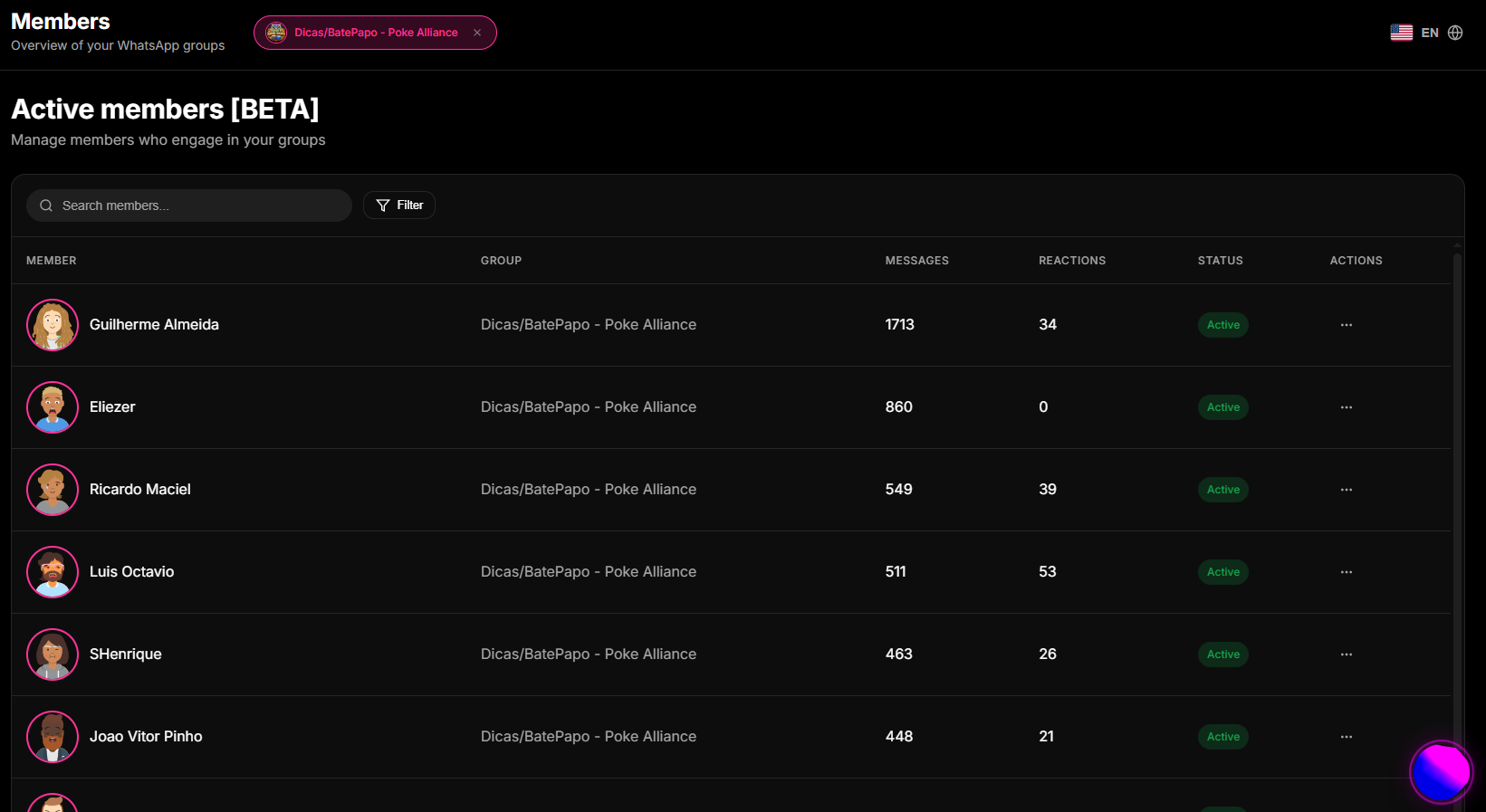
- Access your 9bot Dashboard, open the sidebar menu, and select Members.
- Analyze the consolidated active user list and identify interest or behavioral patterns based on previous chat interactions.
- Select the participants you want to group and associate custom tags with them (e.g., `vip_client`, `news_interest`, `east_region`).
- Leverage the search bar and built-in inactivity filters to refine and keep your lists up to date.
Step 2: Capture preferences automatically during onboarding
- On the 9bot panel, open the Commands > Custom Commands tab.
- Create a simple native survey or quick command (triggers like `/interest` or `/choice`) with predefined options for group participants.
- Program the bot to associate a tag with a member automatically once they reply to the poll or trigger a specific interactive button.
- Integrate this preference loop into your welcome message automation rules to capture the user's profile in their very first minutes.
Onboarding Warning: Do not scare away newcomers with massive surveys. Limit options to a maximum of 3 simple choices to keep engagement rates high.
Step 3: Schedule and broadcast targeted campaigns
- Once your subgroups are accurately tagged, navigate to the Schedules tab on the 9bot panel.
- Create a new scheduled broadcast and fill in the message content, focusing tightly on the chosen niche.
- Under the recipient options, apply the selection filter restricted to the corresponding tag (e.g., broadcasting a sports update exclusively to those carrying the `sports` tag).
- Review the peak time suggestions gathered from your dashboard reports and send the campaign without interrupting the routines of other participants.
Broadcast Warning: Always double check the selected tag in your filter. Blasting targeted promotions with wrong tags causes instant chat noise and muting.
How it works in practice
Sending generic broadcasts to the entire group is like blasting all of your newsletters, coupon codes, and industrial updates in a single daily email to every customer. Members who only care about news get annoyed by promotions and mute the chat. With 9bot, it's like deploying a smart tag and segmented CRM broadcast engine. New members select their interests during onboarding via interactive buttons or choice commands (like `/sports` or `/tech`), and 9bot tags them automatically. When you schedule a broadcast, the message reaches only those carrying the corresponding tag. The main chat remains clean, noise drops to zero, and conversions skyrocket.
Test it now in your group
- Go to your 9bot Dashboard and manually assign the tag `test_vip` to your personal WhatsApp account and a co-admin in the Members listing.
- Access the Schedules tab and create an exclusive test message containing a targeted benefit.
- Configure the broadcast filter to target strictly the subgroup carrying the `test_vip` tag.
- Send the message and verify that it reached only the tagged devices, while other group participants received no notification.
If the message of niche reached only the marked test devices, your smart pigeon sorting mailbox is active and ready to grow your brand!
Read also

Frequently asked questions
What is segmented communication in groups?
How do I segment group members using 9bot?
What are the real benefits of audience segmentation?
Is it hard to keep segments updated?
How can I start segmenting today?