How to Avoid Burnout When Managing WhatsApp Groups
Protect your mental health. Learn strategies and configure 9bot to automate and shield your WhatsApp group management, eliminating digital overwhelm.
The Hidden Weight of Community Moderation
Managing WhatsApp groups might seem, at first glance, like a simple and low-stress task. But anyone on the front line leading business communities, major content portals, or high-volume customer support channels understands the sheer scale of the challenge. The feeling of needing to be available 24/7, answering dozens of direct messages, handling expectations, and de-escalating interpersonal drama places community managers in a constant state of hyper-vigilance.
When this relentless pace of monitoring isn't managed carefully, exhaustion sets in silently. Accumulated stress quickly morphs into Burnout Syndrome (chronic work-related exhaustion). According to global labor health statistics, burnout cases have skyrocketed in recent years, placing digital workers, particularly community managers and social media moderators, at the highest risk of mental fatigue.
In digital environments, burnout manifests as apathy, severe irritability toward simple member queries, constant mental fatigue, and an overwhelming urge to completely walk away from the group. To prevent this collapse, modern administrators must urgently rethink their routine, separating their human, strategic presence from the repetitive, mechanical work of daily moderation.
The Problem in Practice
Insisting on managing highly active groups manually leads to three major bottlenecks that harm both the administrator's well-being and the community's overall engagement:
- The loop of infinite alerts: Silencing your phone feels impossible, as leaving the group unmonitored for just an hour could mean it gets flooded with spam, malware, or phishing scams.
- Mental drain from repetitive tasks: Manually writing the same rules and guidelines 20 or 30 times a day for new members quickly depletes your daily cognitive energy.
- Fatigued decision-making: Accumulated exhaustion leads to irritable, reactionary decisions. You might handle minor chat conflicts with harshness, issuing disproportionate bans that harm community trust.
By automating tasks, the administrator regains control over their time and preserves their energy for high-value strategic interactions.
What You Will Configure and Solve
In this practical guide, you will learn how to configure an automated protection structure using 9bot that takes over the heavy lifting of daily moderation so you can:
- Shield your chat from spammers and inappropriate links without needing to be online.
- Pre-schedule weeks of valuable content, announcements, and newsletters at once.
- Deliver instant, self-service answers to frequently asked questions (FAQs).
- Disconnect on weekends knowing that the bot is mathematically protecting the chat.
Before You Begin
- A WhatsApp group successfully connected to your 9bot Dashboard.
- Administrative access to the 9bot control panel.
- Your target group selected in the sidebar.
- The bot configured as an administrator in your WhatsApp group.
Step-by-Step Dashboard Setup
Step 1: Install Automatic Defense Barriers under Automações
- Log in to your 9bot Dashboard.
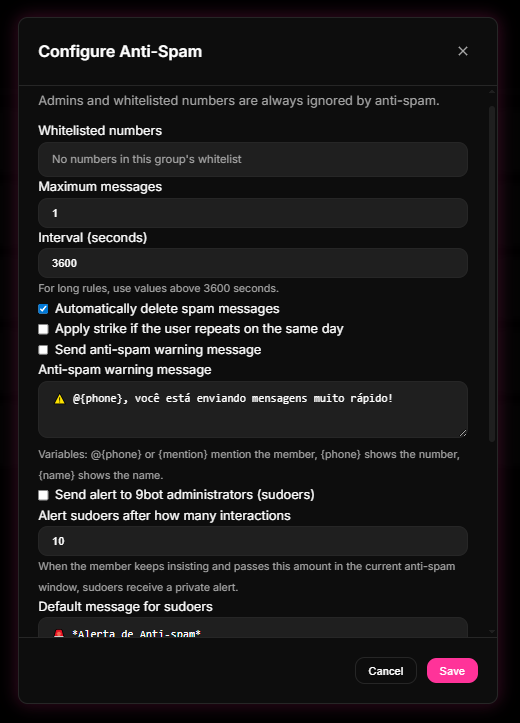
- In the sidebar menu, click Automações and access the Anti-Spam section.
- Enable the active filter by establishing flooding limits (e.g., maximum of 3 messages within 5 seconds) and select the automatic deletion penalty for violations.
- Click on Moderação de Links (Link Moderation / Configure Anti-Link), enable immediate deletion, and configure warning strikes for repeat offenders.
Quick Checkpoint: Make sure to add your human co-administrators and trusted team moderators to the Whitelist under Moderação > Whitelist. This prevents the bot from accidentally deleting their official announcements and newsletters as flooding.
Step 2: Pre-Schedule Content and Bulletins under Agendamentos
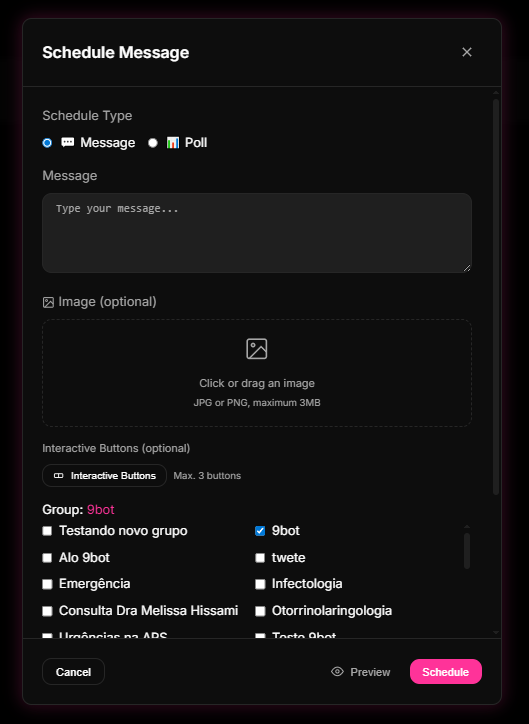
- In the sidebar panel, click on Agendamentos (Scheduling).
- Click Criar Agendamento (Create Schedule) and choose whether to program a text post, poll, or image.
- Define the precise date, time, and recurrence interval (e.g., every Friday at 6:00 PM).
- Review the visual preview of your post with interactive buttons and save. The bot will send your updates right on time without you needing to open WhatsApp during your rest hours.
Quick Checkpoint: Always test your scheduled campaigns on a secondary test group first to verify time zones and link displays before scheduling long-term announcements.
Step 3: Build an Automated FAQ Center under Comandos
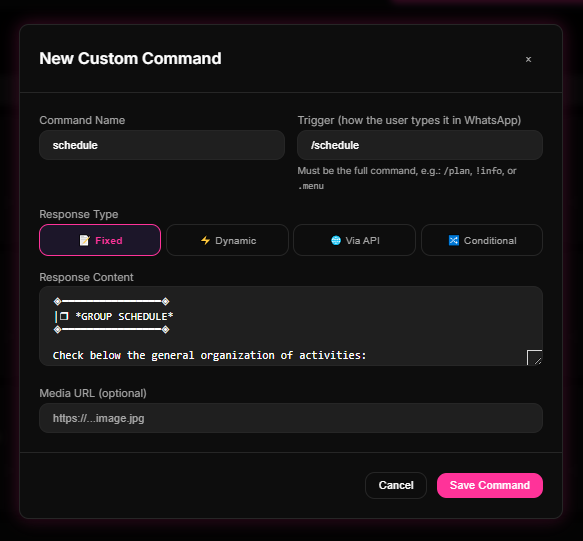
- Navigate to the Comandos tab and select Comandos Personalizados (Custom Commands).
- Click Novo Comando to map your most repetitive questions (e.g., `/rules`, `/support`, `/pricing`, `/schedule`).
- Set up the corresponding reply containing consolidated links to your official portals. The bot will reply instantly whenever a member triggers the shortcut, saving you from typing the same answer dozens of times.
How it works in practice
Managing large groups without automation is like handling a high-traffic e-commerce customer support queue with a single agent typing replies 24/7. Without 9bot, the admin must watch the screen constantly, delete scam links manually, and greet every newcomer. The phone vibrates non-stop, causing instant burnout. With 9bot, it's like deploying an active network firewall and smart router. The bot runs in the background, automatically removing unauthorized links, filtering spam, blocking offensive keywords, and dispatching onboarding guidelines. The admin steps in only to foster high-value human relationships, keeping their personal time peaceful.
Test Your Setup Now
- Schedule a quick test post for 5 minutes from now under Agendamentos and confirm that the bot fires it automatically.
- Using a secondary test account (non-admin), try posting an unauthorized link and verify that the bot deletes the message within a second.
- Type your FAQ trigger (such as `/rules`) and confirm that the bot delivers the structured reply instantly.
If the bot handled the triggers immediately and logged the actions successfully on your Dashboard logs, your automatic fire sprinkler system is fully active and guarding your peace of mind!
Read also
Frequently asked questions
What is burnout in WhatsApp group moderation?
How does group automation support mental health?
How does pre-scheduling messages help me rest?
How should I set up my team to avoid individual overload?
Does muting group notifications solve admin burnout?