9 Tasks Every Group Administrator Must Delegate Immediately
Manage your community without overwhelm. Discover the 9 crucial tasks you must delegate or automate using 9bot to maintain an active, stress-free group.
Why Delegating Tasks Is Absolutely Vital
Anyone who manages WhatsApp groups or online communities knows how exhausting the daily routine can be. New messages arrive constantly, repeat questions pop up, entry requests pile up, and heated debates can spiral out of control in seconds. What starts as a simple communication channel quickly turns into a chaotic second job, eating up precious hours of your day.
Beyond the mental toll, there is a critical factor that many ignore: civil and criminal liability. In many jurisdictions, a group administrator can be held legally responsible for omissions, offensive remarks made by third parties, or data leaks under regulations such as general data protection laws.
At the same time, studies by digital rights institutes show that intolerance and fear of conflict in group environments alienate participants, with over 50% of members feeling hesitant to voice their opinions. Therefore, maintaining active, professional moderation is no longer optional—it is a matter of survival, brand reputation, and legal security.
The Problem in Practice
Trying to handle all moderation duties manually creates three major operational bottlenecks:
- Growth bottlenecks: Leaving new members waiting days for manual approval in WhatsApp dampens engagement and projects an amateur brand image.
- Sharp drops in engagement: The lack of rapid-fire moderation against spam, phishing links, and aggressive drama causes high-quality members to mute notifications or leave the group permanently.
- Leadership burnout: Vetting every post 24/7 drains your team's energy, leaving them with zero bandwidth to focus on core content strategy or sales conversion.
Smart delegation combines human co-moderation with automated filters to create an uninterrupted growth workflow.
What You Will Configure and Solve
By the end of this tutorial, you will have configured 9bot to take over routine operational tasks, successfully solving:
- Instant replies to members' repetitive questions (FAQs).
- Preventive control against spammers and unauthorized links.
- Automated, personalized onboarding for new arrivals.
- A bulletproof security net that keeps your group safe even when you are offline.
Before You Begin
- A WhatsApp group successfully connected to the 9bot control panel.
- Administrative access to the 9bot Dashboard.
- Your target group selected in the active sidebar under Groups.
- The bot configured as an administrator in your WhatsApp group.
Step-by-Step Dashboard Setup
Step 1: Delegate Frequently Asked Questions (FAQs) to Automated Commands
- Log in to your 9bot Dashboard and select the appropriate group.
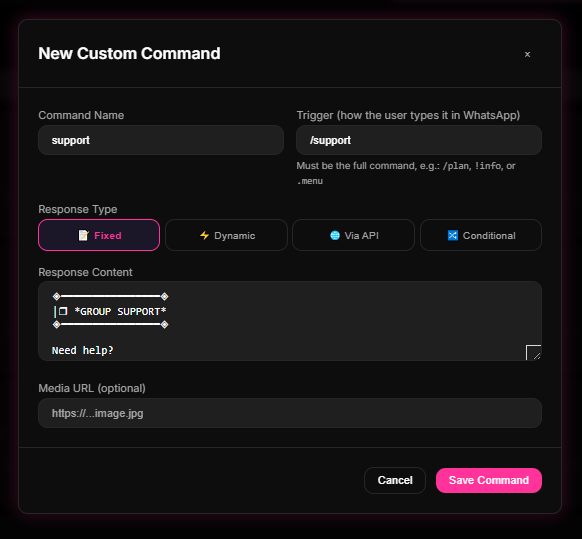
- On the sidebar navigation, click Comandos and open the Comandos Personalizados (Custom Commands) tab.
- Click Novo Comando (New Command). Create quick triggers (e.g., `/rules`, `/help`, or `.support`) associating them with a rich text reply and helpful links.
Step 2: Delegate Onboarding and Member Approvals
- In your native WhatsApp group settings, keep Approve New Participants toggled on to set a basic vetting gate.
- In the 9bot Dashboard, navigate to Automações on the sidebar and open the Mensagem de Boas-vindas (Welcome Message) section.
- Enable the workflow and set up a personalized greeting using placeholders like `{name}` to welcome members immediately upon approval and deliver your pinned guidelines.
Quick Checkpoint: Remember to periodically review recently approved profiles in the Membros tab. This stops cloning bots or spam numbers that bypassed manual queues from staying in your group and stealing leads.
Step 3: Delegate Active Moderation and Spam Interception
- Go to the Automações tab and click on Anti-Spam. Define flooding limits (e.g., maximum of 3 messages within 5 seconds) and enable automatic deletion.
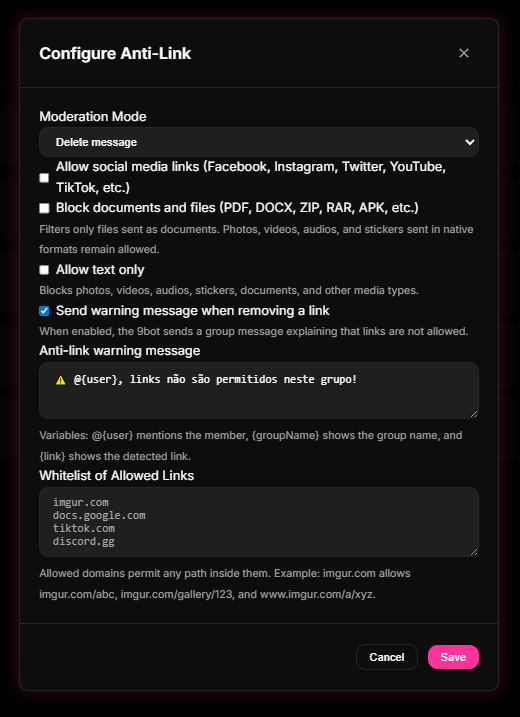
- Click on Moderação de Links (Link Moderation) and select "delete message" or "remove member" to contain unauthorized external URLs.
- Complete your whitelist by adding your brand's official URLs and payment portals so legitimate links are never blocked.
Quick Checkpoint: To prevent false positives with your own team, configure the moderation whitelist under Moderação > Whitelist or add co-moderator numbers so the bot bypasses their official announcements.
How it works in practice
Think of WhatsApp group administration as running a Highly Successful Restaurant Kitchen with a World-Class Master Chef.
Without 9bot (relying entirely on manual moderation), the administrator is like the Master Chef trying to do absolutely everything alone. He greets customers at the door, sweeps the floor, washes the dishes, takes orders, cooks the main course, and serves the tables. The result is completely predictable: the kitchen descends into chaos, dishes are served late and cold, customers leave angry, and the Chef collapses from sheer exhaustion (burnout). The restaurant's reputation drops, and people stop visiting.
Configuring 9bot changes everything. It is like installing smart automated kitchen stations and hiring specialized assistants (bots/moderators):
- Vetting and welcoming new guests at the gate (approvals and onboarding) is delegated to an automated host.
- Standard questions about menu ingredients and hours (FAQ) are handled by a digital interactive tablet on each table (the Custom Commands).
- Saloon security against troublemakers and mess (flooding and link spamming) is delegated to smart sensors and automatic conveyor belts that sweep trash immediately (the Anti-Spam and Anti-Link systems running in the background).
The Chef (administrator) is finally free from washing pans. He can now focus on what truly matters: creating new signature recipes, improving the dining experience, and expanding the brand. The kitchen operates with mathematical precision 24/7, keeping everyone happy.
Smart Admin Delegation Checklist
- Custom commands created for the 5 most frequent FAQs.
- Native WhatsApp approval enabled and personalized welcome workflow configured.
- Active message rate limits defined in the Anti-Spam panel.
- Link moderation (Anti-Link) enabled with company domain whitelists.
- Administrators and trusted co-moderators whitelisted in the exceptions panel.
- Active message scheduling (Agendamentos) for weekly recurring announcements.
Test Your Setup Now
- Create a custom command (such as `/rules`) on the panel and type the trigger in the group using a secondary test account to verify the instant reply.
- Send 4 rapid, consecutive messages using the test account to ensure the bot deletes the flooding spam on the spot.
- Share an unauthorized link and verify that the bot wipes it out and issues the strike instantly.
If the bot executed the penalties immediately and recorded the infractions on your Dashboard logs, your automated kitchen is fully set up and running!
Read also
Frequently asked questions
What does a group administrator do?
What tasks should I delegate first to avoid overwhelm?
How does delegation via AI or custom triggers work in 9bot?
Can human co-moderators bypass 9bot's automated filters?
Can automation completely replace human moderators?