WhatsApp group welcome message: 10 templates and automatic setup
Pick a welcome template for your type of group, tweak it in two minutes and let 9bot send it to everyone who joins.
How it works in practice

Step by step in the 9bot dashboard
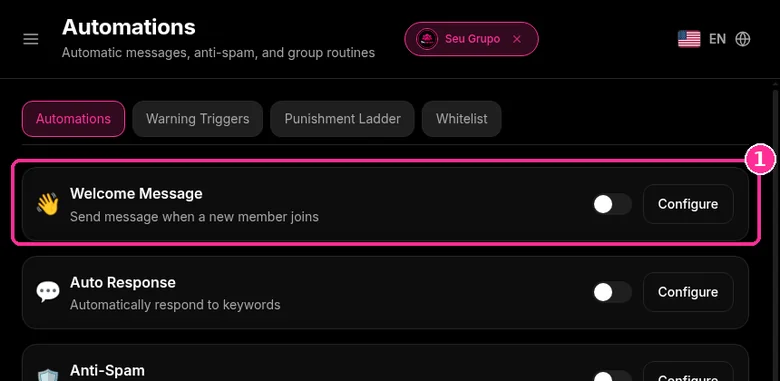
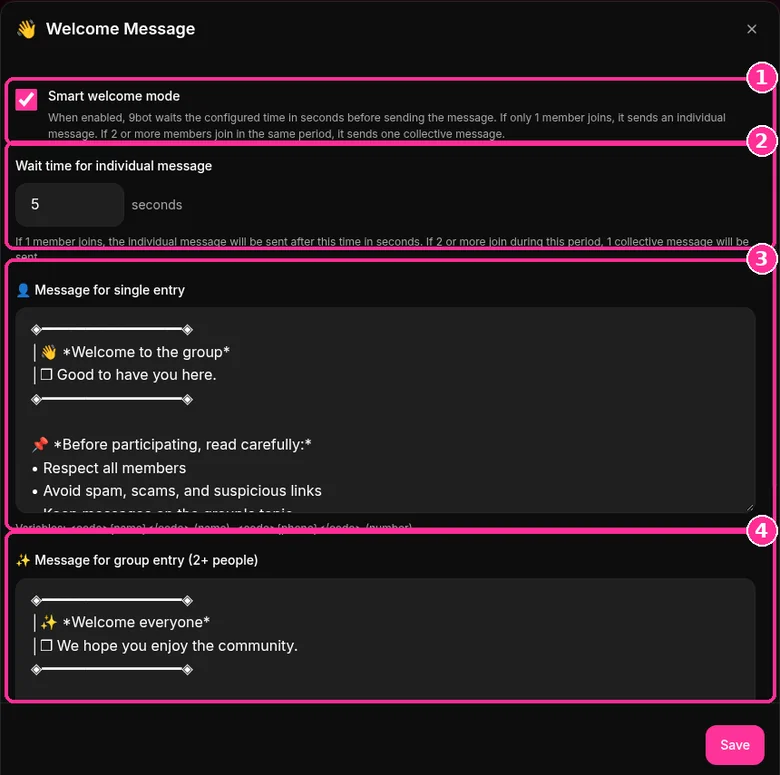
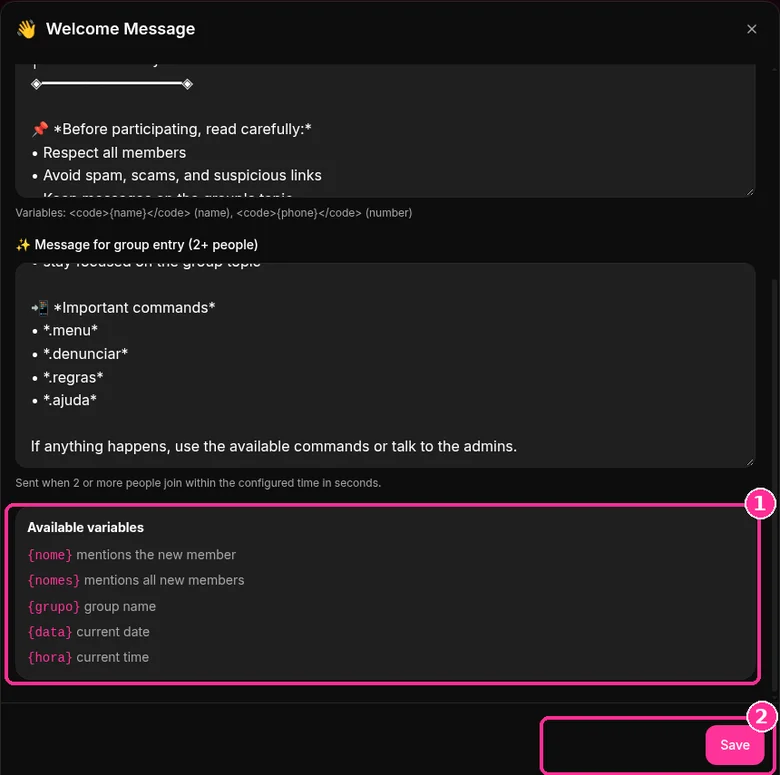
In the side menu, open Automations and find Welcome Message. The screenshots below come from the real dashboard, in a test group called "Seu Grupo", with member names and contacts blurred. The numbers on the images follow the order of the clicks.
Before you start, the group must be connected to the 9bot dashboard and the bot must be a group admin in WhatsApp. It all starts earlier, with a group people actually want to join.
Step 1: Open the welcome message
- On the Automations tab, click Configure on the Welcome Message card.
Step 2: Write the welcome
- Turn on Smart welcome mode: if 2 or more members join in the same period, 9bot sends one group message.
- Set the Wait time for individual message (5 seconds in the example).
- Write the Message for single entry. In the example it has a greeting, the rules and useful commands.
- Write the Message for group entry (2+ people). The Available variables are {nome}, {nomes}, {grupo}, {data} and {hora}.
- Click Save.
Direct answer: A good WhatsApp group welcome message has three parts: a greeting with the person's name, what the group is for, and 3 to 5 short rules with a clear next step. WhatsApp doesn't send welcome messages on its own. In 9bot, select the group, open Automations > Welcome Message, paste one of the templates below and test it with a spare account.
Example you can copy: "Hi {name}, welcome to [group]! This group is for [purpose]. Rules: 1) stay on topic, 2) no links or ads without approval, 3) be respectful. Type .menu to see what the bot can do."
Quick steps:
- In the Dashboard, open Groups and select your group.
- Go to Automations > Welcome Message > Configure.
- Write a short greeting with {name}, up to 5 rules and commands like .menu.
- Save, join with a test account and check Reports later.
Before the welcome message, pick a strong name: here are 120 WhatsApp group name ideas by theme.
10 WhatsApp welcome message templates to copy
These templates use {name}, the variable 9bot replaces with the new member's name. Swap the text in brackets, cut anything you don't need and keep it short: people read the first few lines and decide whether to keep going.
Commands like .menu reply in the group when 9bot is active. Shortcuts like .rules or .links only work if you turn them on or create them under Commands.
1. Work or team group
For teams that use the group for announcements and quick updates.
Hi {name}, welcome to the [team name] group! 👋
We use this group for announcements and quick updates, Monday to Friday, [9am] to [6pm].
• Personal topics go to private chat.
• When you share a file, add one line saying what it is.
• Urgent? Mention @[person in charge].
Type .rules to see all our guidelines.
2. Class or student group
For school, college or course classes.
Hi {name}, welcome to [class name]! 📚
This group is for updates about classes, exams and assignments.
• No chain messages or off-topic chat.
• Got a question about the material? Ask here, someone else probably has it too.
• Be respectful: insults and bullying get you removed.
Good luck with your studies!
3. Parents group
For parents and guardians of a class or school.
Hi {name}, welcome to the [class name] parents group.
We share school announcements and class arrangements here.
• Questions about your own child: please contact the school directly.
• Avoid late-night messages and side conversations.
• Saw an important notice? React with 👍 so we know you read it.
Thanks for joining!
4. Neighborhood or building residents
For residents of a building, condo or street.
Hi {name}, welcome to the [building/neighborhood] residents group! 🏢
This group is for building management notices and topics that affect everyone.
• Formal complaints: contact management at [contact].
• No sales, politics or chain messages.
• Noise, parking and deliveries: keep it friendly, we're neighbors.
Type .rules to read the group guidelines.
5. Church or faith community
For congregations that share schedules and events.
Welcome, {name}! We're so glad you joined the [church/ministry] group. 🙏
Here we share service times, events and prayer requests.
• Please keep posts focused on our community.
• Avoid politics and unrelated content.
• Personal requests can go privately to [leader].
Welcome to the family!
6. Customers and sales
For shops that use the group for news and offers.
Hi {name}, welcome to the [store] customer group! 🛍️
You'll get new arrivals, deals and restock alerts here first.
• Orders and returns: message us privately at [link or number].
• Only our team posts offers.
• Product questions are welcome here.
Type .menu to see the shortcuts.
7. VIP, mentoring or paid community
People who paid to join want to find the content fast. Messages pinned before someone joins aren't visible to them, so deliver access with a command.
{name}, welcome to [VIP group name]! 🚀
Start here:
1. Type .links to get access to the members area.
2. Introduce yourself: name, city and your goal.
3. Questions about the content go in today's thread.
This content is exclusive: please don't forward it or share screenshots outside the group.
8. Event or short-term course
For groups that only exist during an event or course.
Hi {name}, you're in the official group for [event] on [date]. 🎟️
We'll post schedule, venue and program updates here.
• Only the organizers post announcements; feel free to ask questions.
• Badges and payments: [contact].
This group will close [X] days after the event.
9. Friends or family
More relaxed, but with a few ground rules to avoid drama.
Look who's here! Welcome, {name}! 🎉
Anything goes, with three ground rules:
• No chain messages or news without a source.
• No spam and no 10-minute voice notes 😅
• Respect above all.
10. Hobby, sports or gaming community
Start the first conversation right away.
Hi {name}, welcome to the [topic] community! 👋
Tell us: how long have you been [playing/training/learning], and what are you hoping to find here?
• Links to other groups aren't allowed.
• Questions are welcome, we were all beginners once.
Type .rules to see the full guidelines.
Lots of people joining at once? 9bot has a group welcome text for that. A simple example: “Welcome to everyone who joined today! 👋 Introduce yourselves with your name and city, and type .menu to see the group shortcuts.”
Your welcome message isn't the place for the full rulebook
Welcome messages work best with 3 to 5 key rules. Keep the full rules somewhere members can check later:
- Group description: everyone sees it when they tap the group name.
- .rules command: 9bot replies with the full text whenever someone asks.
- Pinned message: useful for current members, but according to the WhatsApp Help Center, people who join after a message was pinned can't see it. That's why it doesn't replace a welcome message.
No rules yet? Use the WhatsApp group rules generator, then summarize the key points in your welcome message.
Want the full rules ready to paste? See these WhatsApp group rules templates by group type. If you are starting from zero, first create the WhatsApp group and set its permissions.
Why automatic welcome rules make a difference
Many WhatsApp group admins face the same cycle: new people join every week, the same questions come back, and someone has to repeat the basic rules manually.
This is not only an operational issue. When onboarding is unclear, members do not understand the group purpose, ignore agreements, and lower the quality of discussion from day one.
A good welcome message creates context before the problem appears: it explains the community purpose, shows how to participate, and points members to useful rules or commands.
The real problem
As a WhatsApp group grows, the same onboarding issues repeat: new members ask what the group is for, post links before reading the rules, or stay silent because they do not know how to participate.
The welcome message sets the first impression. It does not need to be long. It needs to explain where the person is, which rules matter, and what to do next.
The welcome message should be useful before it is pretty: short rules, a clear next step, and the right group context.
What you will configure
By the end of this tutorial, you will have:
- A single-entry welcome message for one new member.
- A group welcome message for multiple people joining close together.
- A support path with .menu, .rules, or .help.
- A practical test to confirm 9bot replied in the correct group.
The welcome message as an entrance sign
A welcome message is like a sign at the entrance of a building. It does not control every person, but it shows the right path before someone gets lost.
If the sign is confusing, everyone asks a different question. If it is simple, the group starts in a more organized way.
Message checklist
- It explains the purpose of the group.
- It includes 3 to 5 essential rules.
- It shows how to ask for help.
- It avoids long text and threatening tone.
- It includes useful commands when they exist in the group.
Test it in your group
- Ask a test account to join the group.
- Check whether 9bot sends the expected message.
- Type .rules or .menu if those commands are configured.
- Adjust the text if the person still does not know what to do.
If the test works, the onboarding flow is ready for real members. If it fails, review the selected group, the saved text, and the bot permissions.
The greeting, away message and quick replies of the Business app, and what changes in groups, are covered in WhatsApp Auto Reply: How to Set It Up in WhatsApp Business and What to Do in Groups. Bold and lists make long messages easier to read, and the WhatsApp text formatter does it for you.
Read also

FAQ
If several people join together, does each one get a welcome message?
What are automatic welcome rules?
Where do I configure welcome messages in 9bot?
Should the message be long?
Can I include commands like .menu and .rules?
How do I know if the welcome setup worked?
Does 9bot replace human admins?
What is a good welcome message example for a WhatsApp group?
Can a WhatsApp group send a welcome message automatically without a bot?
Which rules should a WhatsApp group have?
How do I set up an automatic welcome message in a WhatsApp group?
Can new members see pinned messages in a WhatsApp group?