Why WhatsApp Groups with 9bot Grow Faster: A Deep Dive
Discover the key factors that enable WhatsApp groups structured with 9bot to grow faster, retain participants, and maintain high engagement on autopilot.
The digital group landscape and its growth pace
In recent years, we have observed a significant transformation in how digital communities organize, communicate, and grow. Message application groups, particularly on WhatsApp, have become central gathering hubs for creators, businesses, companies, and content portals. However, the differentiator that separates highly active and crowded groups from the rest is not just the content, but the strategic use of smart automation. News sites in particular get a lot out of this, as we show in how news portals use 9bot on WhatsApp.
Managing a successful community requires a steady influx of new members. Paradoxically, the more a group grows, the more challenging it becomes to moderate conversations, maintain order, and ensure participant retention without admins experiencing burnout. The very dynamics of communities shift when you add automation, turning manual tasks into instantaneous processes.

Step by step in the 9bot dashboard
In the side menu, open Reports ("Reports for messages, members, and automations"). The screenshots below come from the real dashboard, in a test group called "Seu Grupo", with member names and contacts blurred. The numbers on the images follow the order of the clicks.
Growth and active member numbers show whether the group really grows, not just how many people joined.
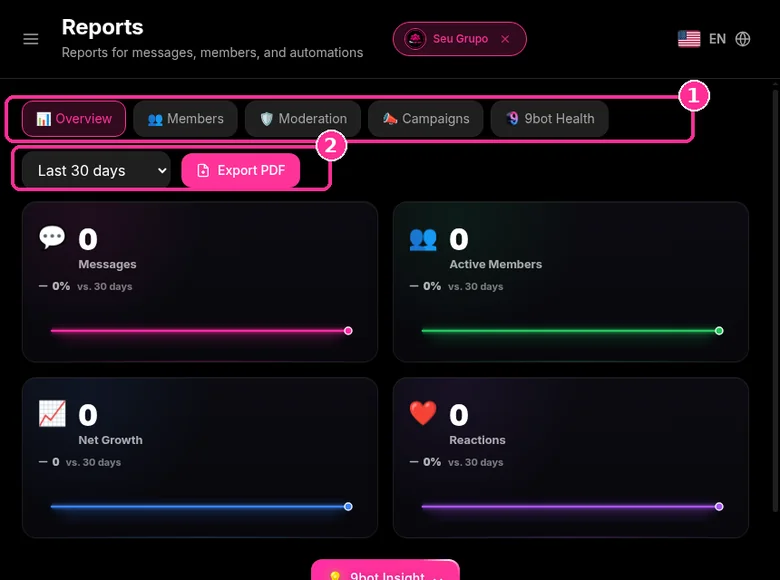
Step 1: Pick the tab and period
- Choose the tab: Overview, Members, Moderation or Bot Health.
- In the period selector, choose for example Last 30 days.
- Use Export PDF to keep or send the report.
- Overview shows Messages, Active Members, Net Growth and Reactions.
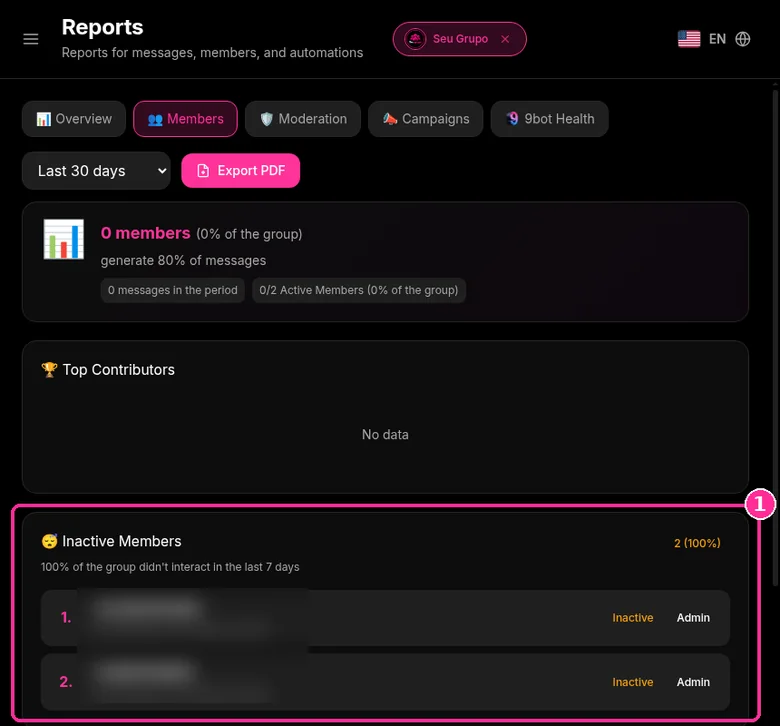
Step 2: See inactive members
- On the Members tab, the Inactive Members card lists who has not interacted in the last 7 days.
- The same tab shows Top Contributors.
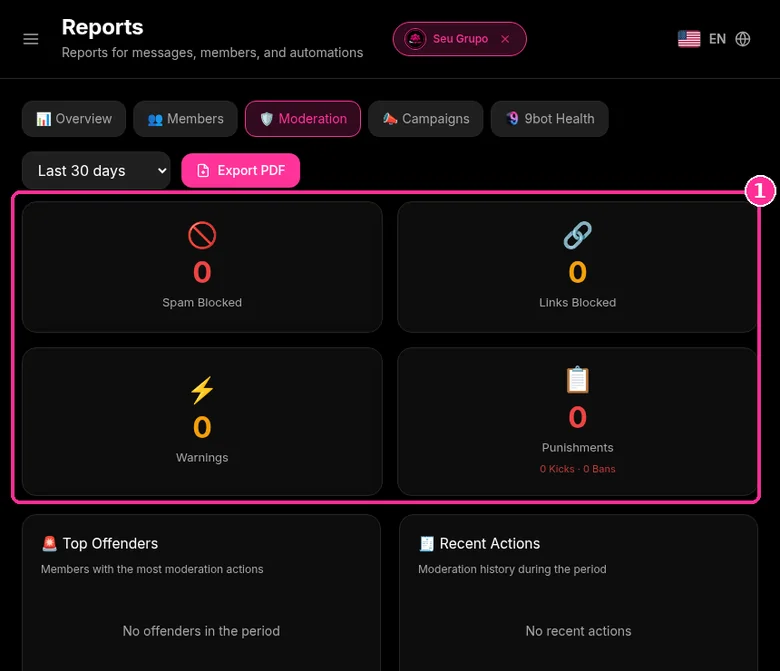
Step 3: Track moderation
- On the Moderation tab, see Spam Blocked, Links Blocked, Warnings and Punishments.
- Below are Top Offenders and Recent Actions.
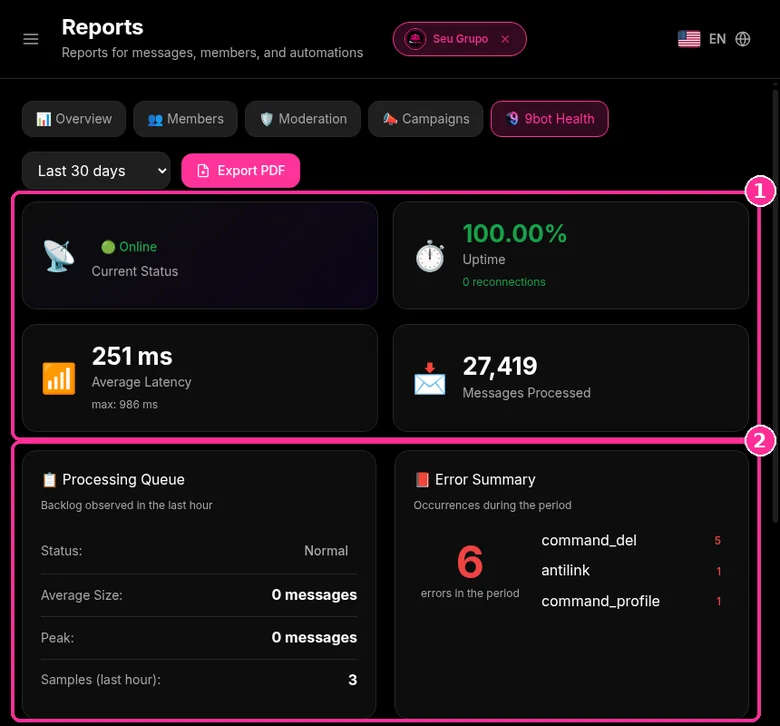
Step 4: Check bot health
- On the Bot Health tab, see Current Status, Uptime, Average Latency and Messages Processed.
- Processing Queue and Error Summary show what is pending or failed.
Want to try it in your group? See the 9bot plans with a 7-day trial. Repeated steps like this can run on their own with 9bot workflows.
How bots transform the group experience
Automating operational tasks is no longer a luxury reserved for large enterprises. Modern platforms like 9bot have democratized access to automated solutions for groups of any size, from small study groups to massive news distribution channels. Robots deliver exceptional value by streamlining key engagement and security routines:
- Instant welcome messages for new members with clear, pinned community guidelines.
- Real-time moderation of inappropriate words, leaked external links, and prohibited media.
- Automated content delivery from news portals and updates directly via RSS integration.
- Custom shortcut commands to resolve recurring questions in execution runtime.
- Intelligent invite management and seamless auto-approval pipelines for new signups.
- Immediate FAQ replies configured and triggered directly from the Dashboard.
Practical factors in the 9bot Dashboard
When comparing communities with and without automation, we observe drastic differences in member retention and overall engagement. Here is the step-by-step 9bot Dashboard path containing the key growth-accelerating factors:
Step 1: Immediate onboarding and consolidated visualization
- Before inviting members, prepare your operational setup by monitoring the Reports > General Overview screen in the 9bot Dashboard.
- Analyze the active member growth curve and daily message telemetry to fully understand community behaviors.
- Leverage the consolidated member list to organize your initial participant data.

Step 2: Activate auto-approval and smart moderation
- In the Automations menu, access and toggle the Auto-Approval panel.
- Set up personalized onboarding rules, delivering clear, synthetic welcome messages to new members upon entry.
- Calibrate active antispam filters and prohibited word checklists in the moderation tab to shield the group instantly.
Quick checkpoint: Run a test using a secondary number and confirm that the bot responds instantly, and that moderation filters isolate unauthorized content without lags.

Step 3: Scalability without main processor overhead
- With 9bot fully set up, open the gates gradually to avoid acing WhatsApp's internal network spam thresholds.
- Access the Members tab to audit active participants, tag VIP contributors, and filter out inactive profiles.
- Implement custom shortcut commands so the bot can answer recurring FAQs autonomously without relying on your availability.

Main challenges of growth and how to overcome them
Managing a massive group without technological assistance imposes severe barriers to growth. 9bot's smart automations completely eliminate these common bottlenecks:
- Overwhelmed with repetitive tasks: The bot resolves redundant queries, leaving you free to focus on strategic brand actions.
- Spammers and bad actors: The auto-approval pipeline and link filters autonomously filter and drop malicious accounts on entry.
- Low engagement from new arrivals: Welcome sequences featuring quick shortcuts and commands encourage prompt interaction.
- No analytical data or control: Complete telemetry dashboards in 9bot guide your operational plans based on real, qualified data.
A clean, harmonious environment free of clutter and spam increases current member satisfaction, preventing high-value contributors from leaving out of visual fatigue.
The impact of technology on learning and employability
A surprising and verified aspect is the educational impact of well-structured groups. According to a study by FATEC Zona Leste highlighting the role of technology initiatives in employability, automated communities prepare participants more effectively for the digital job market.
By interacting in professional spaces governed by clear rules, efficient bot queries, and immediate moderation, members build crucial digital collaboration and technical fluency skills. Automation also acts as a tool for digital inclusion, ensuring structured information is accessible to anyone.
How It Works in Practice
Trying to manually manage a rapidly growing WhatsApp group is like organizing an event or concert where hundreds of new guests arrive every minute, but your entry gate has only one person trying to check tickets and give directions by hand. The line stretches down the block, people get frustrated, spammers slip into the crowd unnoticed, and chaos takes over the venue.
With 9bot, growth runs like a modern entrance equipped with automatic electronic turnstiles. Whether 5 or 500 people arrive at the exact same time, the bot screens them instantly, sends a welcome message with the rules, and organizes them cleanly and immediately. The entry flow remains smooth and secure, allowing your community to grow healthily and without limits, while you focus on the quality of the main event.
Practical test in your group
- Set up a short command under Custom Commands, such as
/rules, containing essential group policies. - Add a secondary test phone to your community and verify the bot's reaction speed.
- Monitor your traffic metrics in the Reports tab after the first member wave and adjust moderation rules as needed.
If the onboarding welcome message was sent immediately and behavioral filters worked without lags, your elastic WhatsApp ecosystem is perfectly calibrated and ready to scale safely!
Read also

Frequently asked questions
Can I export the group report as a PDF?
Why do WhatsApp groups with bots grow faster?
Does using 9bot make community interactions feel impersonal?
What are the essential features to accelerate group growth?
How does automatic moderation help retain participants?
Can I see group growth reports in the dashboard?