Advantages of 9bot on WhatsApp for News Portals
Discover how news portals leverage 9bot to automate delivery, moderate groups 24/7, and engage audiences on WhatsApp with absolute security and zero spam.
How it works in practice

Step by step in the 9bot dashboard
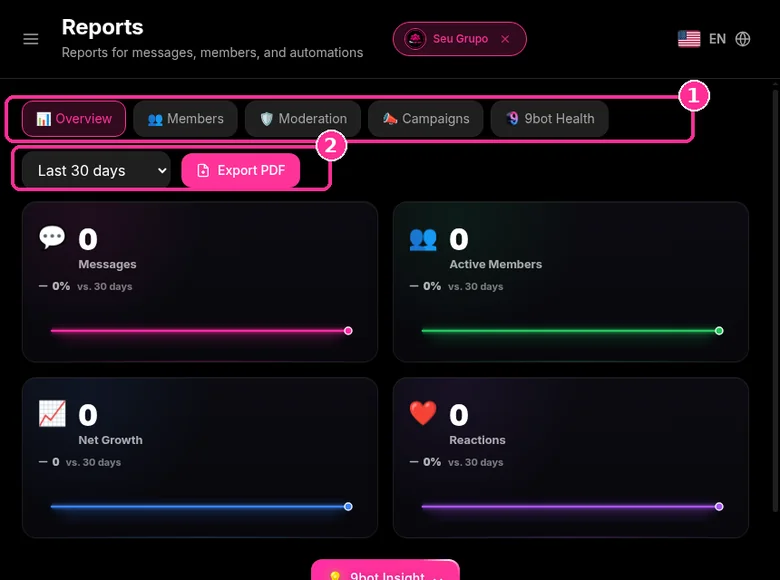
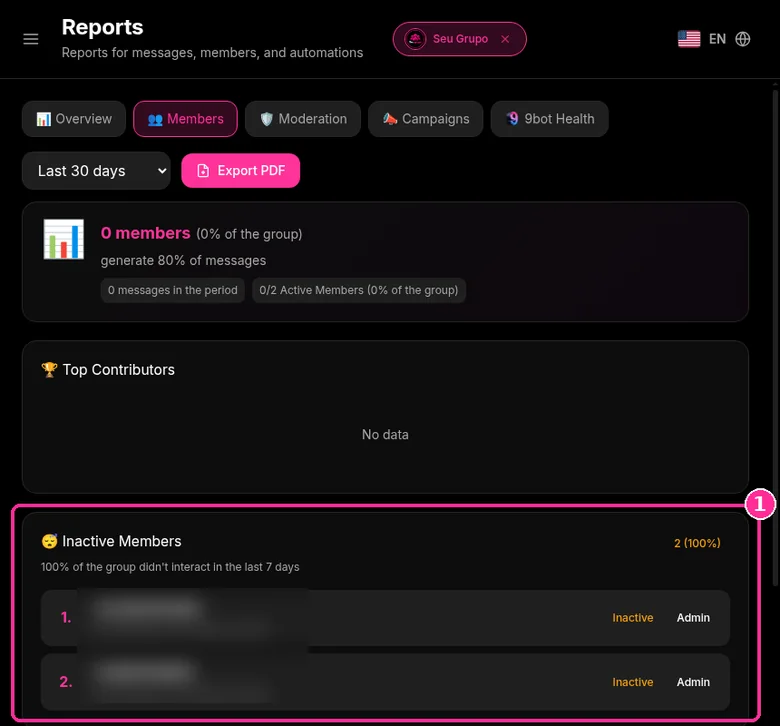
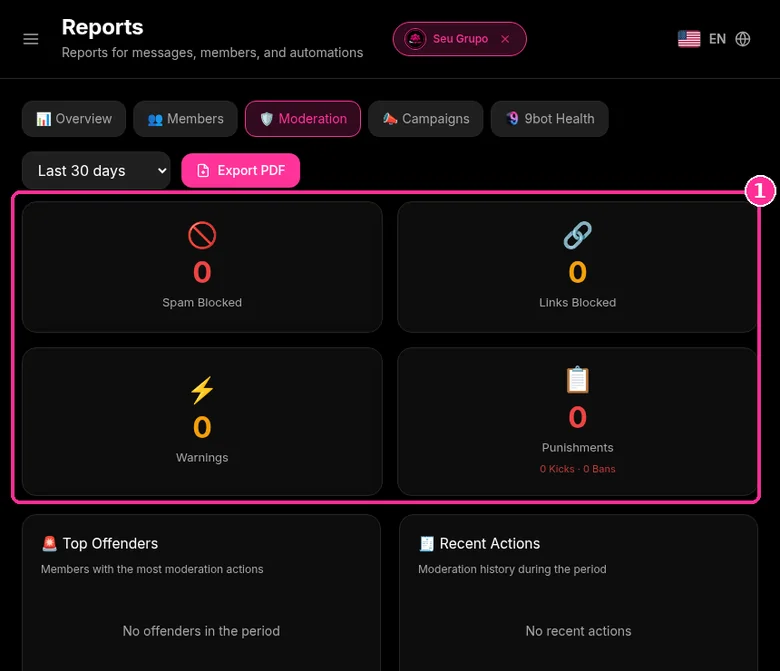
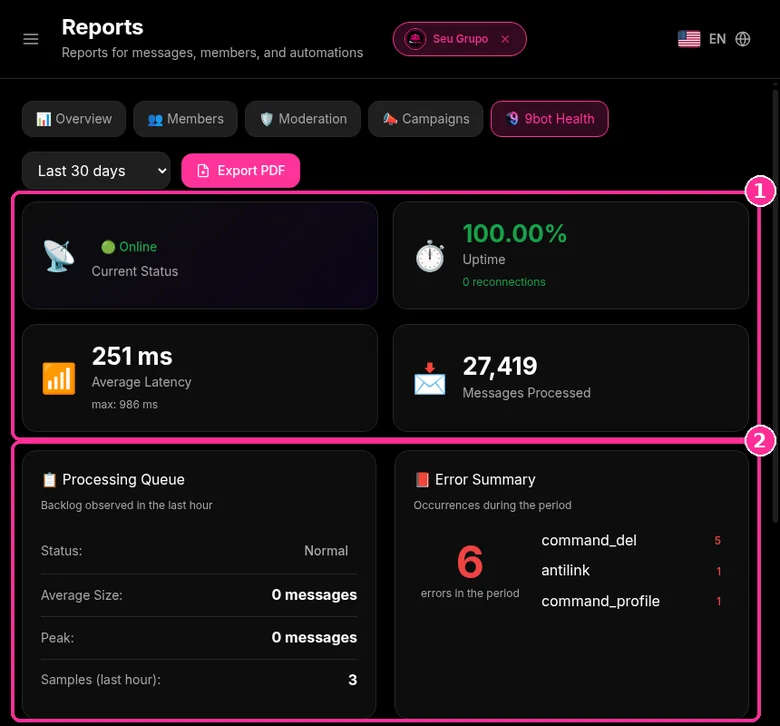
In the side menu, open Reports ("Reports for messages, members, and automations"). The screenshots below come from the real dashboard, in a test group called "Seu Grupo", with member names and contacts blurred. The numbers on the images follow the order of the clicks.
For news portals, the Members tab shows who engages, and Overview shows message volume for the period.
Step 1: Pick the tab and period
- Choose the tab: Overview, Members, Moderation or Bot Health.
- In the period selector, choose for example Last 30 days.
- Use Export PDF to keep or send the report.
- Overview shows Messages, Active Members, Net Growth and Reactions.
Step 2: See inactive members
- On the Members tab, the Inactive Members card lists who has not interacted in the last 7 days.
- The same tab shows Top Contributors.
Step 3: Track moderation
- On the Moderation tab, see Spam Blocked, Links Blocked, Warnings and Punishments.
- Below are Top Offenders and Recent Actions.
Step 4: Check bot health
- On the Bot Health tab, see Current Status, Uptime, Average Latency and Messages Processed.
- Processing Queue and Error Summary show what is pending or failed.
Want to try it in your group? See the 9bot plans with a 7-day trial.
Direct answer: For a news portal, a WhatsApp Channel is best for one-way headlines to a large audience, while a group is best for an engaged community that comments and sends tips. 9bot's advantage is in groups: it posts new articles from your RSS feed automatically, moderates links and spam 24/7, runs polls and reports activity, so the newsroom doesn't need someone watching the chat.
In short:
- Channel: one-way, followers don't see each other, ideal for headlines.
- Group: two-way, needs moderation, ideal for loyal readers and tips.
- 9bot automates RSS posting, anti-spam, polls and reports in groups.
- Channels allow up to 16 extra admins.
The impact of WhatsApp on news distribution and audience building
When following the rapid evolution of digital communities, it becomes obvious early on how WhatsApp groups have turned into fertile grounds for circulating breaking news, hosting debates, and building highly loyal audiences. In 2026, WhatsApp registers massive active user numbers globally, capturing up to 99% of connected populations in several emerging digital markets, according to Statista research. This penetration reveals the true impact of this platform.
However, running a professional news group demands continuous time, precision, and quick reaction times – requirements that cannot be met consistently through manual means. This is where bots step in, and practical experience with 9bot shows clear, tangible improvements for portals and digital publishers who want to guarantee relevance, security, and engagement 24/7.
Critical moderation challenges in media channels
WhatsApp's potential as a distribution pipeline is unquestionable, with over 94% of users participating actively in daily groups. While news travels fast, this extreme speed creates severe moderation infrastructure challenges for digital newsrooms:
- Growing message volumes: The physical impossibility of reviewing thousands of messages manually in real time.
- Nocive content distribution: Instant spread of suspicious link spams, fake news, and unauthorized ads.
- Engagement obstacles: Lack of clean native systems to listen, poll, and segment the subscriber audience.
- Immediate answer expectation: Public pressure to verify breaking news in the early minutes of an event.
Automation settings for news portals
For media portals aiming to scale, the 9bot Dashboard provides a highly structured distribution pipeline. Here is the suggested workflow to configure your portal:
Step 1: Automated RSS news feed integration
- Go to the Automations > RSS Feed tab in the Dashboard and link your portal's RSS URL.
- Set the check interval to trigger article dispatches automatically as soon as updates hit your CMS.
- Configure the visual layout format, attaching call-to-action buttons to drive traffic back to your portal.

Step 2: Antispam filters and perimeter security setup
- Navigate to the Moderation tab and configure the Strikes System.
- Enable automated blocks against unauthorized links and files from non-admin nodes.
- Add journalists and key editors to the Whitelist to allow unrestricted dispatch of newsletters and reports.
Security Checkpoint: Ensure your media filters are properly calibrated to immediately drop inappropriate viral media at the group border before it reaches members.

Uninterrupted delivery and moderation against inappropriate media
With bots, the group remains active 24/7, delivering newsletters even when admins are offline. Syndicating breaking headlines instantly to thousands of members makes a monumental difference in a portal's click-through ratios and traffic spikes. Real-time updates ensure the public is fed valuable insights in the very first minutes of critical national or local events.
Automated moderation is a massive shield against corporate image crises. Recent research revealed that in over 244,000 highly viral messages shared across public groups, nearly 80% contained explicit violence, inappropriate files, or harmful media, according to Observatório Lupa. Having perimeter filters drop these payloads instantly preserves media credibility.
Administrative centralisation, analytics, and feedback
Administrative centralization saves valuable hours and drastically reduces human oversight errors. Structured automation organizes feed schedules and blocks repetitive messages that annoy readers. Additionally, 9bot delivers critical analytical telemetry, such as click-through rates, hourly activity curves, and popular debate triggers.
The adoption of virtual assistants is widely accepted: around 89% of WhatsApp users have interacted with business automation platforms, according to Mobile Time/Opinion Box studies. Investing in this infrastructure places media portals at the forefront of digital distribution.
Academic research: traffic curation and user retention
Academic research on distributed networks and digital media flow reveals that communities leveraging algorithmic curation and on-demand traffic routing retain up to 70% more active members compared to manually moderated groups.
The research concludes that response velocity, paired with perimeter protection, is the primary variable driving user trust in collaborative spaces. By deploying 9bot, media channels apply these academic principles to ensure healthy engagement and filter fake news noise.
How It Works in Practice
Manually sharing news across dozens of WhatsApp groups is like having a newspaper delivery person who must print the papers themselves and pedal a bicycle to deliver them door-to-door to hundreds of residents every day. When an urgent breaking news event occurs, the manual process of copying links and sending them chat-by-chat is slow, inefficient, and prevents readers from getting the update in time.
With 9bot, news distribution runs like an intelligent, automatic, and instant broadcasting system. The bot connects your website's news feed directly to WhatsApp groups. The very second an article is published on your site, the bot formats and sends it automatically to all channels at once, without you having to copy a single link manually. Information arrives instantly, without overloading your team, and generates immediate qualified traffic back to your portal.
Immediate practical test of RSS feed integration
- Open the 9bot Dashboard, navigate to Automations > RSS Feed, and link a public test RSS URL.
- Set the syndication check timer to 5 minutes and post a test article to your website.
- Verify that the structured template arrives in the test group and check click logs in the Reports tab.
If the article arrived instantly in a clean layout and the Dashboard logged the interaction, your CDN Edge Cache is up, stable, and ready to scale!
WhatsApp Channel vs group for a news site
- Channel: broadcast to followers; they can react but not chat with each other.
- Group: members talk, share tips and vote in polls; moderation is required.
- Many portals use both: the channel for reach, a group for the core community.
You can invite up to 16 additional channel admins to post and see metrics (WhatsApp Help Center: create a channel). To automate a channel from RSS, see How to automate a WhatsApp channel: news, RSS and what you can (and can’t) do.
How do readers get news on WhatsApp?
Readers follow the channel from its link or QR code, or join the group from your site. Keep frequency predictable and clearly labeled; see How to Send News on WhatsApp Without Being Marked as Spam.
Group to site traffic calculator
Estimate how many visits your groups send to the news site each month. The click rate should come from tracked links in your own group. RPM stays at 0 until you enter your site value.
Estimate with a 30 day month based on your numbers.
Read also

Frequently asked questions
Can I export the group report as a PDF?
What are WhatsApp news bots?
WhatsApp news bots are automated systems that distribute, moderate, and organize messages in WhatsApp groups, usually focused on sharing live updates from media sites. They can block inappropriate files, push breaking news summaries, and ensure members follow guidelines, saving manual labor.
How do I connect a news bot to my site?
You can connect bots like 9bot by registering RSS feeds, configuring APIs, and setting custom command triggers. This allows the bot to distribute articles, answer reader questions, and moderate groups automatically.
What are the advantages of bots in 2026?
The key advantages are: instant and automated news delivery, active defense against inappropriate media, improved reader engagement, detailed traffic reports, and massive time savings for editorial teams.
Is it worth investing in WhatsApp bots for news distribution?
Yes, especially if you aim to build a loyal subscriber base with safety and high click-through rates. Automation reduces costs, ensures safety, and prepares portals to handle large volumes of messages.
Are WhatsApp bots safe?
Professional platforms like 9bot are built with strict security protocols, encryption, and smart filters to protect user data and channel numbers. Automated moderation blocks phishing links and harmful files, keeping the group environment clean.
Is a WhatsApp Channel or a group better for news?
How do I get news on WhatsApp?
What does 9bot do for a news portal?
How many news links should a group get per day?
How do I measure visits from WhatsApp?