How to Automate Birthdays and Dates on WhatsApp
Strengthen your community's engagement. Learn how to configure birthday and special date automations on WhatsApp using 9bot's control panel.
The Power of Celebration in Digital Communities
Managing a digital community—whether it's a VIP customer group, a student network, or a private neighborhood association—requires more than just strict moderation and sharing links. The true strength of a sustainable group lies in a sense of welcoming and belonging. When a member is congratulated on their birthday, or when the group collectively celebrates major holidays and seasonal milestones, it creates a human connection that drastically reduces member churn.
However, in the hectic daily schedule of a community manager, remembering the birthdates of hundreds of active participants is humanly impossible. Relying purely on memory or paper calendars inevitably leads to failures: an influential member's birthday is forgotten, the team's congratulations arrive far too late, or the message is sent without proper formatting.
Smart automation exists not to replace genuine human affection, but to guarantee that the celebration happens on time, matching the perfect tone of your business, without demanding your precious operational time every day. According to digital engagement data, groups that celebrate milestones and special dates maintain significantly higher activity and participation rates than purely informational chats.
The Problem in Practice
The lack of a structured system to manage celebrations in populous groups leads to immediate operational bottlenecks:
- Forgotten dates and friction: Systematically forgetting active members' birthdays creates a subtle feeling of exclusion, weakening group cohesion.
- Daily operational drain: The administrator has to stop their work dozens of times a week to consult external spreadsheets, manually type messages, and search for images on their phone.
- Disorganized seasonal posts: Holiday announcements and greetings (like Mother's Day, Father's Day, or Black Friday) are often sent at bad times or filled with visual noise due to a lack of pre-scheduling.
Automation doesn't reduce the value of a greeting; it guarantees that no important member is left behind on their special day.
What You Will Configure and Solve
In this practical guide, you will learn how to structure an intelligent ecosystem of automatic celebrations using 9bot so you can:
- Create a fast self-service channel for birthdate collection.
- Pre-schedule seasonal campaigns and birthday greetings weeks in advance.
- Personalize announcements with images, dynamic text, and interactive action buttons.
- Keep the group active and warm while you focus on business strategy.
Before You Begin
- An active WhatsApp group successfully connected to your 9bot Dashboard.
- Administrative access to the 9bot control panel.
- Your target group selected in the sidebar menu.
- The bot configured as an administrator in your WhatsApp group settings.
Step-by-Step Dashboard Setup
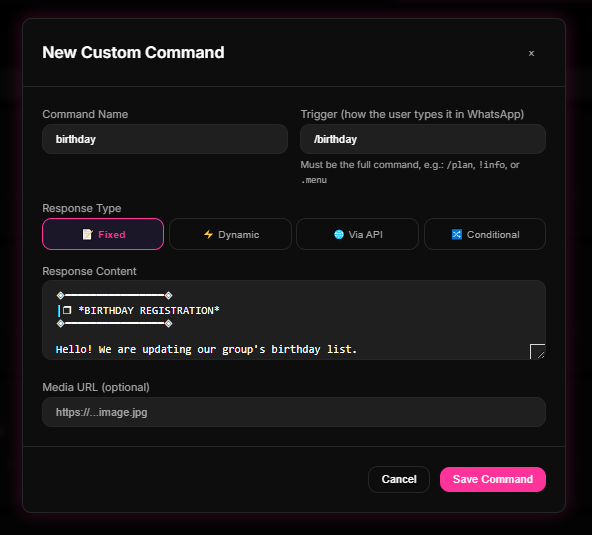
Step 1: Create a Collection Flow under Comandos Personalizados
- Log in to your 9bot Dashboard and select your active group.
- Click the Comandos (Commands) tab and navigate to Comandos Personalizados (Custom Commands).
- Click Novo Comando (New Command) to set up an instructional shortcut (e.g., `/bday` or `!birthday`).
- In the fixed reply box, write clear instructions and include the link to your external digital form (such as Google Forms) where members can securely submit their birthdate in compliance with data privacy.
Quick Checkpoint: Make sure the instructional command is short and self-explanatory. Test the trigger in your chat to verify that the form link is correct and loads perfectly on mobile screens.
Step 2: Pre-Schedule Campaigns and Greetings under Agendamentos
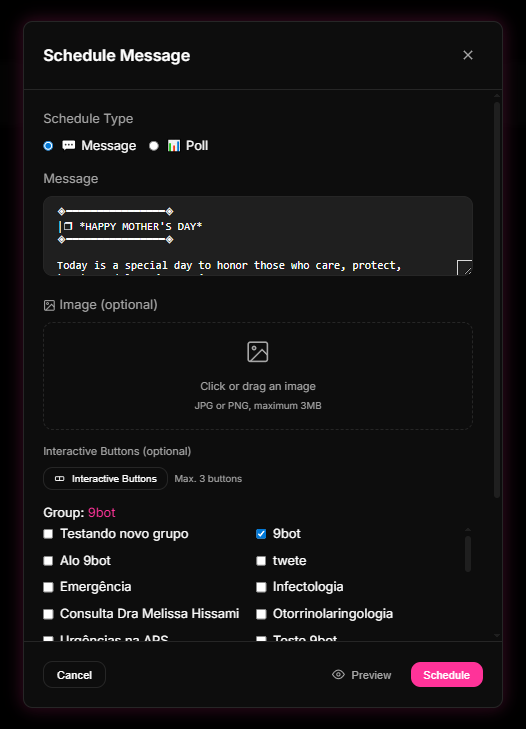
- In the sidebar menu of your Dashboard, click on Agendamentos (Scheduling).
- Click Criar Agendamento (Create Schedule) and choose your media type (text message, interactive poll, or holiday card image).
- Select the corresponding group and set the precise date and time (e.g., Mother's Day at 08:00 AM or the group's anniversary).
- If it's a recurring yearly date, enable the corresponding recurrence option. Add interactive buttons and save the scheduled post.
Quick Checkpoint: Always test your dynamic buttons and redirect links on a draft team group first before scheduling long-term announcements. This prevents broken URLs or spelling mistakes from reaching the official group.
How it works in practice
Trying to celebrate important dates and member birthdays manually in a large community is like an HR manager trying to write down the birthdays of 2,000 employees on a single sheet of paper, hoping to remember to call each of them on their exact day. With 9bot, it's like deploying an automated scheduled task manager (Cron) paired with a user preferences database. New members register their dates via simple commands, and 9bot schedules automated congratulations at the exact date and peak hour, driving dynamic brand loyalty without operational overhead.
Test Your Setup Now
- Schedule a quick test card to post 5 minutes from now under the Agendamentos panel.
- Confirm that the message fires exactly on time with the correct layout and buttons.
- Type your collection shortcut (e.g., `/bday`) in your WhatsApp chat and verify that the bot instantly replies with your form instructions.
If the tests were successful and your Dashboard logged the actions in your audit feed, your automated celebration calendar is fully active and ready to grow a warm, highly engaged community!
Read also
Frequently asked questions
How does birthday automation work on WhatsApp using 9bot?
Do I need to install any external apps or browser extensions?
Can I schedule promotional announcements for commercial holidays?
How do I protect the privacy and security of my members' information?
Can I add interactive buttons to my scheduled holiday greetings?