Silent WhatsApp Groups: How to Deal & Boost Conversations
Digital silence in your community can drive members away. Learn simple tactics and deploy automated scheduled surveys to re-activate discussions and boost group engagement.
Why Do Groups Fall Silent?
Who has not entered a WhatsApp group expecting dynamic interactions, only to observe complete, absolute silence take over the space? This phenomenon, digitally known as a "ghost community," is incredibly common. It generates discomfort, insecurity, and a feeling of abandonment among members, inevitably resulting in a silent exit of the participants. Understanding the core reasons behind this freezing of conversations is the first step to reverse inertia and restore vitality to your communication channel.
Member inhibition is heavily backed by recent digital interaction research. Studies show that factors such as fear of public exposure, absence of relevant topics, and hostile environments are the main triggers that block participant interaction. In many analyzed scenarios, over 56% of users declare they are explicitly afraid of speaking out in public discussions or crowded groups.
A digital group does not survive on inertia: it requires a clear, defined purpose, a welcoming moderation style, and constant stimuli to remain warm and relevant in the minds of its members.
Besides the psychological factor, daily information overload is an implacable adversary. With dozens of notifications competing for user attention, groups that do not offer immediate utility or high-value interactions are quickly muted, falling into complete digital oblivion.
The Problem in Practice
The absence of stimuli and strategic control in silent groups causes severe operational damage:
- Loss of Sales Conversion: Passive customer or lead groups lose their persuasive power, cooling down interest in the product or service.
- Mass Silent Exits: Participants see no value in keeping a muted chat on their phones, taking up storage, and decide to leave without notice.
- Spam Intrusion Windows: Inactive chats invite automated spam bots that take advantage of the lack of active moderation to flood the timeline with illegal ads.
- Administrator Burnout: Trying to manually warm up a dead group by typing repetitive ice-breakers with zero response is deeply frustrating.
What You Will Configure and Resolve
In this practical re-activation tutorial, you will learn how to structure an intelligent ecosystem in your 9bot Dashboard to:
- Create and schedule automatic interactive polls and quizzes to break the ice.
- Configure a flow of user-friendly custom commands for self-service member engagement.
- Establish active moderation to keep the environment free of toxic discussions.
- Automatically keep the channel warm while you focus on core business strategies.
Before You Begin
- A WhatsApp group actively integrated and online on your 9bot Dashboard.
- Full administrative access to the 9bot Control Panel.
- A mapped script containing simple, highly engaging poll questions.
- Admin permissions enabled for the bot in your WhatsApp group settings.
Step-by-Step in the Dashboard
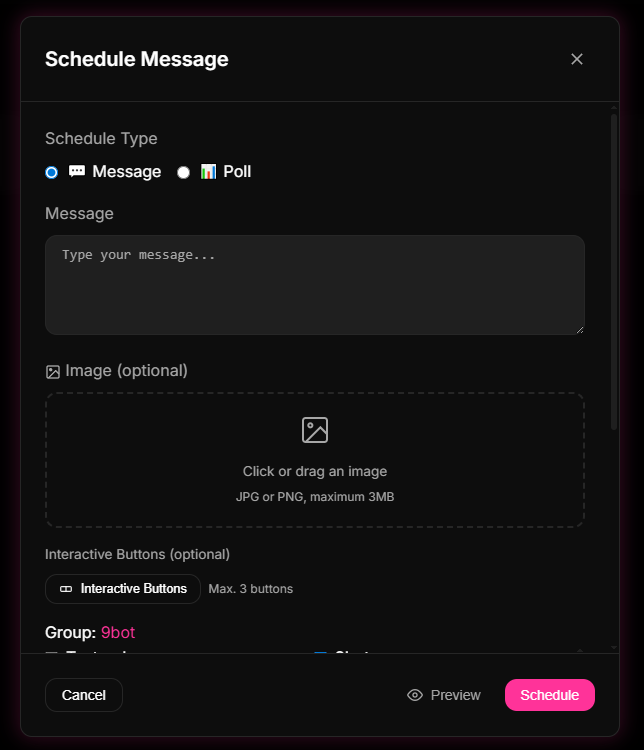
Step 1: Redefine the Objective and Create Polls in Agendamentos
- Log in to your 9bot Dashboard and select your target silent group.
- In the side menu, click the Agendamentos tab and then click Criar Agendamento.
- Instead of sending long blocks of text that cause reading fatigue, choose to build an Interactive Poll (or send messages with up to 3 quick action buttons).
- Craft open or multiple-choice questions tailored to the group's niche (e.g., "What is your biggest bottleneck in Y today?").
- Schedule the automatic dispatch for peak hours (usually early evening or lunch breaks) and set up a weekly recurrence on the 9bot panel.
Quick Checkpoint: Program a quick test poll 5 minutes in advance. Confirm that 9bot posts the interactive poll perfectly in the chat and that the voting buttons function correctly on mobile screens.
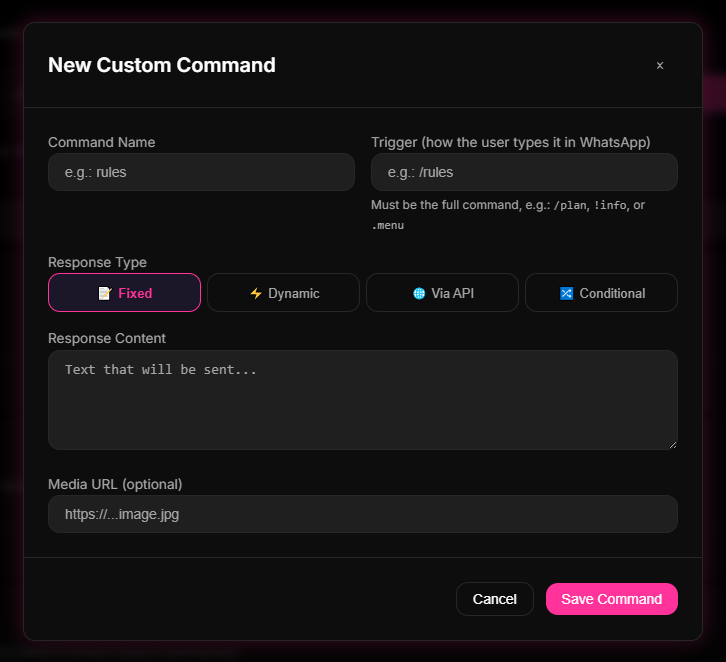
Step 2: Establish Interactive Shortcuts in Comandos Personalizados
- On the 9bot panel menu, navigate to the Comandos tab and click Comandos Personalizados.
- Click Novo Comando to register easy, engaging shortcuts for your members (e.g., `/help`, `/challenge`, or `/poll`).
- Set up attractive automated responses containing dynamic links to educational resources, limited discount coupons, or quick support forms.
- Encourage members to type these shortcuts in the main chat to pull information on-demand, breaking the operational silence.
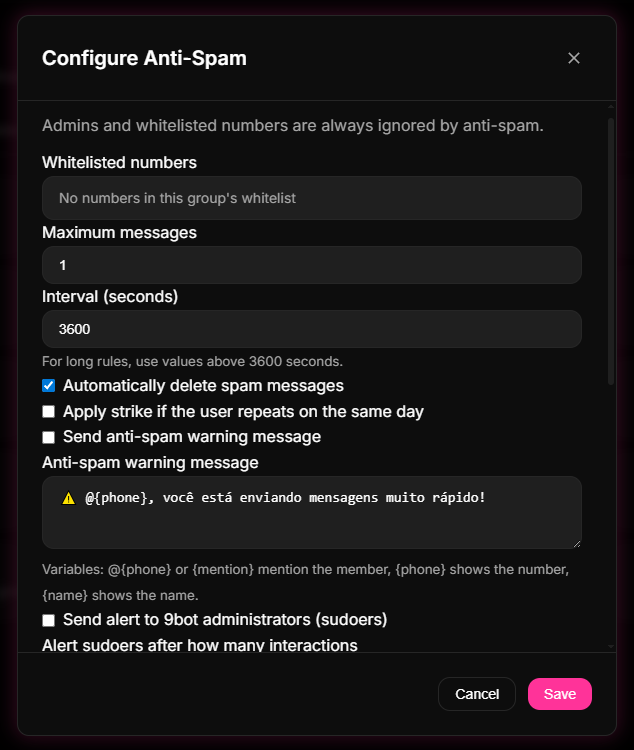
Step 3: Set Up Anti-Pollution Moderation for a Safe Space
- In the Dashboard sidebar, navigate to the Moderação tab and open the rules panel.
- Enable strict anti-spam filters to immediately delete any messages containing unauthorized external links or heavy media formats from regular users.
- Configure automatic warning strikes to repress offensive language or toxic arguments, maintaining a clean space where quiet members feel comfortable participating.
- Save the rules on the panel so 9bot takes care of chat security 24/7.
Quick Checkpoint: Test this by sending a banned link from a regular participant account. Confirm that 9bot deleted the message in milliseconds and triggered the strike warning.
How It Works in Practice
Trying to revive a silent WhatsApp group manually is exactly like hosting a dinner party at your home where all the guests sit in absolute silence on the sofa, shy, and you have to go from person to person trying to strike up a conversation individually. It is an exhausting task for the host and rarely succeeds in livening up the entire room.
With 9bot, group reactivation works like having a warm, engaging, and smart co-host at your gathering. Instead of draining your own energy, the bot naturally suggests interesting activities. It schedules and sends engaging questions during peak hours, creates interactive commands that members love to use (like /rules or /help), and responds to interactions quickly, breaking the ice. Members' shyness fades away, and the community starts chatting lightly and organically.
Test It Now in Your Group
- Schedule a fun, niche-specific poll 5 minutes in advance on the dashboard.
- Confirm that 9bot dispatched the poll on time with all voting options active.
- Cast a vote with a test phone number and verify the live telemetry count updates instantly.
- Type your custom command in the chat and check that the bot answers right away with the correct link.
If the dynamic scheduling and interactive commands performed flawlessly in your tests, your WhatsApp community is warm and ready to engage your VIP audience!
Read also
Frequently Asked Questions
Why do WhatsApp groups fall silent over time?
How do 9bot's automatic polls help revive conversations?
Can I automate recurring content to keep the group active?
How does active moderation impact member participation?
Does automating with 9bot make group interactions feel impersonal?