Security settings for large WhatsApp groups: stop raids and scams
Protecting large digital communities goes far beyond basic options. Learn the best security settings to fortify your groups, prevent data leaks, and safeguard member privacy.
How it works in practice

Step by step in the 9bot dashboard
In the side menu, open Automations. The Warning Triggers, Punishment Ladder and Whitelist tabs control when 9bot warns and what happens next. The screenshots below come from the real dashboard, in a test group called "Seu Grupo", with member names and contacts blurred. The numbers on the images follow the order of the clicks.
Before you start, the group must be connected to the 9bot dashboard and the bot must be a group admin in WhatsApp. Co-admins and team moderators can go on the Whitelist, a tab in Automations, so the filters do not block them.
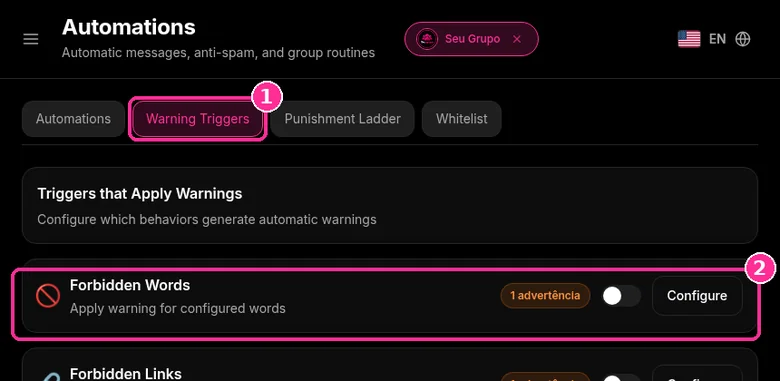
Step 1: Pick the trigger
- Open the Warning Triggers tab ("Triggers that Apply Warnings").
- Find the trigger, for example Forbidden Words or Forbidden Links, and click Configure.
Step 2: Set up the trigger
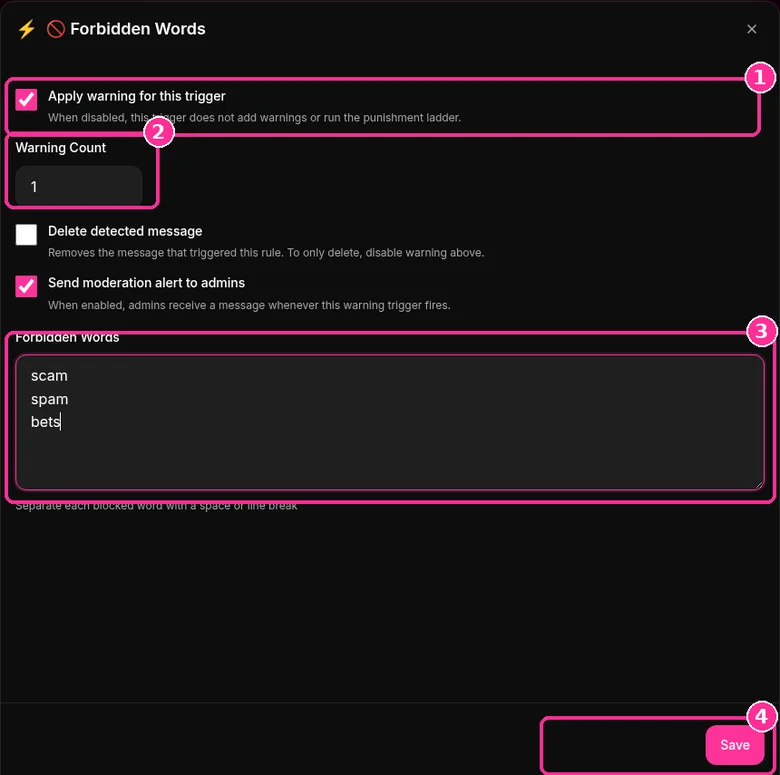
- Tick Apply warning for this trigger.
- In Warning Count, set how many warnings each hit adds.
- If you want, tick Delete detected message and Send moderation alert to admins.
- Write one word per line in the word field and click Save.
Step 3: Review the Punishment Ladder
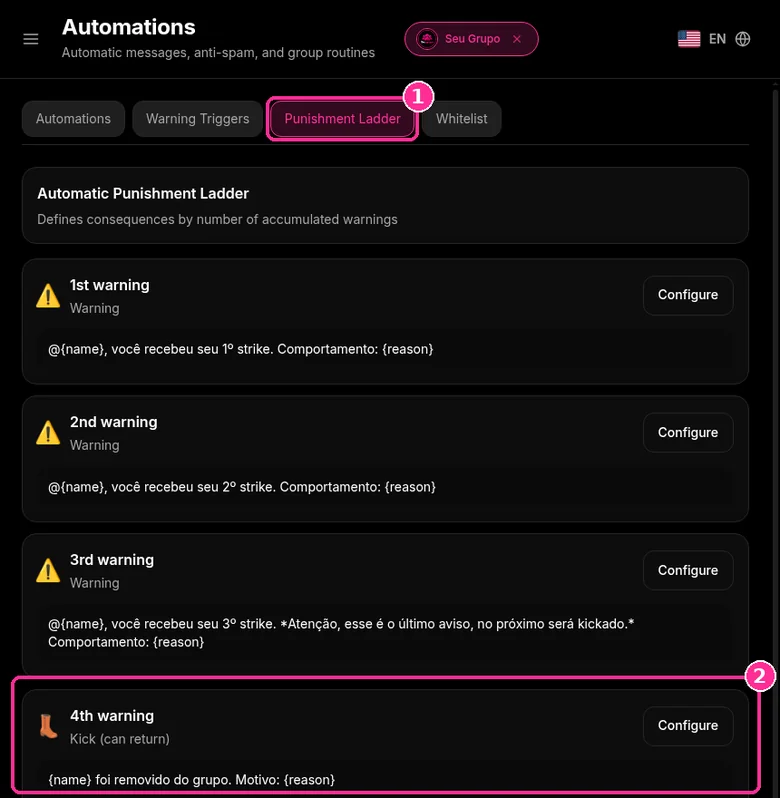
- Open the Punishment Ladder tab.
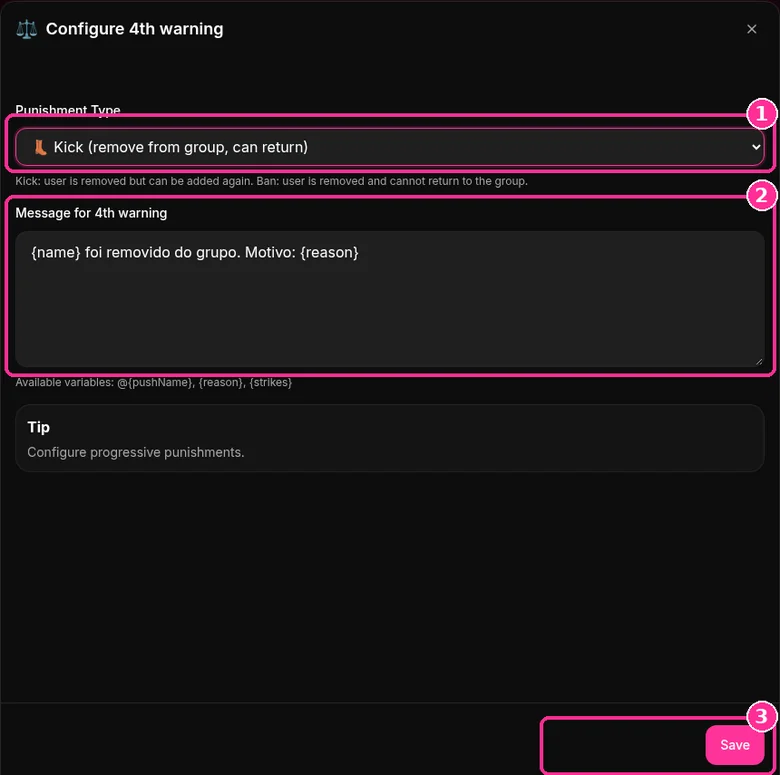
- By default, the 1st, 2nd and 3rd warnings send a notice and the 4th warning applies Kick (remove from group, can return).
Step 4: Adjust a step
- Click Configure on the step you want to change.
- Choose the Punishment Type and edit the message. The {name} and {reason} variables go into the text.
- Click Save.
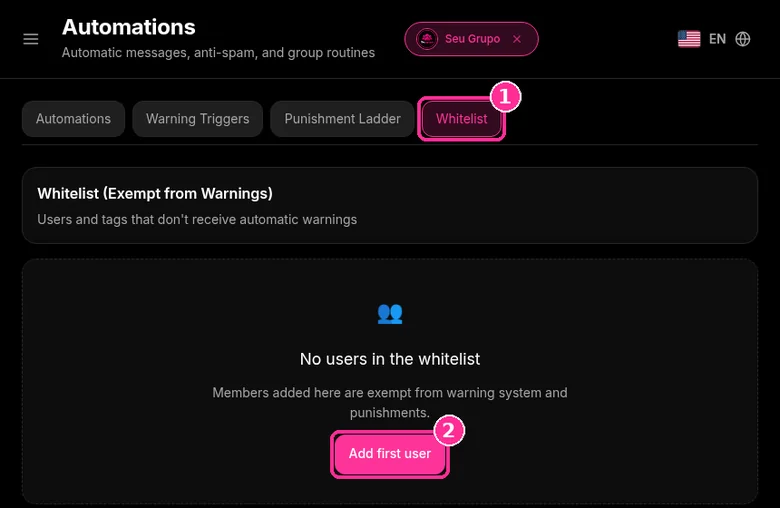
Step 5: Exempt who needs it
- On the Whitelist tab, click Add first user to free someone from automatic warnings.
Want to try it in your group? See the 9bot plans with a 7-day trial.
In short:
- Group permissions: only admins edit info, add members and create links.
- Approving new members stops suspicious profiles before they join.
- Link leaked? Reset it: the old link stops working and can't be restored.
- Two-step verification on admin accounts protects against takeovers.
- 9bot moderates spam, flood, links and banned words.
About this guide: this one covers WhatsApp and 9bot security settings against raids and scams. The moderation routine is in Moderation checklist for large WhatsApp groups: the admin routine, and the daily check is in What to monitor every day in WhatsApp groups.
Why Speak About Security in Large Groups?
Managing large virtual communities requires much more than just mediating conversations and sharing content. As a WhatsApp group grows, attracting hundreds or thousands of participants, it becomes a highly valuable asset for your business — but also an appealing target for malicious agents, spammers, and online fraudsters. Ensuring the integrity of this channel goes far beyond the members' well-being: it is about safeguarding your brand's reputation and protecting valuable private data.
The urgency for efficient security barriers is backed by alarming data on digital crime and mobile device theft. According to official public safety statistics, over 442,000 mobile phone thefts were registered in key metropolitan areas in 2023 alone. This high rate means that at any moment, an active phone number within your community could be physically compromised, allowing unauthorized third parties to launch social engineering attacks, spread malicious links, and steal information from your members.
Security is not a minor operational detail: it is the invisible infrastructure that determines whether a digital community will grow sustainably or collapse entirely under the weight of spam, leaks, and disorder.
Relying solely on the default tools provided by traditional messaging apps is insufficient for large-scale operations. You must adopt corporate cyber-protection strategies, establishing dynamic layers of automated moderation and screening to continuously mitigate operational risks.
The Problem in Practice
The lack of a shielded security ecosystem in highly populated groups generates severe vulnerabilities in the administrator's daily routine:
- Massive Spam Intrusions: Invite links shared without preliminary screening allow coordinated bot entry, flooding chats with unwanted ads, adult content, and malicious links.
- Social Engineering and Scams: Fraudsters impersonate group administrators or scrape active member lists to initiate private messages, attempting to steal data or money.
- Participant Data Leaks: Unsupervised sharing of media files and sensitive documents exposes members' privacy to legal and regulatory compliance risks.
- Moderator Overload: Attempting to manually monitor thousands of messages in real-time 24/7 leads to extreme burnout and missing fast-paced attacks.
Companies that need to formalize these rules can start from a corporate WhatsApp usage policy with roles, controls and a ready template.
What You Will Configure and Resolve
In this practical, step-by-step guide, you will learn to configure key digital defenses on your 9bot Dashboard to:
- Create an automated approval workflow for new members.
- Block links and media files before they even appear in the chat.
- Establish an authorized whitelist of domains and trusted contacts.
- Secure administrative credentials and audit suspicious interactions in real-time.
Your group's automated gatehouse
Managing the security and integrity of a large WhatsApp group manually is like trying to guard the entrance of an enormous residential complex with thousands of residents, without any automatic gates, intercoms, or security cameras. Any stranger can slip in quietly at any time, paste scams on the walls, and harass residents, and you would only find out hours later, after the damage has been done.
With 9bot, security operates like an integrated surveillance and automatic control system running 24/7. The bot acts as a highly trained electronic security guard at the gate. It filters out suspicious links (anti-link) and repetitive spam messages (anti-spam) in milliseconds, preventing scams from reaching the chat even when human admins are asleep. The environment remains protected and peaceful, and you only need to step in for exceptional cases.
Test It Now in Your Group
- Ask a test contact to send a link from an unauthorized domain in the official group chat.
- Confirm that 9bot deletes the link within milliseconds and triggers the corresponding strike warning.
- Access the audit tab in your Dashboard and verify the security incident was logged in real-time.
- Type a sensitive blacklisted term and ensure the moderation filter acted instantly and without lag.
If the blocking filters and automated kicks performed perfectly in your internal tests, your corporate WhatsApp security ecosystem is 100% active and ready to defend your community!
How to secure a WhatsApp group: native checklist
"WhatsApp group security settings" and "is it safe to join WhatsApp groups?" are among the most searched questions. Before any bot, tune what WhatsApp already offers.
Settings to turn on today
- Group permissions: turn off editing group settings and adding other members for regular members (Help Center: group admin settings).
- Approve new members: people joining via link need an admin's approval (Help Center: approve new members).
- Reset link: if the invite spreads where it shouldn't, use Invite to group via link > Reset link. The previous link can't be restored (Help Center: group invites).
- Advanced chat privacy: admins can enable it to limit sharing messages and media outside WhatsApp (Help Center: advanced chat privacy).
- Two-step verification: each admin sets a PIN under Settings > Account (Help Center: two-step verification).
How to stop people adding you to groups
Tell members: in Settings > Privacy > Groups, choosing "My contacts" means strangers can only send a private invite (Help Center: group privacy settings). For what can and can't be posted, publish WhatsApp Group Rules: Copy-and-Paste Templates; for specific scams, see How to Prevent Scams in WhatsApp Groups. In a WhatsApp job openings group, the same rule keeps out fake listings and upfront fees.
Read also

Frequently Asked Questions
At which warning does 9bot remove a member?
How does 9bot prevent intrusions and spam in large WhatsApp groups?
Can I choose which specific domains are allowed in the group?
What happens if a participant shares sensitive personal data in the chat?
How does two-factor authentication protect group administration?
Can I generate safety incident reports with 9bot?
Is it safe to join WhatsApp groups?
How do I secure a WhatsApp group?
How do I stop people adding me to WhatsApp groups?
What should I do if the group invite link leaked?